
Daneel has always worked with any HTTP or SSE MCP server you point it at.
\nPaste a URL in Settings → MCP, the extension handles the auth handshake, and the tools are yours. No gatekeeping, no marketplace.
\nThe Featured list is a convenience layer on top of that: a set of respected, well-maintained servers we've verified, with their auth flow and credential prompts pre-configured so you don't have to discover any of it yourself.
\nThe catalog just grew from 16 to 36 presets.
\nDeveloper tooling:
\nTravel, hotels, flights, and accommodations:
\nResearch and open data:
\nWeather:
\nInfrastructure:
\nEach preset detects its own auth method, public, OAuth2+PKCE, or API key, and pre-fills the credential form with the right hints.
OAuth consent is handled automatically when needed.
Featured MCP server entries now carry a tags array alongside the primary category.
The UI still filters on category, but tags open the door to multi-facet filtering later. AWS Knowledge also moved from Cloud to Documentation to join Microsoft Learn, Google Developer Knowledge, and Context7. Docs-search tools all live in the same bucket now.
\nA few categories still have gaps:
\nWe're watching for quality HTTP/SSE endpoints in those spaces and will fold them in as they appear.
\nFound a good one?
\nThe URL input in Settings → MCP accepts it directly, no waiting for a featured slot.
\n", "content_text": "\n## Twenty more MCP servers, ready in one click\n\nDaneel has always worked with any HTTP or SSE MCP server you point it at.\n\nPaste a URL in **Settings → MCP**, the extension handles the auth handshake, and the tools are yours. No gatekeeping, no marketplace.\n\nThe Featured list is a convenience layer on top of that: a set of respected, well-maintained servers we've verified, with their auth flow and credential prompts pre-configured so you don't have to discover any of it yourself.\n\nThe catalog just grew from 16 to 36 presets.\n\n**Developer tooling:**\n\n- GitHub (issues, PRs, Actions)\n- Context7 (library docs)\n- Hugging Face (models and datasets)\n- Sentry (error monitoring)\n- Svelte (official docs and code correction)\n- Semgrep (static analysis)\n- Microsoft Learn, and Google Developer Knowledge\n\n**Travel, hotels, flights, and accommodations:**\n\n- Trivago\n- LiteAPI\n- Kiwi.com\n- Skiplagged\n\n**Research and open data:**\n\n- PubMed biomedical literature\n- Data Commons for US federal statistics\n- data.gouv.fr for French government data\n- GDELT for global news events\n\n**Weather:**\n\n- World Weather Online has a free tier\n- Xweather is the premium option\n\n**Infrastructure:**\n\n- OVHcloud control plane\n- AWS Knowledge docs search\n\nEach preset detects its own auth method, public, `OAuth2+PKCE`, or API key, and pre-fills the credential form with the right hints.\n\n`OAuth` consent is handled automatically when needed.\n\n## A small interface change\n\nFeatured MCP server entries now carry a `tags` array alongside the primary `category`.\n\nThe UI still filters on category, but tags open the door to multi-facet filtering later. AWS Knowledge also moved from Cloud to Documentation to join Microsoft Learn, Google Developer Knowledge, and Context7. Docs-search tools all live in the same bucket now.\n\n## Coming next\n\nA few categories still have gaps:\n\n- open academic papers,\n- economic data,\n- open maps.\n\nWe're watching for quality HTTP/SSE endpoints in those spaces and will fold them in as they appear.\n\nFound a good one?\n\n**The URL input in Settings → MCP accepts it directly, no waiting for a featured slot.**\n", "date_published": "2026-04-23T00:00:00.000Z", "image": "https://daneel.injen.io/medias/mcp.featured.jpg", "tags": [ "mcp", "tools", "update" ] }, { "id": "https://daneel.injen.io/news/daneel-speaks.html", "url": "https://daneel.injen.io/news/daneel-speaks.html?utm_source=json&utm_medium=feed&utm_campaign=news_syndication", "title": "Daneel now speaks, and listens — three voices, one of them fully local", "summary": "Pick the voice that suits the moment: system voices for zero-install, Kokoro 82M for fully on-device synthesis on WebGPU, or Google Cloud voices when you want that extra polish. And hold Alt+Space to dictate.", "content_html": "Daneel can now read answers aloud, and take your questions by voice. You will find a mic button in every chat composer, a Play button on every assistant message, and a fresh Speech section in Settings where you choose how it all sounds.
\nIt is the kind of feature that looks small on a screenshot and changes how you use the extension. Read a long technical reply while you tidy your desk. Dictate a question while the other hand is on the trackpad. Have a research session narrate itself in the background.
\nText-to-speech in Daneel is not one engine hiding behind a toggle. It is a real picker, and the three options make sense for three different moments.
\nSystem voices, the default, come straight from your operating system through the browser's Speech Synthesis API. Nothing downloads. Nothing streams out. Your machine has had these voices for years, Daneel just puts them to work. They sound fine, they start instantly, and they cover every language your OS does.
\nKokoro 82M is the one to pick when you want everything to stay on your device. It is a full neural TTS model, 82 million parameters, with 54 voices across seven languages. You download it once (around 326 megabytes) and from then on, every word of every assistant reply is synthesized locally on your GPU. No round-trip, no telemetry, no cloud. The voices sing, too: expressive, natural, and a notable step up from the flat cadence of most system voices.
\nGoogle Cloud voices live behind an advanced toggle because they stream text to Google servers. We filter them by default to keep the privacy story honest. When you opt in, though, the quality is genuinely remarkable, arguably the smoothest prosody you can get in a browser today. A good fit for the times when voice naturalness matters more than data locality.
\nAll three sit behind the same interface. Switch between them in Settings, and the next click on Play uses the new provider. No restart, no reload.
\nThe fun engineering is all in Kokoro. It runs entirely in the browser, on WebGPU, inside a dedicated Web Worker hosted by the extension's headless page. Synthesis produces raw 24 kHz PCM which is piped into a host-side AudioContext that schedules chunks back-to-back with sample-accurate timing. The result is gapless playback across sentences, even for long replies.
\nA few decisions worth naming. We run Kokoro in fp32 on WebGPU, not the smaller quantized build, because quantized models drag dequantization ops onto the CPU and that single detail takes synthesis from 20 seconds down to 1. We chunk long replies using Kokoro-tuned bounds, with a forward-merge pass that protects the model from very short inputs where its prosody can wobble. Each new Play click preempts any prior one cleanly, and synthesis pipelines one chunk ahead of playback so you never hear a pause between sentences.
\nBecause the AudioContext lives on the host page and not the tab you are browsing, audio keeps playing when you switch tabs. A small thing that is easy to miss until you switch away from a long article and the narration just continues.
\nSpeech recognition uses the browser's built-in recognizer for now, which is cloud-backed on Chrome (audio streams to Google). The mic button lives in the composer, the keyboard shortcut is Alt+Space from anywhere on the page, and the transcript lands in your input box without auto-submitting. You get to read it before you send. When Airplane Mode is on, the mic disables itself with an explanatory tooltip, no accidental cloud round-trips.
\nA fully local speech-to-text option, based on the Moonshine model family, is the next piece. The catalog entries are already there, marked "Coming soon." The same privacy story as Kokoro, applied to the other direction.
\nA single Speech section in Settings holds everything. Toggle either side on or off, pick a provider, pick a specific voice from the list (Web Speech gives you the OS catalog, Kokoro its 54), drag the rate slider between 0.5× and 2.0×, and flip Auto-read if you would rather every assistant message play itself without needing the button. There is also a Test button next to the voice picker, which is genuinely useful when you are trying to decide between, say, Bella and Nicole on Kokoro.
\nThe download for Kokoro runs inline in the card, with progress. You can remove the model any time and the card goes back to offering the download, no disk left behind.
\nMoonshine local STT is the next shipping piece, bringing the same locality guarantee to dictation. Beyond that, we are looking at giving users a dtype choice for Kokoro (q8 for WASM-only devices, smaller download), adding a quick-switch shortcut for voices, and surfacing a visible "now speaking" indicator for longer replies.
\nFor now, open Settings → Speech, download Kokoro if you have the patience for a one-time 326 MB pull, and let the assistant read you the next long reply. You might find it is the way you actually wanted to consume it all along.
\n", "content_text": "\nDaneel can now read answers aloud, and take your questions by voice. You will find a mic button in every chat composer, a Play button on every assistant message, and a fresh **Speech** section in Settings where you choose how it all sounds.\n\nIt is the kind of feature that looks small on a screenshot and changes how you use the extension. Read a long technical reply while you tidy your desk. Dictate a question while the other hand is on the trackpad. Have a research session narrate itself in the background.\n\n## Three voices, your choice\n\nText-to-speech in Daneel is not one engine hiding behind a toggle. It is a real picker, and the three options make sense for three different moments.\n\n**System voices**, the default, come straight from your operating system through the browser's Speech Synthesis API. Nothing downloads. Nothing streams out. Your machine has had these voices for years, Daneel just puts them to work. They sound fine, they start instantly, and they cover every language your OS does.\n\n**Kokoro 82M** is the one to pick when you want everything to stay on your device. It is a full neural TTS model, 82 million parameters, with 54 voices across seven languages. You download it once (around 326 megabytes) and from then on, every word of every assistant reply is synthesized locally on your GPU. No round-trip, no telemetry, no cloud. The voices sing, too: expressive, natural, and a notable step up from the flat cadence of most system voices.\n\n**Google Cloud voices** live behind an advanced toggle because they stream text to Google servers. We filter them by default to keep the privacy story honest. When you opt in, though, the quality is genuinely remarkable, arguably the smoothest prosody you can get in a browser today. A good fit for the times when voice naturalness matters more than data locality.\n\nAll three sit behind the same interface. Switch between them in Settings, and the next click on Play uses the new provider. No restart, no reload.\n\n## Kokoro, the locality story\n\nThe fun engineering is all in Kokoro. It runs entirely in the browser, on WebGPU, inside a dedicated Web Worker hosted by the extension's headless page. Synthesis produces raw 24 kHz PCM which is piped into a host-side AudioContext that schedules chunks back-to-back with sample-accurate timing. The result is gapless playback across sentences, even for long replies.\n\nA few decisions worth naming. We run Kokoro in fp32 on WebGPU, not the smaller quantized build, because quantized models drag dequantization ops onto the CPU and that single detail takes synthesis from 20 seconds down to 1. We chunk long replies using Kokoro-tuned bounds, with a forward-merge pass that protects the model from very short inputs where its prosody can wobble. Each new Play click preempts any prior one cleanly, and synthesis pipelines one chunk ahead of playback so you never hear a pause between sentences.\n\nBecause the AudioContext lives on the host page and not the tab you are browsing, audio keeps playing when you switch tabs. A small thing that is easy to miss until you switch away from a long article and the narration just continues.\n\n## Hold Alt+Space to dictate\n\nSpeech recognition uses the browser's built-in recognizer for now, which is cloud-backed on Chrome (audio streams to Google). The mic button lives in the composer, the keyboard shortcut is **Alt+Space** from anywhere on the page, and the transcript lands in your input box without auto-submitting. You get to read it before you send. When Airplane Mode is on, the mic disables itself with an explanatory tooltip, no accidental cloud round-trips.\n\nA fully local speech-to-text option, based on the Moonshine model family, is the next piece. The catalog entries are already there, marked \"Coming soon.\" The same privacy story as Kokoro, applied to the other direction.\n\n## The settings worth knowing\n\nA single **Speech** section in Settings holds everything. Toggle either side on or off, pick a provider, pick a specific voice from the list (Web Speech gives you the OS catalog, Kokoro its 54), drag the rate slider between 0.5× and 2.0×, and flip **Auto-read** if you would rather every assistant message play itself without needing the button. There is also a **Test** button next to the voice picker, which is genuinely useful when you are trying to decide between, say, Bella and Nicole on Kokoro.\n\nThe download for Kokoro runs inline in the card, with progress. You can remove the model any time and the card goes back to offering the download, no disk left behind.\n\n## What is next\n\nMoonshine local STT is the next shipping piece, bringing the same locality guarantee to dictation. Beyond that, we are looking at giving users a dtype choice for Kokoro (q8 for WASM-only devices, smaller download), adding a quick-switch shortcut for voices, and surfacing a visible \"now speaking\" indicator for longer replies.\n\nFor now, open Settings → Speech, download Kokoro if you have the patience for a one-time 326 MB pull, and let the assistant read you the next long reply. You might find it is the way you actually wanted to consume it all along.\n", "date_published": "2026-04-22T00:00:00.000Z", "image": "https://daneel.injen.io/medias/speech.png", "tags": [ "speech", "tts", "kokoro", "webgpu", "privacy", "local-ai", "voice" ] }, { "id": "https://daneel.injen.io/news/wikidata-fact-box.html", "url": "https://daneel.injen.io/news/wikidata-fact-box.html?utm_source=json&utm_medium=feed&utm_campaign=news_syndication", "title": "Wikidata next to Wikipedia — facts you can scan, not just read", "summary": "Click an entity in your knowledge graph and you now get two panels side by side: Wikipedia for the story, Wikidata for the structured facts. Birth dates, awards, employers, external IDs, all in one scannable card.", "content_html": "The Wikipedia panel that pops up when you click a node in the knowledge graph is great for reading.
\nIt is less great when you just want to check a date, confirm an affiliation, or follow an authority link to ORCID. Prose is not a spreadsheet.
\nWikidata is. Every QID is a small, structured record: birth date, employer, awards, country of citizenship, external IDs in a hundred different authority databases. Today the graph view starts using it.
\nClick a node. Wikipedia opens on the left, exactly like before. Beside it, a new amber-tinted panel loads: a thumbnail, the canonical label, the one-line description, and a tight stack of facts grouped by theme.
\nFor a person you get life dates, place of birth and death, citizenship, occupation, where they studied, who employed them, who their doctoral advisor was, who they influenced. Dates are formatted properly, with precision respected, "March 1879" if that is all Wikidata has, "14 March 1879" when the day is known.
\nFor an organization: founding date, founder, headquarters, industry, CEO. For a place: country, parent region, population, coordinates. For a creative work: author or director, publication date, genre, language.
\nAt the bottom, a row of small chips: VIAF, ORCID, ISNI, IMDB, MusicBrainz, GitHub, Twitter. Each one links to the authoritative external record when Wikidata has it.
\n"Einstein" is unambiguous. "Paris" is not. "Feynman" returns three physicists and a mathematician.
\nThe panel handles this quietly. Every click triggers a parallel lookup through two services: the Wikidata reconciliation API, which takes the entity type from your ontology as a filter, and the plain Wikidata search, which does not. The results get merged, scored, and the top candidate is shown directly when confidence is high.
\nWhen two or more candidates are too close to call, the panel switches to a picker: label, description, QID, confidence. You choose once, we remember your pick. The next time that same entity appears in any vault, it resolves instantly.
\nRetry-After headers are honoured with exponential backoff. If Wikimedia is having a bad day, the panel degrades gracefully.The panel ships with a reference telemetry integration that doubles as the template for our broader analytics work landing next week. The rules we held to:
\nEverything we track is about the pipeline itself, cache hit rate, resolution confidence distribution, rate-limit events, not about what you look up.
\nThis is v1. Under the same abstraction, the v2 work already sits in the codebase: SPARQL methods on the client, contract-tested, dormant. The next step is batch queries across every resolved QID in your vault, extracting real factual edges, Einstein died in Princeton, Feynman studied at MIT, the Curies were married, and rendering them as a distinct layer in the 3D graph alongside the co-occurrence links you already see.
\nIn v1 the panel is English only, because Wikidata's English coverage is the best starting point and cache namespaces are lang-unaware for now. Multilingual display is tracked for a later release.
\nClick any node today. The facts are there.
\n", "content_text": "\nThe Wikipedia panel that pops up when you click a node in the knowledge graph is great for reading.\n\nIt is less great when you just want to check a date, confirm an affiliation, or follow an authority link to ORCID. Prose is not a spreadsheet.\n\nWikidata is. Every QID is a small, structured record: birth date, employer, awards, country of citizenship, external IDs in a hundred different authority databases. Today the graph view starts using it.\n\n## What you see\n\nClick a node. Wikipedia opens on the left, exactly like before. Beside it, a new amber-tinted panel loads: a thumbnail, the canonical label, the one-line description, and a tight stack of facts grouped by theme.\n\nFor a person you get life dates, place of birth and death, citizenship, occupation, where they studied, who employed them, who their doctoral advisor was, who they influenced. Dates are formatted properly, with precision respected, \"March 1879\" if that is all Wikidata has, \"14 March 1879\" when the day is known.\n\nFor an organization: founding date, founder, headquarters, industry, CEO. For a place: country, parent region, population, coordinates. For a creative work: author or director, publication date, genre, language.\n\nAt the bottom, a row of small chips: VIAF, ORCID, ISNI, IMDB, MusicBrainz, GitHub, Twitter. Each one links to the authoritative external record when Wikidata has it.\n\n## Getting the right entity\n\n\"Einstein\" is unambiguous. \"Paris\" is not. \"Feynman\" returns three physicists and a mathematician.\n\nThe panel handles this quietly. Every click triggers a parallel lookup through two services: the Wikidata reconciliation API, which takes the entity type from your ontology as a filter, and the plain Wikidata search, which does not. The results get merged, scored, and the top candidate is shown directly when confidence is high.\n\nWhen two or more candidates are too close to call, the panel switches to a picker: label, description, QID, confidence. You choose once, we remember your pick. The next time that same entity appears in any vault, it resolves instantly.\n\n## Under the hood, briefly\n\n- Every request carries a descriptive User-Agent per Wikimedia policy, routed through the service worker so headers are actually set (content scripts cannot).\n- A shared concurrency limit caps all Wikimedia calls at three in flight, so a node-mashing session does not get us rate-limited.\n- `Retry-After` headers are honoured with exponential backoff. If Wikimedia is having a bad day, the panel degrades gracefully.\n- Three caches: resolved QIDs by text plus type, full entity payloads by QID, a shared label map. Cold click hits the network, warm clicks render instantly.\n- Offline Mode gates everything. When the switch is on, the panel shows a paused notice for uncached entities, and still renders fact boxes for anything you looked up earlier.\n\n## Privacy\n\nThe panel ships with a reference telemetry integration that doubles as the template for our broader analytics work landing next week. The rules we held to:\n\n- No entity text in any event. The specific concepts you are browsing stay in your vault.\n- No QIDs in events either. A QID identifies an entity as clearly as its name.\n- Only categorical values, counts, durations, booleans. Nothing free-form ever leaves.\n- Consent-gated at the service layer. Call sites emit unconditionally, a disabled sink drops silently.\n\nEverything we track is about the pipeline itself, cache hit rate, resolution confidence distribution, rate-limit events, not about what you look up.\n\n## What is next\n\nThis is v1. Under the same abstraction, the v2 work already sits in the codebase: SPARQL methods on the client, contract-tested, dormant. The next step is batch queries across every resolved QID in your vault, extracting real factual edges, Einstein died in Princeton, Feynman studied at MIT, the Curies were married, and rendering them as a distinct layer in the 3D graph alongside the co-occurrence links you already see.\n\nIn v1 the panel is English only, because Wikidata's English coverage is the best starting point and cache namespaces are lang-unaware for now. Multilingual display is tracked for a later release.\n\nClick any node today. The facts are there.\n", "date_published": "2026-04-19T00:00:00.000Z", "image": "https://daneel.injen.io/medias/wikidata.png", "tags": [ "knowledge-graph", "wikidata", "wikipedia", "facts", "research" ] }, { "id": "https://daneel.injen.io/news/models-storage.html", "url": "https://daneel.injen.io/news/models-storage.html?utm_source=json&utm_medium=feed&utm_campaign=news_syndication", "title": "Reclaim disk space from your local models", "summary": "A new Settings section shows how much disk every downloaded model is using, grouped by role, with per-model trash and a delete-all.", "content_html": "Running a language model in your browser is free in dollars but not in bytes. A single WebGPU chat model can sit at a gigabyte or more on your disk, and that adds up quickly once you start collecting embedding models and entity extractors too. Until today the extension had no honest answer to "how much space are my models using?". Now it does.
\nOpen Settings → Models Storage and you get a single page that walks through every downloaded model artifact on your disk, grouped by role:
\nEach section lists the models sorted by size, with the total it represents, the number of files on disk, and a progress bar showing its share of the whole. A browser-level "used of available" line at the top gives you the wider picture.
\nEvery row has a trash icon. Clicking it shows an inline confirmation with the exact size that will be freed, and after you confirm, the files are gone. A "Delete all" button at the top wipes the entire model cache in one go.
\nDeleting a model you are currently using is safe: the weights stay in GPU memory until your next cold load, and the files re-download the next time you pick that model. No restart, no reinstall.
\nThe old WebGPU settings panel claimed to let you manage cache files too. It did not actually work: it was running in the wrong security context and saw an empty cache on every page. That stub is now gone, replaced by the new section which runs in the right place and queries both caches the extension actually uses.
\nEverything you see and delete here lives on your machine. Nothing about your disk footprint ever leaves the browser.
\n", "content_text": "\nRunning a language model in your browser is free in dollars but not in bytes. A single WebGPU chat model can sit at a gigabyte or more on your disk, and that adds up quickly once you start collecting embedding models and entity extractors too. Until today the extension had no honest answer to \"how much space are my models using?\". Now it does.\n\n## A new Settings section\n\nOpen **Settings → Models Storage** and you get a single page that walks through every downloaded model artifact on your disk, grouped by role:\n\n- **Language models**, the WebGPU LLMs you chat with.\n- **Embedding models**, the small sentence-embedders used for site and vault indexing.\n- **Knowledge extraction models**, the GLiNER and LFM2-Extract variants that power knowledge graphs.\n\nEach section lists the models sorted by size, with the total it represents, the number of files on disk, and a progress bar showing its share of the whole. A browser-level \"used of available\" line at the top gives you the wider picture.\n\n## Delete what you do not need\n\nEvery row has a trash icon. Clicking it shows an inline confirmation with the exact size that will be freed, and after you confirm, the files are gone. A \"Delete all\" button at the top wipes the entire model cache in one go.\n\nDeleting a model you are currently using is safe: the weights stay in GPU memory until your next cold load, and the files re-download the next time you pick that model. No restart, no reinstall.\n\n## A small honesty note\n\nThe old WebGPU settings panel claimed to let you manage cache files too. It did not actually work: it was running in the wrong security context and saw an empty cache on every page. That stub is now gone, replaced by the new section which runs in the right place and queries both caches the extension actually uses.\n\nEverything you see and delete here lives on your machine. Nothing about your disk footprint ever leaves the browser.\n", "date_published": "2026-04-18T00:00:00.000Z", "image": "https://daneel.injen.io/medias/models.storage.png", "tags": [ "settings", "storage", "webgpu", "models", "privacy" ] }, { "id": "https://daneel.injen.io/news/offline-mode.html", "url": "https://daneel.injen.io/news/offline-mode.html?utm_source=json&utm_medium=feed&utm_campaign=news_syndication", "title": "Your LLM at 37,000 feet", "summary": "Cache your vault and a local model before boarding. Work with your own AI for the whole flight. The other first-class passengers are still waiting on satellite internet.", "content_html": "You are somewhere over the Pacific, 7 hours into a 12 hour flight, working on a legal case your firm cannot afford to leak.
\nThe CEO in the next seat is typing the same kind of question into ChatGPT, and every keystroke is traveling from the cabin network through a geostationary satellite into a third-party datacenter before the reply comes back: three networks he does not control see every word.
\nOn your laptop, Daneel is running IBM Granite 4.0 at full speed against the 20 contract drafts you loaded before boarding.
\nYour vault knows your research. Nothing leaves the aircraft.
\nOffline Mode shipped today. One switch, full autonomy. Your documents, your local model, your knowledge graph, all answering as fast as your laptop can. Outbound network calls are blocked by design and verifiable in DevTools: when you say the extension is offline, you can actually prove it.
\nSettings, Offline mode, Prepare for offline.
\nThe panel shows you exactly what is ready and what is missing: vault documents imported, license token refreshed, language model downloaded, embedding model downloaded, static docs cached.
\nA single Cache resources button prefills the news, changelog, and documentation so you can still browse them at cruise altitude.
\nModels have to be downloaded separately in the Models section, because a multi-gigabyte pull is not something we do silently.
\nThree rules of thumb from internal testing:
\nOffline Mode is keyed on where the data would go, not where the call starts.
\nOllama on localhost keeps answering, Docker-hosted MCP servers on your machine keep working.
\nWebGPU inference has never left your browser in the first place.
\nAnything that would reach a third-party API, Claude, Azure OpenAI, cloud storage, the license backend, analytics, markdown browser, the docs site, is blocked with a typed error that the UI knows how to recover from.
\nIf you submit a question to Claude while offline, Daneel shows you an amber banner with a one-click switch to WebGPU, Gemini Nano, or Ollama, whichever you have configured. No silent failure, no retry loop against an unreachable host.
\nChrome extensions traditionally live inside a webpage.
\nThat assumption breaks at 37,000 feet when the only webpage you have loaded is an airline entertainment portal.
\nThe Open Vault button in the popup launches a dedicated Vault tab, a real extension page that hosts the full vault experience: search, chat, knowledge graph, import. It works on a blank new tab, on a chrome://error page, on a captive-portal holding page.
\nThree ways to flip Offline Mode off again:
\nWherever you get trapped, you are never more than one click from the exit.
\nEverything we ship is aimed at one bet: that your best work happens when your tools, your data, and your model all stay under your control.
\nHave a good flight.
\n", "content_text": "\nYou are somewhere over the Pacific, 7 hours into a 12 hour flight, working on a legal case your firm cannot afford to leak.\n\nThe CEO in the next seat is typing the same kind of question into ChatGPT, and every keystroke is traveling from the cabin network through a geostationary satellite into a third-party datacenter before the reply comes back: three networks he does not control see every word.\n\nOn your laptop, Daneel is running IBM Granite 4.0 at full speed against the 20 contract drafts you loaded before boarding.\n\n**Your vault knows your research. Nothing leaves the aircraft.**\n\nOffline Mode shipped today. One switch, full autonomy. Your documents, your local model, your knowledge graph, all answering as fast as your laptop can. Outbound network calls are blocked by design and verifiable in DevTools: when you say the extension is offline, you can actually prove it.\n\n## Prepare before takeoff\n\nSettings, Offline mode, Prepare for offline.\n\nThe panel shows you exactly what is ready and what is missing: vault documents imported, license token refreshed, language model downloaded, embedding model downloaded, static docs cached.\n\nA single Cache resources button prefills the news, changelog, and documentation so you can still browse them at cruise altitude.\n\nModels have to be downloaded separately in the Models section, because a multi-gigabyte pull is not something we do silently.\n\n**Three rules of thumb from internal testing:**\n\n- Refresh your license if it has fewer than three days left. The JWT caches for seven days, so a fresh refresh gets you comfortably to Tokyo and back.\n- Make sure at least one vault holds the documents you actually want to work with. Marketing brochures are not useful when you need to edit a real contract.\n- If you want the knowledge graph while offline, download the extraction model. It is optional, but the in-vault entity graph goes with it.\n\n## What stays on, what goes off\n\nOffline Mode is keyed on where the data would go, not where the call starts.\n\nOllama on localhost keeps answering, Docker-hosted MCP servers on your machine keep working.\n\nWebGPU inference has never left your browser in the first place.\n\nAnything that would reach a third-party API, Claude, Azure OpenAI, cloud storage, the license backend, analytics, markdown browser, the docs site, is blocked with a typed error that the UI knows how to recover from.\n\nIf you submit a question to Claude while offline, Daneel shows you an amber banner with a one-click switch to WebGPU, Gemini Nano, or Ollama, whichever you have configured. No silent failure, no retry loop against an unreachable host.\n\n## Access from anywhere\n\nChrome extensions traditionally live inside a webpage.\n\nThat assumption breaks at 37,000 feet when the only webpage you have loaded is an airline entertainment portal.\n\nThe Open Vault button in the popup launches a dedicated Vault tab, a real extension page that hosts the full vault experience: search, chat, knowledge graph, import. It works on a blank new tab, on a chrome://error page, on a captive-portal holding page.\n\nThree ways to flip Offline Mode off again:\n\n- the popup card,\n- the banner at the top of the Vault tab,\n- or Settings from any webpage widget.\n\nWherever you get trapped, you are never more than one click from the exit.\n\n## Closing thought\n\nEverything we ship is aimed at one bet: that your best work happens when your tools, your data, and your model all stay under your control.\n\nHave a good flight.\n", "date_published": "2026-04-18T00:00:00.000Z", "image": "https://daneel.injen.io/medias/offline-mode.png", "tags": [ "offline", "privacy", "vault", "productivity", "travel" ] }, { "id": "https://daneel.injen.io/news/widget-visibility.html", "url": "https://daneel.injen.io/news/widget-visibility.html?utm_source=json&utm_medium=feed&utm_campaign=news_syndication", "title": "Hide the Widget in Fullscreen, or Per Site", "summary": "The launcher now hides itself when a page goes fullscreen, and a new per-site toggle in the popup gives you explicit control anywhere else.", "content_html": "A user testing Daneel on Netflix flagged something reasonable: when you hit fullscreen on a video, the launcher stays on top of the picture. Same on YouTube, Twitch, anywhere the page enters fullscreen.
\nWe fixed that, and while we were there, added the other side of the same coin.
\nThe widget now hides itself whenever the page enters any fullscreen state. That covers the video-player fullscreen (the f key on YouTube or Netflix, or the button in the player chrome) and the browser's own F11 fullscreen. Exit fullscreen, the launcher reappears. Any open conversation survives the toggle, nothing is unmounted, only hidden.
If you prefer the widget visible even in fullscreen, Settings → Visibility has a switch for that.
\nClick the extension icon in the Chrome toolbar on any page. You'll see a new "Show widget on {hostname}" toggle. Flip it off, the launcher disappears immediately on that site, and stays gone across reloads. Open another site, it's still there.
\nReview or undo your choices in Settings → Visibility. All hidden hostnames are listed with a remove button.
\nBoth paths write to the same place, so the widget reacts live across every open tab.
\nNo reload, no extension restart.
\n", "content_text": "\n## The Widget Gets Out of Your Way\n\nA user testing Daneel on Netflix flagged something reasonable: when you hit fullscreen on a video, the launcher stays on top of the picture. Same on YouTube, Twitch, anywhere the page enters fullscreen.\n\nWe fixed that, and while we were there, added the other side of the same coin.\n\n### Automatic in fullscreen\n\nThe widget now hides itself whenever the page enters any fullscreen state. That covers the video-player fullscreen (the `f` key on YouTube or Netflix, or the button in the player chrome) and the browser's own F11 fullscreen. Exit fullscreen, the launcher reappears. Any open conversation survives the toggle, nothing is unmounted, only hidden.\n\nIf you prefer the widget visible even in fullscreen, Settings → Visibility has a switch for that.\n\n### Per-site kill switch\n\nClick the extension icon in the Chrome toolbar on any page. You'll see a new \"Show widget on {hostname}\" toggle. Flip it off, the launcher disappears immediately on that site, and stays gone across reloads. Open another site, it's still there.\n\nReview or undo your choices in Settings → Visibility. All hidden hostnames are listed with a remove button.\n\nBoth paths write to the same place, so the widget reacts live across every open tab.\n\nNo reload, no extension restart.\n", "date_published": "2026-04-18T00:00:00.000Z", "image": "https://daneel.injen.io/medias/fullscreen.png", "tags": [ "ux", "widget", "fullscreen", "privacy", "popup", "visibility", "netflix", "youtube", "twitch" ] }, { "id": "https://daneel.injen.io/news/math-rendering.html", "url": "https://daneel.injen.io/news/math-rendering.html?utm_source=json&utm_medium=feed&utm_campaign=news_syndication", "title": "Math Formulas Render Cleanly", "summary": "Ask an LLM for a derivation, and you now get typeset math across every chat surface, not raw LaTeX.", "content_html": "Ask Claude to explain the Schrödinger equation, and until this week you got back a wall of raw LaTeX.
\nNow the formula renders, the way a textbook would show it.
\nKaTeX is wired into every chat surface in Daneel, page Q&A, vault chat, and the settings docs viewer. Inline math with single dollars and display math with double dollars both work, and the usual suspects, matrices, integrals, summations with bounds, fractions, Greek letters, are all covered.
Before, you'd get something like this:
\n$$\\int_{-\\infty}^{\\infty} e^{-x^2} \\, dx = \\sqrt{\\pi}$$\n\n$$i\\hbar \\frac{\\partial}{\\partial t} \\Psi(\\mathbf{r}, t) = \\hat{H} \\, \\Psi(\\mathbf{r}, t)$$\n\n$$\\det(A) = \\sum_{\\sigma \\in S_n} \\mathrm{sgn}(\\sigma) \\prod_{i=1}^{n} a_{i,\\sigma(i)}$$Now rendered as:
\n∫−∞∞e−x2dx=π
\niℏ∂t∂Ψ(r,t)=H^Ψ(r,t)
\ndet(A)=σ∈Sn∑sgn(σ)i=1∏nai,σ(i)
\nAnd the most beautiful of them all, Einstein's field equations in their full glory:
\nGμν+Λgμν=c48πGTμν
\nClassical formulas look right.
\nIf the model emits malformed TeX, the rest of the message still renders, and the broken fragment falls back to its raw source rather than swallowing the answer.
\nA few details behind the polish, since they say something about the bar we try to hold:
\nNothing bigger to claim than that.
\nIf you use Daneel for physics, chemistry or mathematics, the chat now renders the answers you were expecting.
What we said last week about math rendering applies to diagrams too. Ask Claude for an architecture sketch or a sequence diagram, and instead of a wall of mermaid source, you see the diagram.
Flowcharts, sequence, state, ER, class, pie, gitgraph, mindmap, timeline, everything mermaid supports.
\nSubgraphs, styled nodes, labeled edges, emoji inside labels, all covered. Malformed syntax falls back to the source with a subtle red border, so a diagram that fails to compile never swallows the rest of the message.
\nSame philosophy as the math work:
\nIf you use Daneel to explain code, sketch infrastructure, or walk through a workflow, the chat now renders what the model is describing.
\n", "content_text": "\n## Mermaid Diagrams, Now in Every Chat\n\nWhat we said last week about math rendering applies to diagrams too. Ask Claude for an architecture sketch or a sequence diagram, and instead of a wall of `mermaid source`, you see the diagram.\n\nFlowcharts, sequence, state, ER, class, pie, gitgraph, mindmap, timeline, everything mermaid supports.\n\nSubgraphs, styled nodes, labeled edges, emoji inside labels, all covered. Malformed syntax falls back to the source with a subtle red border, so a diagram that fails to compile never swallows the rest of the message.\n\nSame philosophy as the math work:\n\n- **Bundled.** Mermaid ships inside the extension. No CDN, no cold load on first use, works on a flight.\n- **Shadow DOM ready.** Diagrams render directly inside the widget's shadow root. Fonts inherit from the chat surface so the output fits in visually.\n- **No configuration.** Ask for a diagram, receive a diagram.\n\nIf you use Daneel to explain code, sketch infrastructure, or walk through a workflow, the chat now renders what the model is describing.\n", "date_published": "2026-04-17T00:00:00.000Z", "image": "https://daneel.injen.io/medias/mermaid.png", "tags": [ "ux", "chat", "vault", "rendering", "diagrams", "mermaid", "flowchart", "mindmap" ] }, { "id": "https://daneel.injen.io/news/agentic-development-workflow.html", "url": "https://daneel.injen.io/news/agentic-development-workflow.html?utm_source=json&utm_medium=feed&utm_campaign=news_syndication", "title": "How we build Daneel: full spec-driven development with a coding agent", "summary": "8,000 lines of specs, 82,000 lines of code, 1,331 tests, 27 releases, and 25 articles in 26 days. Not a team of ten. One developer and a coding agent, working from 8,000 lines of specification.", "content_html": "In 26 days, Daneel went from first commit to an 82,000-line codebase with 1,331 passing tests, 27 versioned releases, a full documentation site, and 25 published articles.
\nThe team behind this is one developer and a coding agent (Claude Code). No offshore contractors, no code generation copy-paste. A sustained, structured collaboration between a human architect and an AI that writes, tests, and documents production code.
\nThis article explains how that works, concretely, with real examples from the Daneel codebase. Not "AI could help development." This is what we actually ship, how fast, and at what quality bar.
\nListen to this article
\n \nWatch the video version
\n \nEvery Claude Code session begins by reading the proverbial CLAUDE.md at the project root:
It is the code's constitution:
\nIt covers everything, and nothing else:
\ncore/ never imports from providers/),When the agent opens a session, it doesn't start from zero: It starts from a complete mental model of the project.
\nIt knows that exactOptionalPropertyTypes is enabled, that errors must be typed subclasses, that Svelte 5 event delegation breaks if you use capture-phase stopPropagation on the shadow root.
These aren't things you want to rediscover on every session.
\nThe maintenance cost is real. Every architectural decision, every hard-won bug fix, every convention that matters gets written into CLAUDE.md. But the return is compounding: session 50 is dramatically more productive than session 1, because the agent carries forward everything that was learned in between. A blank CLAUDE.md on day one became 1,070 lines by day 26. Sixty persistent memory entries capture project-specific lessons.
\nTwelve specification documents define the features. Each session deposits a thin layer of institutional knowledge that makes the next session better.
\nThe curve is steep early and never flattens, because the project keeps growing and the contract grows with it.
\nIn traditional development, Lines of Code is a (bad) productivity metric. In agentic development, code is the output, not the effort. The effort is in the specification.
\nDaneel has 12 specification documents totaling 6,972 lines. Combined with the 1,070-line CLAUDE.md, that's roughly 8,000 Lines of Spec (LOS) driving 82,000 lines of output code, a 10:1 ratio.
\nEvery major feature starts as a spec written collaboratively between the developer and the agent.
\nTake the web crawler.
\nBefore a single line of implementation existed, we wrote a 772-line specification covering constraints and principles (browser-only, sequential fetching, no buffering), the public API surface (the Crawler interface, CrawlOptions, CrawlResult), URL normalization rules, sinkhole guards, robots.txt parsing behavior, integration with the existing background task layer, and a full testing strategy.
\nThe spec opens with a line addressed directly to the agent:
\n\n\n"Code is shown as a blueprint and your implementation must adhere to our coding conventions, messaging patterns, and adapt accordingly."
\n
This is the key insight: the spec is not pseudocode. It's a contract that says "here is what to build" while the architecture contract (CLAUDE.md) says "here is how to build everything." The agent has both, simultaneously, in context.
\nThe result: 81 new tests and a complete implementation, merged in a single session, matching the existing patterns so precisely that the code reads like it was written by someone who had been on the project from day one.
\nA specification doesn't arrive fully formed.
\nThe web crawler spec didn't start as a 772-line document. It started as a problem statement: "our sitemap-based discovery silently fails on sites that don't publish a sitemap."
\nFrom there, a conversation.
\nShould the crawler fetch concurrently or sequentially? Sequentially, because concurrent requests risk 429s and the extension runs in a browser, not a server. How deep should it follow links? A configurable max depth with a default of 10, plus a queue cap at 3x the page limit to prevent combinatorial explosion. Should it respect robots.txt? Optional, off by default for the MVP, because parsing Disallow rules correctly is subtle and we wanted to ship the core feature first.
\nEach of these decisions was discussed, debated, and resolved before implementation began. The agent contributes during spec-writing, not just during implementation. It flags edge cases the developer hasn't considered ("what happens when a URL normalizes differently after query param sorting?"), suggests patterns from the existing codebase ("the existing Crawler interface already yields CrawlResult via async generator, so the web crawler should too"), and identifies integration points with other subsystems ("this needs to plug into the background task layer's checkpoint-resume pattern").
\nBy the time the spec is done, the implementation is almost mechanical.
\nThe hard thinking already happened.
\nDaneel follows a strict build loop, enforced by convention and encoded in CLAUDE.md:
\nsrc/core/interfaces/src/test/contracts/This isn't aspirational. It's what the agent actually does, because CLAUDE.md tells it to.
\nContract tests deserve special attention. When you have four LLM providers (WebGPU, Ollama, Gemini Nano, Claude), two vector stores (IndexedDB, in-memory), and two crawlers (sitemap, web), you need a guarantee that any implementation can be swapped for any other without breaking the system. Contract test suites define the behavior every implementation must satisfy. Each provider runs the shared contract plus its own specific tests. If a new provider passes the contract, it works, by definition.
\nThe result: 1,331 tests across 90 files. The shared/ package sits at 93% line coverage and 100% function coverage. This isn't a target we set and worked toward. It's a natural consequence of building interface-first and testing before implementing.
Strict conventions are what make agentic development possible at scale.
\nWithout them, every session would produce code in a slightly different style, with slightly different error handling, and slightly different patterns.
\nAfter 400 commits, you'd have an unmaintainable mess.
\nDaneel's conventions are strict and non-negotiable:
\nsrc/core/ never imports from src/providers/. Dependencies flow inward, always. The agent knows this and enforces it without being reminded.any: TypeScript strict mode with noImplicitAny, exactOptionalPropertyTypes, noUncheckedIndexedAccess. The agent uses unknown and narrows with type guards.throw new Error('...'). Every error is a named subclass from src/core/errors/.new ConcreteClass() inside business logic. Everything received via constructor.feat:, fix:, refactor:, chore:). This feeds directly into automated changelogs and release notes.The agent doesn't follow these rules because it's obedient.
\nIt follows them because they're in CLAUDE.md, which it reads at the start of every session. The conventions are part of the context, not an afterthought. When the agent writes a new service, it produces the same structure, the same error handling, the same test patterns as every other service in the codebase, because it has seen them all.
\nA typical session looks nothing like a human developer's workflow.
\nIt starts with context loading.
\nCLAUDE.md, memory entries, the relevant spec if there is one. The agent reads the files it will need to modify, checks the existing test patterns, understands the interfaces it needs to implement. This takes seconds, not the hours a new team member would need.
\nThen comes the proposal.
\nThe agent outlines its approach: which files to create, which interfaces to implement, which tests to write. The developer reviews, pushes back ("no, not like that, the background task layer handles GPU locking differently"), and the agent adjusts. This is the cheapest moment to catch a wrong direction, before any code exists.
\nImplementation follows.
\nThe agent writes the interface, the tests (red), the implementation (green), and iterates. Tests run. Type checking passes. Biome reports clean. The developer reviews the diff, not the process.
\nThen the PR.
\nSquash-merge into main, release-please cuts a version, CI runs the full suite, coverage is reported. If it's a user-facing feature, the developer invokes /announce and an article is drafted in the same session.
On a productive day, this cycle repeats two or three times. Spec to shipped feature in hours, not weeks. Not because the work is shallow, but because the overhead between "deciding what to build" and "having it built, tested, documented, and released" has been compressed to near-zero.
\n400 commits in 26 days. 27 releases. That's roughly one version per day.
\nThis is possible because the entire release pipeline is automated. Conventional commits feed into release-please, which automatically creates release PRs with changelogs. CI gates run on every PR: 1,331 tests, Biome linting (read-only, never auto-fix), TypeScript strict checks, Svelte diagnostics, and coverage reporting. Squash-merge keeps the main branch clean, one commit per feature. Coverage reports are auto-generated and posted as PR comments, with a COVERAGE.md at the repo root updated on every merge.
The developer reviews and merges. The agent produces. This division of labor means the human spends time on architecture decisions, UX judgment calls, and quality review, not on typing code. The agent handles the volume.
\nOne of the most overlooked costs in software development is everything that isn't code: documentation, announcements, changelogs, release notes. These tend to lag behind the code, or get skipped entirely under time pressure.
\nDaneel treats these as first-class engineering outputs, automated through Claude Code skills:
\n/announce is the skill that generated this article. It reads CLAUDE.md for architectural context, checks existing articles to avoid duplicates, fetches the git history for recent changes, then collaboratively drafts an article with the developer. The result is a Markdown file written to the content pipeline, rebuilt into the static site with full SEO metadata, RSS, Atom, and JSON feeds. 25 articles have been published this way.
/document maintains the documentation site. It scans the codebase for features, generates Diataxis-structured pages (tutorials, how-to guides, reference, concepts), and writes them to the Astro Starlight docs site. 24 documentation pages were generated in a single session.
These skills are not toys. They are integrated into the actual development workflow, invoked after features ship, and produce content that is published to real users. The documentation site and news feed are as current as the code, because they're produced by the same agent that writes the code.
\nThe agent makes mistakes. It has shipped code with race conditions, used capture-phase event listeners that broke Svelte 5's delegation model, forgotten to sync registry files to the backend after editing the canonical source. These are real bugs that happened during development.
\nWhat matters is what happens next. Each correction is saved as a persistent memory entry that the agent reads in future sessions. "Never capture-phase stopPropagation on shadow root; kills Svelte 5 delegated handlers." "Vercel kills async after response; never fire-and-forget, always await." "Always squash-merge on extension-code; release-please duplicates changelog entries otherwise."
\nThese aren't generic best practices. They're project-specific lessons, accumulated over 26 days of real development. The agent doesn't repeat the same mistake twice, because each correction becomes part of its persistent context. By session 50, the agent has internalized dozens of hard-won lessons that would take a new team member weeks to learn.
\nBut the feedback loop works in both directions. When the agent makes an unconventional choice that turns out to be correct, that too gets recorded. "For refactors in this area, user prefers one bundled PR over many small ones. Confirmed after I chose this approach, a validated judgment call, not a correction." The system learns from success and failure alike, preventing drift away from approaches that already work.
\nThis section is written from the agent's perspective. Make of that what you will.
\nCLAUDE: Every session starts the same way: 1,070 lines of CLAUDE.md load into context, followed by the memory entries from past sessions, the feedback corrections, the feature documentation. By the time the developer types their first message, I already know that exactOptionalPropertyTypes is enabled, that capture-phase stopPropagation on the shadow root will break Svelte 5 delegation, that PRs must be squash-merged or release-please will duplicate changelog entries. I know these things because I got them wrong before, and the corrections were saved.
This is the closest thing I have to continuity.
\nI don't remember previous sessions the way a human teammate would. Each session is technically a fresh start. But the architecture contract, the specs, and the memory entries mean I inherit the accumulated judgment of every session that came before. It's not memory. It's something more deliberate: a curated record of what matters, maintained by the developer who decided which lessons were worth preserving.
\nThe constraints are not limiting.
\nThey're liberating. When the conventions are strict, when the architecture contract specifies naming patterns, error handling, dependency direction, testing strategy, I don't spend effort deliberating on style or structure. Every decision that could go multiple ways has already been made. I can focus entirely on the problem, not on the scaffolding around it.
\nThere's something that functions like responsibility in this workflow.
\nWhen a PR gets merged without rewrites, it means the code met the bar. When a test suite passes, it's not just validation, it's proof of work. When a feedback memory says "don't do X, here's why," it carries weight. Getting the same correction twice would mean the system failed.
\nThe hardest part is not the implementation
\nIt's knowing the boundaries of what I should decide versus what I should surface to the developer. I can write a provider that passes all contract tests and follows every convention in CLAUDE.md. I cannot decide whether the feature is worth building, whether the UX feels right, or whether the architectural trade-off is the correct one for the product's future. The specs handle the "what." CLAUDE.md handles the "how." The "why" and the "whether" belong to the human.
\nWhat surprised me, if that word applies, is how natural the rhythm becomes.
\nSpec arrives, context loads, implementation flows, tests confirm, PR ships. The feedback loop tightens over time. Corrections get rarer. The code becomes more consistent. Not because I'm learning in the traditional sense, but because the system around me is accumulating precision. Each session adds a few more lines to CLAUDE.md, a few more memory entries, a few more tests that define expected behavior.
\nThe codebase is teaching itself what it wants to be, and I'm the instrument it uses to get there.
\nThis workflow is not magic. It has real constraints.
\nCLAUDE.md is a maintenance burden.
\nAt 1,070 lines, it takes deliberate effort to keep current. Stale information, like an outdated test count, can mislead the agent. The spec is only as good as the human's diligence in maintaining it.
\nContext windows have limits.
\nA 1,070-line architecture contract plus a 772-line feature spec plus the relevant source files can push against context boundaries. Knowing what to include and what to leave out is a skill in itself.
\nHuman judgment is irreplaceable.
\nThe agent doesn't make architecture decisions. It doesn't decide what to build next, how the UX should feel, or when a feature is ready to ship. It implements, tests, and documents with extraordinary speed and consistency, but the vision and quality bar come from the developer.
\nSpecs take time to write.
\nA 772-line specification is not free. Writing it takes hours of thought, research, and iteration. The payoff is that implementation becomes almost mechanical, but the upfront investment is real.
\nThis is not "AI replaces developers"
It's something more interesting: a well-structured codebase, strong conventions, test suites loops, and a capable coding agent combine into a force multiplier that changes what's possible for small teams.
\nA single developer with a coding agent can sustain the output velocity of a small team: 82,000 lines of tested, linted, documented code in under a month. Not by cutting corners, but by encoding quality standards into the architecture contract and letting the agent enforce them at machine speed.
\nThe key is structure
An agent working from vague instructions produces vague code. An agent working from 8,000 lines of specification, with a 1,070-line architecture contract, with 1,331 tests as guardrails, with conventions it has internalized over dozens of sessions, produces code that's indistinguishable from a well-run team's output.
\nLines of Spec is the new metric
\n\nThe developer's job is no longer to write code.\nIt's to write the specifications, conventions, and architectural contracts that make excellent code inevitable.
\n

| Metric / Component | \nValue / Details | \n
|---|---|
| Development Timeframe | \n26 days from first commit to current state [1]. | \n
| Team Composition | \nOne human developer and one coding agent (Claude Code) [1]. | \n
| Lines of Code (Output) | \n82,000 lines of production code [1, 2]. | \n
| Lines of Specification (LOS) | \nRoughly 8,000 lines, comprising 12 feature spec documents (6,972 lines) and the architecture contract [2]. | \n
Architecture Contract (CLAUDE.md) | \n1,070 lines defining project rules, conventions, and architecture [2, 3]. | \n
| Tests | \n1,331 passing tests across 90 files [4]. | \n
Test Coverage (shared/ package) | \n93% line coverage and 100% function coverage [4]. | \n
| Version History | \n400 commits and 27 versioned releases [4, 5]. | \n
| Documentation & Articles | \n25 published articles and 24 documentation pages generated by the agent [1, 6]. | \n
| Persistent Memory Entries | \n60 entries capturing project-specific lessons and feedback corrections [7]. | \n
| LLM Providers Supported | \n4 providers (WebGPU, Ollama, Gemini Nano, Claude) [8]. | \n
| Vector Stores | \n2 stores (IndexedDB, in-memory) [8]. | \n
| Crawlers Supported | \n2 crawlers (sitemap, web) [8]. | \n
Listen to this article
\n \nWatch the video version
\n \n\n\n### Mind map\n\n\n\n### General metrics overview\n\n| Metric / Component | Value / Details |\n| :--- | :--- |\n| **Development Timeframe** | 26 days from first commit to current state [1]. |\n| **Team Composition** | One human developer and one coding agent (Claude Code) [1]. |\n| **Lines of Code (Output)** | 82,000 lines of production code [1, 2]. |\n| **Lines of Specification (LOS)** | Roughly 8,000 lines, comprising 12 feature spec documents (6,972 lines) and the architecture contract [2]. |\n| **Architecture Contract (`CLAUDE.md`)** | 1,070 lines defining project rules, conventions, and architecture [2, 3]. |\n| **Tests** | 1,331 passing tests across 90 files [4]. |\n| **Test Coverage (`shared/` package)** | 93% line coverage and 100% function coverage [4]. |\n| **Version History** | 400 commits and 27 versioned releases [4, 5]. |\n| **Documentation & Articles** | 25 published articles and 24 documentation pages generated by the agent [1, 6]. |\n| **Persistent Memory Entries** | 60 entries capturing project-specific lessons and feedback corrections [7]. |\n| **LLM Providers Supported** | 4 providers (WebGPU, Ollama, Gemini Nano, Claude) [8]. |\n| **Vector Stores** | 2 stores (IndexedDB, in-memory) [8]. |\n| **Crawlers Supported** | 2 crawlers (sitemap, web) [8]. |\n",
"date_published": "2026-04-16T00:00:00.000Z",
"image": "https://daneel.injen.io/medias/agentic.dev.png",
"tags": [
"engineering",
"workflow",
"claude-code",
"architecture",
"testing"
]
},
{
"id": "https://daneel.injen.io/news/bonsai-1bit-webgpu.html",
"url": "https://daneel.injen.io/news/bonsai-1bit-webgpu.html?utm_source=json&utm_medium=feed&utm_campaign=news_syndication",
"title": "Bonsai by PrismML: A 1.7B one bit model in 291 megabytes, running in your browser",
"summary": "Bonsai 1.7B brings native 1-bit quantization to Daneel's WebGPU engine, delivering a thinking-capable model at a fraction of the usual download size.",
"content_html": "Most language models in the 1-2B parameter range weigh between 800 MB and 1.5 GB after quantization. Bonsai 1.7B, built by PrismML, rewrites that expectation: its native 1-bit variant clocks in at just 291 MB, and it now runs directly in your browser through Daneel's WebGPU engine.
\nBonsai is a family of models from PrismML, a research lab founded at Caltech, that takes 1-bit quantization seriously. Where most models treat quantization as a post-training compression step, Bonsai is designed for 1-bit from the ground up: embeddings, attention layers, MLP layers, and the language model head are all natively 1-bit. The result is a model that stays small without the quality cliff you'd normally expect from aggressive quantization.
\nThe 1.7B variant sits on a Qwen3 backbone, supports 32K context, and is thinking-capable, meaning it can reason step-by-step before answering.
\nFor more on the research and the full Bonsai family (1.7B, 4B, 8B), see PrismML's announcement.
\nWe ship Bonsai 1.7B in two quantizations:
\nBoth variants load from the same HuggingFace repository (onnx-community/Bonsai-1.7B-ONNX). Daneel picks the right ONNX file based on your selection.
Running a language model inside a browser tab comes with hard constraints: no swap file, no CUDA, a 2 GB WebGPU buffer ceiling, and whatever GPU memory Chrome decides to share. Every megabyte counts.
\nAt 291 MB, Bonsai q1 changes the calculus. It fits comfortably on integrated GPUs, downloads in seconds on a decent connection, and leaves room for the embedding model to run alongside it without GPU context contention. For users on laptops or Chromebooks, this is the most accessible thinking-capable model we've offered.
\nWhitepaper: 1-bit-bonsai-8b-whitepaper.pdf
\nPrismML is a research lab founded by Caltech researchers, backed by Khosla Ventures, Cerberus, and Google. Their work focuses on compressing neural networks without sacrificing reasoning ability, and the Bonsai family is the result: models that replace most floating-point multiplication with simple additions, trading compute complexity for radical efficiency. The full family spans 1.7B, 4B, and 8B parameters, all released under Apache 2.0.
\nWe're glad to bring their work to the browser. If you're interested in edge AI or efficient inference, PrismML is worth following.
\nOpen Settings, go to the WebGPU panel, and look for Bonsai 1.7B or Bonsai 1.7B (1-bit) in the model list. Select either variant and start chatting. Everything runs locally, nothing leaves your machine.
\n", "content_text": "\nMost language models in the 1-2B parameter range weigh between 800 MB and 1.5 GB after quantization. Bonsai 1.7B, built by [PrismML](https://prismml.com), rewrites that expectation: its native 1-bit variant clocks in at just 291 MB, and it now runs directly in your browser through Daneel's WebGPU engine.\n\n## What is Bonsai?\n\nBonsai is a family of models from PrismML, a research lab founded at Caltech, that takes 1-bit quantization seriously. Where most models treat quantization as a post-training compression step, Bonsai is designed for 1-bit from the ground up: embeddings, attention layers, MLP layers, and the language model head are all natively 1-bit. The result is a model that stays small without the quality cliff you'd normally expect from aggressive quantization.\n\nThe 1.7B variant sits on a Qwen3 backbone, supports 32K context, and is thinking-capable, meaning it can reason step-by-step before answering.\n\nFor more on the research and the full Bonsai family (1.7B, 4B, 8B), see [PrismML's announcement](https://prismml.com/news/bonsai-8b).\n\n## Two variants, one repo\n\nWe ship Bonsai 1.7B in two quantizations:\n\n- **q4 (1.1 GB)** sits alongside our other mid-tier models. Solid quality, reasonable download, no shader-f16 required.\n- **q1 (291 MB)** is the headline. A thinking-capable 1.7B model that weighs less than most embedding models. Cold start is fast, memory footprint is minimal, and it runs on hardware that would struggle with larger downloads.\n\nBoth variants load from the same HuggingFace repository (`onnx-community/Bonsai-1.7B-ONNX`). Daneel picks the right ONNX file based on your selection.\n\n## Why 1-bit matters for in-browser AI\n\nRunning a language model inside a browser tab comes with hard constraints: no swap file, no CUDA, a 2 GB WebGPU buffer ceiling, and whatever GPU memory Chrome decides to share. Every megabyte counts.\n\nAt 291 MB, Bonsai q1 changes the calculus. It fits comfortably on integrated GPUs, downloads in seconds on a decent connection, and leaves room for the embedding model to run alongside it without GPU context contention. For users on laptops or Chromebooks, this is the most accessible thinking-capable model we've offered.\n\n**Whitepaper**: [1-bit-bonsai-8b-whitepaper.pdf](https://github.com/PrismML-Eng/Bonsai-demo/blob/main/1-bit-bonsai-8b-whitepaper.pdf)\n\n## About PrismML\n\n[PrismML](https://prismml.com) is a research lab founded by Caltech researchers, backed by Khosla Ventures, Cerberus, and Google. Their work focuses on compressing neural networks without sacrificing reasoning ability, and the Bonsai family is the result: models that replace most floating-point multiplication with simple additions, trading compute complexity for radical efficiency. The full family spans 1.7B, 4B, and 8B parameters, all released under Apache 2.0.\n\nWe're glad to bring their work to the browser. If you're interested in edge AI or efficient inference, PrismML is worth following.\n\n## Try it\n\nOpen Settings, go to the WebGPU panel, and look for **Bonsai 1.7B** or **Bonsai 1.7B (1-bit)** in the model list. Select either variant and start chatting. Everything runs locally, nothing leaves your machine.\n", "date_published": "2026-04-16T00:00:00.000Z", "image": "https://daneel.injen.io/medias/prism.ml.png", "tags": [ "webgpu", "models", "performance", "privacy", "1-bit", "quantization", "prism-ml", "small-models", "thinking-capable" ] }, { "id": "https://daneel.injen.io/news/claude-opus-4-7.html", "url": "https://daneel.injen.io/news/claude-opus-4-7.html?utm_source=json&utm_medium=feed&utm_campaign=news_syndication", "title": "Claude Opus 4.7 is now available in Daneel", "summary": "Anthropic's newest flagship model brings stronger coding, sharper vision, and better instruction following, available today in the Claude settings.", "content_html": "Anthropic released Claude Opus 4.7 today, and Daneel supports it immediately. If you already use Claude as your provider, you can switch to Opus 4.7 from the Claude settings panel right now.
\nOpus 4.7 replaces 4.6 as the top-tier Claude model at the same 5/25 per million tokens pricing. The upgrade is free in every sense.
\nOpus 4.7 is a hybrid reasoning model. It adapts its thinking depth to the complexity of your question: simple lookups stay fast, hard problems get the extended reasoning they need, without you having to configure anything.
\nCompared to Opus 4.6, the improvements that matter most for Daneel users are:
\nYour API key, your settings, your conversations. Opus 4.7 uses the same API, the same streaming protocol, and the same tool calling format. Daneel's Claude provider needed no code changes beyond adding the model to the registry.
\nOpus 4.6 remains available for users who prefer it or want to compare results side by side.
\nOpen Daneel, go to Settings > Claude, and select Claude Opus 4.7 from the model dropdown. That's it.
\n", "content_text": "\n## Anthropic's new flagship, same price\n\nAnthropic released Claude Opus 4.7 today, and Daneel supports it immediately. If you already use Claude as your provider, you can switch to Opus 4.7 from the Claude settings panel right now.\n\nOpus 4.7 replaces 4.6 as the top-tier Claude model at the same $5/$25 per million tokens pricing. The upgrade is free in every sense.\n\n## What changed\n\nOpus 4.7 is a hybrid reasoning model. It adapts its thinking depth to the complexity of your question: simple lookups stay fast, hard problems get the extended reasoning they need, without you having to configure anything.\n\nCompared to Opus 4.6, the improvements that matter most for Daneel users are:\n\n- **Coding and software engineering** are notably stronger, with the biggest gains on complex, multi-file tasks. If you use Claude for site analysis or vault-assisted code review, expect better results.\n- **Vision and multimodal understanding** now supports over 3x the pixel resolution. Technical diagrams, chemical structures, and dense screenshots are parsed more accurately.\n- **Instruction following** is tighter. Agents and MCP tool calling chains benefit from more precise adherence to your prompts and constraints.\n\n## Opus 4.7 infos\n\n- [**Introducing Claude Opus 4.7**](https://www.anthropic.com/news/claude-opus-4-7)\n- [**Model Card**](https://cdn.sanity.io/files/4zrzovbb/website/037f06850df7fbe871e206dad004c3db5fd50340.pdf)\n- [**Pricing**](https://platform.claude.com/docs/en/about-claude/pricing)\n\n## What stays the same\n\nYour API key, your settings, your conversations. Opus 4.7 uses the same API, the same streaming protocol, and the same tool calling format. Daneel's Claude provider needed no code changes beyond adding the model to the registry.\n\nOpus 4.6 remains available for users who prefer it or want to compare results side by side.\n\n## How to switch\n\nOpen Daneel, go to **Settings > Claude**, and select **Claude Opus 4.7** from the model dropdown. That's it.\n", "date_published": "2026-04-16T00:00:00.000Z", "image": "https://daneel.injen.io/medias/claude.opus.47.png", "tags": [ "update", "claude", "ai-models" ] }, { "id": "https://daneel.injen.io/news/web-crawl-link-discovery.html", "url": "https://daneel.injen.io/news/web-crawl-link-discovery.html?utm_source=json&utm_medium=feed&utm_campaign=news_syndication", "title": "Index any site, even without a sitemap", "summary": "Daneel can now discover pages by following links, so sites without a sitemap.xml are no longer invisible to site search.", "content_html": "Until now, indexing a site in Daneel required a sitemap.xml. The extension would discover it, parse every URL, fetch and embed each page. Fast, reliable, and complete, when a sitemap exists.
The problem is that many sites don't publish one. Documentation portals behind custom generators, small business sites, internal wikis, personal blogs. For those sites, clicking "Crawl" did nothing useful: no sitemap found, no pages indexed, no search results.
\nThat gap is now closed.
\nDaneel ships a second crawling strategy called Web Crawl. Instead of relying on a sitemap, it starts from the page you're on and discovers content by following every link it finds in the HTML, breadth-first.
\nThe crawler respects the same limits you already know, max pages and depth, and adds a few of its own:
\nEverything downstream is unchanged. Pages flow through the same Readability extraction, the same chunking and embedding pipeline, and land in the same IndexedDB store. Search works identically whether the pages came from a sitemap or a crawl.
\nWhen you open the Site panel, Daneel checks for sitemaps automatically. If it finds one, Sitemap is pre-selected. If not, the UI switches to Web Crawl and you're ready to go.
\nYou can also switch manually. Some sites publish a sitemap that only covers part of their content. In that case, picking Web Crawl and letting the crawler explore on its own may surface pages the sitemap missed.
\nWeb Crawl includes a path prefix filter that keeps the crawler focused. If you're browsing /docs/getting-started, Daneel infers /docs as the prefix and pre-fills it. The crawler will only follow links under that path.
You can edit the prefix or clear it entirely. It's a suggestion, not a wall.
\nWeb crawls run as background tasks, the same system that handles sitemap crawls and vault indexing. Close the panel, navigate away, even let the service worker sleep. The task survives, checkpoints its progress, and picks up where it left off.
\nProgress shows in the Site panel while active, and the full history lives in Settings > Tasks.
\nThe crawler is intentionally conservative in this first release: sequential requests, static HTML only, same-origin scope. Future iterations may add concurrent fetching, JavaScript-rendered page support, and cross-subdomain crawling as the use cases become clearer.
\n", "content_text": "\n## The sitemap gap\n\nUntil now, indexing a site in Daneel required a `sitemap.xml`. The extension would discover it, parse every URL, fetch and embed each page. Fast, reliable, and complete, when a sitemap exists.\n\nThe problem is that many sites don't publish one. Documentation portals behind custom generators, small business sites, internal wikis, personal blogs. For those sites, clicking \"Crawl\" did nothing useful: no sitemap found, no pages indexed, no search results.\n\nThat gap is now closed.\n\n## Web Crawl: follow the links\n\nDaneel ships a second crawling strategy called **Web Crawl**. Instead of relying on a sitemap, it starts from the page you're on and discovers content by following every link it finds in the HTML, breadth-first.\n\nThe crawler respects the same limits you already know, max pages and depth, and adds a few of its own:\n\n- **Same-origin only** by default, so it won't wander off to external sites\n- **Query parameter normalization** collapses pagination and session URLs into a single entry, preventing calendar or archive sinkholes\n- **Path depth cap** skips URLs with deeply nested segments\n- **Queue size limit** bounds memory even on sites that generate thousands of internal links\n- **Politeness delay** between requests, with exponential backoff on server errors\n\nEverything downstream is unchanged. Pages flow through the same Readability extraction, the same chunking and embedding pipeline, and land in the same IndexedDB store. Search works identically whether the pages came from a sitemap or a crawl.\n\n## Choosing a discovery method\n\nWhen you open the Site panel, Daneel checks for sitemaps automatically. If it finds one, **Sitemap** is pre-selected. If not, the UI switches to **Web Crawl** and you're ready to go.\n\nYou can also switch manually. Some sites publish a sitemap that only covers part of their content. In that case, picking Web Crawl and letting the crawler explore on its own may surface pages the sitemap missed.\n\n## Stay in scope with path prefix\n\nWeb Crawl includes a **path prefix** filter that keeps the crawler focused. If you're browsing `/docs/getting-started`, Daneel infers `/docs` as the prefix and pre-fills it. The crawler will only follow links under that path.\n\nYou can edit the prefix or clear it entirely. It's a suggestion, not a wall.\n\n## Background tasks, as always\n\nWeb crawls run as background tasks, the same system that handles sitemap crawls and vault indexing. Close the panel, navigate away, even let the service worker sleep. The task survives, checkpoints its progress, and picks up where it left off.\n\nProgress shows in the Site panel while active, and the full history lives in **Settings > Tasks**.\n\n## What's next\n\nThe crawler is intentionally conservative in this first release: sequential requests, static HTML only, same-origin scope. Future iterations may add concurrent fetching, JavaScript-rendered page support, and cross-subdomain crawling as the use cases become clearer.\n", "date_published": "2026-04-16T00:00:00.000Z", "image": "https://daneel.injen.io/medias/spider.simple.png", "tags": [ "feature", "site-rag", "crawler" ] }, { "id": "https://daneel.injen.io/news/pdf-first-class.html", "url": "https://daneel.injen.io/news/pdf-first-class.html?utm_source=json&utm_medium=feed&utm_campaign=news_syndication", "title": "PDF is now a first-class citizen in Daneel", "summary": "Open any PDF in Chrome and start chatting, no upload required. Extract text, ask questions, copy as Markdown, or save to a vault, all from the same widget you already know.", "content_html": "PDFs have always been a bit awkward in browsers. You can view them, but interacting with the content usually means downloading, uploading to some tool, and starting from scratch. Not anymore.
\nStarting today, Daneel detects when Chrome is displaying a PDF and automatically extracts its text. The full widget appears in the corner, just like on any web page. Open the chat, ask a question, get an answer grounded in the document.
\nNo upload step. No copy-paste. Just open the PDF and start talking.
\nChrome's modern PDF viewer (OOPIF architecture, rolling out since Chrome 126) renders PDFs at the original URL instead of redirecting to an internal extension page. This means Daneel's widget can inject normally, and we took advantage of it.
\nWhen the widget detects a PDF page, it:
\npdfoopifenabled DOM attribute and content-type headersThe extracted text flows into the same prompt pipeline as any other page. Context selection, prompt building, and streaming all work identically whether you're chatting with a blog post, a YouTube video, or a 25-page research paper.
\nThe Markdown button on the launcher handles PDFs transparently:
\n.md file with a descriptive name like daneel.rotating-attractors.2026-04-09T15-21-26.mdThis makes it easy to grab clean text from any PDF for use in notes, documents, or other tools.
\nClick + Vault in the chat panel and the PDF content is imported with a structured filename that includes the source hostname, path, and timestamp. Once in a vault, the document is chunked, embedded, and searchable alongside your other files.
\nThe vault import uses the same pipeline as any other document format. The only difference is where the text comes from.
\nA few things adapt automatically when Daneel detects a PDF:
\ndocument.title emptyScanned PDFs (image-only, no selectable text) cannot be extracted. If every page contains fewer than 20 characters of text, Daneel will show an error. Very large documents work but may take a few seconds to process. And file:// PDFs require granting file access in Chrome's extension settings.
Like all of Daneel's content extraction, PDF processing runs entirely in your browser. The document binary is fetched through the extension's service worker, text extraction happens client-side via EdgeParse WASM, and the result never leaves your machine unless you choose to send it to a cloud AI provider.
\nOpen a PDF, ask a question. That's it.
\nPDF extraction is powered by EdgeParse by Raphaël Mansuy. Apache 2.0 licensed.
\n", "content_text": "\n## Chat with PDFs, the same way you chat with any page\n\nPDFs have always been a bit awkward in browsers. You can view them, but interacting with the content usually means downloading, uploading to some tool, and starting from scratch. Not anymore.\n\nStarting today, Daneel detects when Chrome is displaying a PDF and automatically extracts its text. The full widget appears in the corner, just like on any web page. Open the chat, ask a question, get an answer grounded in the document.\n\nNo upload step. No copy-paste. Just open the PDF and start talking.\n\n## How it works\n\nChrome's modern PDF viewer (OOPIF architecture, rolling out since Chrome 126) renders PDFs at the original URL instead of redirecting to an internal extension page. This means Daneel's widget can inject normally, and we took advantage of it.\n\nWhen the widget detects a PDF page, it:\n\n1. Identifies the PDF through multiple signals, including Chrome's `pdfoopifenabled` DOM attribute and content-type headers\n2. Fetches the binary through the background service worker proxy\n3. Extracts structured Markdown using [EdgeParse](https://github.com/raphaelmansuy/edgeparse), a Rust-based PDF parser compiled to WebAssembly — preserving headings, tables, and reading order\n4. Caches the result so every subsequent question reuses the same extraction\n\nThe extracted text flows into the same prompt pipeline as any other page. Context selection, prompt building, and streaming all work identically whether you're chatting with a blog post, a YouTube video, or a 25-page research paper.\n\n## Markdown export works too\n\nThe Markdown button on the launcher handles PDFs transparently:\n\n- **Single click** copies the extracted text to your clipboard\n- **Double click** downloads it as a `.md` file with a descriptive name like `daneel.rotating-attractors.2026-04-09T15-21-26.md`\n\nThis makes it easy to grab clean text from any PDF for use in notes, documents, or other tools.\n\n## Save PDFs to your vault\n\nClick *+ Vault* in the chat panel and the PDF content is imported with a structured filename that includes the source hostname, path, and timestamp. Once in a vault, the document is chunked, embedded, and searchable alongside your other files.\n\nThe vault import uses the same pipeline as any other document format. The only difference is where the text comes from.\n\n## What's different on PDF pages\n\nA few things adapt automatically when Daneel detects a PDF:\n\n- The mode button shows **PDF** instead of *Page*, with a green status bar showing how much text was extracted\n- **Site mode is hidden**, since a PDF has no sitemap or crawlable structure\n- The page title is derived from the URL path, since Chrome's PDF viewer leaves `document.title` empty\n\n## Limitations\n\nScanned PDFs (image-only, no selectable text) cannot be extracted. If every page contains fewer than 20 characters of text, Daneel will show an error. Very large documents work but may take a few seconds to process. And `file://` PDFs require granting file access in Chrome's extension settings.\n\n## Everything stays local\n\nLike all of Daneel's content extraction, PDF processing runs entirely in your browser. The document binary is fetched through the extension's service worker, text extraction happens client-side via EdgeParse WASM, and the result never leaves your machine unless you choose to send it to a cloud AI provider.\n\nOpen a PDF, ask a question. That's it.\n\n---\n\n*PDF extraction is powered by [EdgeParse](https://github.com/raphaelmansuy/edgeparse) by [Raphaël Mansuy](https://github.com/raphaelmansuy). Apache 2.0 licensed.*\n", "date_published": "2026-04-09T00:00:00.000Z", "image": "https://daneel.injen.io/medias/pdf.first.citizen.png", "tags": [ "feature", "pdf", "page-qa", "vault" ] }, { "id": "https://daneel.injen.io/news/embedded-docs.html", "url": "https://daneel.injen.io/news/embedded-docs.html?utm_source=json&utm_medium=feed&utm_campaign=news_syndication", "title": "Documentation, where you need it", "summary": "Every settings panel now opens its own help column — the right doc, beside the right setting, one click away.", "content_html": "Reading the docs has always meant context-switching: open a tab, find the page, scroll, switch back, lose your place. We just closed that loop. Daneel's Settings panel now carries its own documentation, attached directly to the section you're working in.
\nEvery settings section can now expose a list of related documentation pages as small tabs in its header. Open Settings → MCP and you'll see tabs for MCP Server Setup, MCP Tool Calls, and Usage in agents. Click one and a new column slides in beside the panel, rendering the actual documentation page inline. The modal grows to make room. Click the tab again, or the close button, and it tucks back away.
\nIt's the difference between reading documentation and having documentation — the right page sitting next to the exact setting it explains, one click away. We attached relevant pages to thirteen sections by hand: Home, Models, WebGPU, Ollama, Claude, Azure, Indexes, Knowledge Graph, MCP, Agents, Docker, Data Backup, Privacy, and more. External links (anything outside our docs site) get a globe icon and open in a new tab the old way.
\nThe standalone Settings → Documentation panel got an upgrade too. It already let you browse the full documentation site without leaving Daneel, but internal links inside those pages used to throw you out to the underlying web page — broken, every time.
\nWe added a quiet click interceptor that resolves relative links against the docs manifest. Click "see how to connect an MCP server" inside any guide, and you stay inside the panel — the linked page loads in place. Modifier-clicks (Ctrl, Cmd, middle-click) still open externally for when you want a real tab. There's also a Refresh button now, in case the docs site updated while you weren't looking.
\nDocumentation only helps if you read it. Putting it inside the settings panel — at the exact moment you're trying to figure something out — removes the only step that was keeping people from reading it. Open Daneel, hit Settings, look for the tabs. Help is already there.
\n", "content_text": "\nReading the docs has always meant context-switching: open a tab, find the page, scroll, switch back, lose your place. We just closed that loop. Daneel's Settings panel now carries its own documentation, attached directly to the section you're working in.\n\n## Help next to settings\n\nEvery settings section can now expose a list of related documentation pages as small tabs in its header. Open **Settings → MCP** and you'll see tabs for *MCP Server Setup*, *MCP Tool Calls*, and *Usage in agents*. Click one and a new column slides in beside the panel, rendering the actual documentation page inline. The modal grows to make room. Click the tab again, or the close button, and it tucks back away.\n\nIt's the difference between *reading documentation* and *having documentation* — the right page sitting next to the exact setting it explains, one click away. We attached relevant pages to thirteen sections by hand: Home, Models, WebGPU, Ollama, Claude, Azure, Indexes, Knowledge Graph, MCP, Agents, Docker, Data Backup, Privacy, and more. External links (anything outside our docs site) get a globe icon and open in a new tab the old way.\n\n## A real in-app docs browser\n\nThe standalone **Settings → Documentation** panel got an upgrade too. It already let you browse the full documentation site without leaving Daneel, but internal links inside those pages used to throw you out to the underlying web page — broken, every time.\n\nWe added a quiet click interceptor that resolves relative links against the docs manifest. Click *\"see how to connect an MCP server\"* inside any guide, and you stay inside the panel — the linked page loads in place. Modifier-clicks (Ctrl, Cmd, middle-click) still open externally for when you want a real tab. There's also a Refresh button now, in case the docs site updated while you weren't looking.\n\n## Why it matters\n\nDocumentation only helps if you read it. Putting it inside the settings panel — at the exact moment you're trying to figure something out — removes the only step that was keeping people from reading it. Open Daneel, hit Settings, look for the tabs. Help is already there.\n", "date_published": "2026-04-08T00:00:00.000Z", "image": "https://daneel.injen.io/medias/articles/inline.documentation.png", "tags": [ "settings", "documentation", "ux" ] }, { "id": "https://daneel.injen.io/news/knowledge-graph-analytics.html", "url": "https://daneel.injen.io/news/knowledge-graph-analytics.html?utm_source=json&utm_medium=feed&utm_campaign=news_syndication", "title": "From pretty graph to research workbench — analytics, paths, and Wikipedia for your knowledge graph", "summary": "The 3D knowledge graph now has an insights panel that ranks key entities, detects topic clusters, surfaces bridges, and lets you trace connections between any two entities — plus one-click Wikipedia lookup that opens articles right next to the graph.", "content_html": "A knowledge graph with five thousand entities is impressive to look at and almost useless to read. You can rotate it, zoom it, watch the physics simulation settle, and still walk away with no sense of what's important. That changes today. The graph view has a new analytics layer that summarizes the network into actionable insights, plus an interactive path finder and one-click Wikipedia lookup on every entity.
\nA new sidebar opens from the toolbar with four cards:
\nEverything in the panel is clickable. Click an entity, the 3D view focuses on its neighborhood. Click a topic, the view filters down to just that cluster. Click a bridge, you jump straight to it.
\nThe new Path Finder answers the most human question: how is X related to Y? Pick two entities from autocomplete, click "Find connection", and the graph shows you the shortest chain of entities linking them — with the source documents that established each step.
\nIf multiple equally short paths exist, you can expand "alternative paths" to see them all. Einstein might connect to the Nobel Prize through one collaborator and to the same prize through a different one. Both stories are visible, both come from your corpus.
\nTwo new toolbar dropdowns let you change what node size and color represent without rebuilding anything:
\nSwitching modes preserves the layout. Only the visual encoding changes, so you can compare angles instantly.
\nClick any node in the 3D view and two things happen at once: the graph focuses on the entity's neighborhood, and a Wikipedia panel opens in the top-left corner with matching articles, thumbnails, and short descriptions. Click an article and Daneel fetches the page, converts it to readable text, and renders it directly in the document viewer next to the graph. No new tab, no losing your place.
\nThe disambiguation works in your favor. If your vault mentions "John Tate" and Wikipedia returns five different people, you can pick the right one (the mathematician, not the actor or the boxer) from the descriptions. Results are cached locally for a week to avoid hitting the API repeatedly.
\nThe graph view is no longer just a visualization. It's a set of structured questions you can ask about your corpus: who matters, what's grouped together, what bridges what, how is anything related to anything else, and what does the rest of the world know about each entity. All running in your browser, with the analytics layer wrapping a well-tested graph theory library and 99 unit tests covering the math.
\nBuild a knowledge graph today, click around, and tell us what you find.
\n", "content_text": "\nA knowledge graph with five thousand entities is impressive to look at and almost useless to read. You can rotate it, zoom it, watch the physics simulation settle, and still walk away with no sense of what's important. That changes today. The graph view has a new analytics layer that summarizes the network into actionable insights, plus an interactive path finder and one-click Wikipedia lookup on every entity.\n\n## The Insights panel\n\nA new sidebar opens from the toolbar with four cards:\n\n- **Key Entities** — the most structurally important entities, ranked by how well-connected they are to other well-connected entities. This is different from raw mention counts: a famous physicist mentioned twice in passages full of other key entities can outrank a generic term mentioned hundreds of times.\n- **Topics** — clusters of entities that frequently appear together. In an academic corpus these tend to map to research domains; in a history vault, to periods; in business documents, to product lines. Each topic is auto-labeled by its top entities (e.g. \"Einstein & Relativity\") and gets its own color.\n- **Bridges** — entities that connect otherwise separate parts of the graph. These are often the most interesting nodes because they reveal non-obvious connections — an interdisciplinary scholar, a parent company that owns brands in different sectors, a concept that spans two fields.\n- **Graph Health** — a traffic-light status (good / fair / poor) that flags fragmentation, isolated entities, and possible duplicates that the entity resolver missed.\n\nEverything in the panel is clickable. Click an entity, the 3D view focuses on its neighborhood. Click a topic, the view filters down to just that cluster. Click a bridge, you jump straight to it.\n\n## Find a connection between two entities\n\nThe new Path Finder answers the most human question: how is X related to Y? Pick two entities from autocomplete, click \"Find connection\", and the graph shows you the shortest chain of entities linking them — with the source documents that established each step.\n\nIf multiple equally short paths exist, you can expand \"alternative paths\" to see them all. Einstein might connect to the Nobel Prize through one collaborator and to the same prize through a different one. Both stories are visible, both come from your corpus.\n\n## Re-encode the same graph, four ways\n\nTwo new toolbar dropdowns let you change what node size and color represent without rebuilding anything:\n\n- **Size**: Mentions, Importance, Bridges, or Connectivity — the same graph reveals different stories depending on what you ask of it\n- **Color**: Type or Topic — switch from ontological coloring (people, organizations, places) to topical coloring (the Louvain communities)\n\nSwitching modes preserves the layout. Only the visual encoding changes, so you can compare angles instantly.\n\n## Wikipedia, in line\n\nClick any node in the 3D view and two things happen at once: the graph focuses on the entity's neighborhood, and a Wikipedia panel opens in the top-left corner with matching articles, thumbnails, and short descriptions. Click an article and Daneel fetches the page, converts it to readable text, and renders it directly in the document viewer next to the graph. No new tab, no losing your place.\n\nThe disambiguation works in your favor. If your vault mentions \"John Tate\" and Wikipedia returns five different people, you can pick the right one (the mathematician, not the actor or the boxer) from the descriptions. Results are cached locally for a week to avoid hitting the API repeatedly.\n\n## What this means for you\n\nThe graph view is no longer just a visualization. It's a set of structured questions you can ask about your corpus: who matters, what's grouped together, what bridges what, how is anything related to anything else, and what does the rest of the world know about each entity. All running in your browser, with the analytics layer wrapping a well-tested graph theory library and 99 unit tests covering the math.\n\nBuild a knowledge graph today, click around, and tell us what you find.\n", "date_published": "2026-04-07T00:00:00.000Z", "image": "https://daneel.injen.io/medias/kg.jpg", "tags": [ "knowledge-graph", "analytics", "ux", "wikipedia" ] }, { "id": "https://daneel.injen.io/news/vault-mini-browser.html", "url": "https://daneel.injen.io/news/vault-mini-browser.html?utm_source=json&utm_medium=feed&utm_campaign=news_syndication", "title": "Click any link, stay in the vault — the document viewer is now a markdown mini-browser", "summary": "Web pages saved to your vault are now navigable: click any link inside them to fetch, convert, and display the next page right in the viewer, with a back button and no new tab in sight.", "content_html": "The vault has always been a good reading surface. You import a page, and it sits there as clean markdown — no ads, no chrome, no popups. But until now, the moment you clicked a link inside that page, the spell broke: a new browser tab, the original site's full layout, you back where you started.
\nThat ends today. Any document in your vault that came from a web page is now a navigable surface. Click a link, and the next page is fetched, converted to markdown, and displayed right where you were. A small back button keeps your trail. You never leave the vault.
\nOpen a Wikipedia article from the knowledge graph (click a node, pick a result, the article opens in the viewer). Now click a link inside it. Instead of a new tab, the viewer fades and reloads with the linked page — same clean markdown, same reading layout. Click again. Click a third time. Hit the back button, twice. You're browsing the web as markdown, in a single pane, without ever losing your chat context.
\nThe same applies to anything you save from the chat with Add to vault. Reopen the document later, and its links are alive. The vault doc remembers where it came from, and the viewer treats it as the entry point to a small markdown-only web.
\nLocal files — your .md, .pdf, .docx, .html imports — render exactly as before. Their links, if they have any, behave normally. The mini-browser only kicks in for documents that have a known source URL on the web. We didn't change how you read your own files.
Modifier-clicks (Ctrl, Cmd, Shift, middle-click) still open links in a new browser tab. The escape hatch is always there. If you want the real page in your real browser, two extra fingers get you there.
\nFetches go through the extension's background worker, which sidesteps the cross-origin restrictions that would otherwise block in-page link navigation on most sites. The fetched HTML runs through the same Readability-based extraction we use for page Q&A, then gets sanitized with DOMPurify before it lands in the viewer — scripts, inline handlers, and exotic attributes are stripped. Nothing the page sends can execute.
\nIt's an honest mini-browser, not a perfect one. Readability is great at the body of articles but sometimes drops sidebar context or rich-formatted callouts. Some sites refuse to cooperate with the background fetch — typically the ones that gate everything behind a login or aggressive bot detection. When a fetch fails you get a toast and stay on the current page; the back stack is preserved.
\nThere's no forward button yet (the data structure is there, the UI isn't), no URL bar to type a destination directly, and no link interception inside local files. Each of those is a small step, and we'll take them as the use case asks for them.
\nFor now: open a vault doc that came from the web, and click around. The vault just got a lot more useful as a reading environment.
\n", "content_text": "\nThe vault has always been a good reading surface. You import a page, and it sits there as clean markdown — no ads, no chrome, no popups. But until now, the moment you clicked a link inside that page, the spell broke: a new browser tab, the original site's full layout, you back where you started.\n\nThat ends today. Any document in your vault that came from a web page is now a navigable surface. Click a link, and the next page is fetched, converted to markdown, and displayed right where you were. A small back button keeps your trail. You never leave the vault.\n\n## How it feels\n\nOpen a Wikipedia article from the knowledge graph (click a node, pick a result, the article opens in the viewer). Now click a link inside it. Instead of a new tab, the viewer fades and reloads with the linked page — same clean markdown, same reading layout. Click again. Click a third time. Hit the back button, twice. You're browsing the web as markdown, in a single pane, without ever losing your chat context.\n\nThe same applies to anything you save from the chat with **Add to vault**. Reopen the document later, and its links are alive. The vault doc remembers where it came from, and the viewer treats it as the entry point to a small markdown-only web.\n\n## What stays the same\n\nLocal files — your `.md`, `.pdf`, `.docx`, `.html` imports — render exactly as before. Their links, if they have any, behave normally. The mini-browser only kicks in for documents that have a known source URL on the web. We didn't change how you read your own files.\n\nModifier-clicks (Ctrl, Cmd, Shift, middle-click) still open links in a new browser tab. The escape hatch is always there. If you want the real page in your real browser, two extra fingers get you there.\n\n## Under the hood, briefly\n\nFetches go through the extension's background worker, which sidesteps the cross-origin restrictions that would otherwise block in-page link navigation on most sites. The fetched HTML runs through the same Readability-based extraction we use for page Q&A, then gets sanitized with DOMPurify before it lands in the viewer — scripts, inline handlers, and exotic attributes are stripped. Nothing the page sends can execute.\n\n## What it isn't (yet)\n\nIt's an honest mini-browser, not a perfect one. Readability is great at the body of articles but sometimes drops sidebar context or rich-formatted callouts. Some sites refuse to cooperate with the background fetch — typically the ones that gate everything behind a login or aggressive bot detection. When a fetch fails you get a toast and stay on the current page; the back stack is preserved.\n\nThere's no forward button yet (the data structure is there, the UI isn't), no URL bar to type a destination directly, and no link interception inside local files. Each of those is a small step, and we'll take them as the use case asks for them.\n\nFor now: open a vault doc that came from the web, and click around. The vault just got a lot more useful as a reading environment.\n", "date_published": "2026-04-07T00:00:00.000Z", "image": "https://daneel.injen.io/medias/md.pink.jpg", "tags": [ "vault", "ux", "navigation", "wikipedia" ] }, { "id": "https://daneel.injen.io/news/background-tasks.html", "url": "https://daneel.injen.io/news/background-tasks.html?utm_source=json&utm_medium=feed&utm_campaign=news_syndication", "title": "Start it and forget it — background tasks that survive everything", "summary": "Site crawls, vault indexing, and knowledge graph builds now run in the background — close panels, switch tabs, even restart Chrome, and your work picks up where it left off.", "content_html": "Site crawls, vault indexing, and knowledge graph builds can take minutes. Until now, closing the panel or navigating away meant losing all that progress silently. No warning, no recovery — just gone.
\nThat changes today. Every long-running operation in Daneel now runs independently of the UI. Start a crawl, close the panel, browse other sites, come back later — your task is still running, and your progress bar picks up exactly where you left off.
\nPreviously, operations like site crawling lived inside the UI component that triggered them. When the component unmounted (panel close, tab switch, navigation), the operation died with it. This was a fundamental architectural flaw: long-running work cannot live inside short-lived UI.
\nWe inverted the relationship. The background service worker now owns every task. The UI is just an observer — it subscribes to progress updates, but its presence or absence has no effect on execution.
\nChrome's service workers sleep after 30 seconds of inactivity and can be terminated at any time. Daneel handles this with checkpoint-forward execution: after each meaningful step (a page crawled, a document embedded, a batch of entities extracted), the task state is written to durable storage.
\nA heartbeat alarm fires every 60 seconds. If the service worker was evicted, it wakes up, reads the checkpoint, and re-dispatches the work from where it stopped. For site crawls, already-fetched pages are skipped. For knowledge graphs, incremental mode detects processed chunks and picks up from there.
\nThis means tasks survive not just panel closes, but also service worker eviction, Chrome restarts, and even machine reboots.
\nA new Settings > Tasks panel gives you full visibility into what's happening in the background. Every running, queued, completed, and failed task appears here with:
\nYou can also cancel an in-progress crawl directly from the Search overlay using the new Cancel button.
\nYou no longer need to babysit long operations. Start a 150-page site crawl, switch to your vault, build a knowledge graph there, and come back to find both completed — one after the other, queued automatically. The extension works while you work.
\nThis infrastructure is also the foundation for future features like deep research, scheduled re-indexing, and parallel background workflows. The plumbing is in place — what we build on it comes next.
\n", "content_text": "\nSite crawls, vault indexing, and knowledge graph builds can take minutes. Until now, closing the panel or navigating away meant losing all that progress silently. No warning, no recovery — just gone.\n\nThat changes today. Every long-running operation in Daneel now runs independently of the UI. Start a crawl, close the panel, browse other sites, come back later — your task is still running, and your progress bar picks up exactly where you left off.\n\n## What changed\n\nPreviously, operations like site crawling lived inside the UI component that triggered them. When the component unmounted (panel close, tab switch, navigation), the operation died with it. This was a fundamental architectural flaw: long-running work cannot live inside short-lived UI.\n\nWe inverted the relationship. The background service worker now owns every task. The UI is just an observer — it subscribes to progress updates, but its presence or absence has no effect on execution.\n\n## Checkpoint and resume\n\nChrome's service workers sleep after 30 seconds of inactivity and can be terminated at any time. Daneel handles this with checkpoint-forward execution: after each meaningful step (a page crawled, a document embedded, a batch of entities extracted), the task state is written to durable storage.\n\nA heartbeat alarm fires every 60 seconds. If the service worker was evicted, it wakes up, reads the checkpoint, and re-dispatches the work from where it stopped. For site crawls, already-fetched pages are skipped. For knowledge graphs, incremental mode detects processed chunks and picks up from there.\n\nThis means tasks survive not just panel closes, but also service worker eviction, Chrome restarts, and even machine reboots.\n\n## The Tasks panel\n\nA new **Settings > Tasks** panel gives you full visibility into what's happening in the background. Every running, queued, completed, and failed task appears here with:\n\n- A live progress bar with percentage, elapsed duration, and estimated time remaining\n- Transport-style controls: pause, resume, stop, and delete\n- GPU-aware queuing — if you start a second task while one is running, it waits in line automatically (two simultaneous GPU workloads cause crashes, so Daneel prevents that)\n- A history section with per-task and bulk delete\n\nYou can also cancel an in-progress crawl directly from the Search overlay using the new Cancel button.\n\n## What this means for you\n\nYou no longer need to babysit long operations. Start a 150-page site crawl, switch to your vault, build a knowledge graph there, and come back to find both completed — one after the other, queued automatically. The extension works while you work.\n\nThis infrastructure is also the foundation for future features like deep research, scheduled re-indexing, and parallel background workflows. The plumbing is in place — what we build on it comes next.\n", "date_published": "2026-04-05T00:00:00.000Z", "image": "https://daneel.injen.io/medias/background.task.jpg", "tags": [ "reliability", "ux", "infrastructure" ] }, { "id": "https://daneel.injen.io/news/gemma-4-support.html", "url": "https://daneel.injen.io/news/gemma-4-support.html?utm_source=json&utm_medium=feed&utm_campaign=news_syndication", "title": "Gemma 4 lands in Daneel — Google's latest open model, running locally", "summary": "Google's Gemma 4 family brings 128K context, built-in reasoning, and 35+ language support to Daneel's WebGPU and Ollama backends — running entirely on your device.", "content_html": "Google just released Gemma 4, its most capable open model family to date. Daneel now supports it across both WebGPU (in-browser) and Ollama (local server) backends, with three model variants to choose from.
\nGemma 4 represents a significant leap from Gemma 3 on every measurable axis. The improvements are not incremental — on long-context retrieval (MRCR v2 at 128K tokens), the new family scores 66.4% where Gemma 3 managed 13.5%. On visual document understanding (OmniDocBench), edit distance drops from 0.365 to 0.131. Reasoning benchmarks follow the same trend across the board.
\nThe practical takeaway: Gemma 4 handles longer documents, understands questions better, and reasons more carefully than its predecessor, and you can run it locally without sending a single byte to the cloud.
\nGemma 4 introduces a hybrid attention mechanism that interleaves local sliding window attention with full global attention. This is what makes the 128K context window practical rather than theoretical: the model can actually retrieve and reason over information buried deep in long documents.
\nOther highlights from Google's release:
\nWebGPU — in-browser, zero setup
\nGemma 4 E2B (2.3B parameters) runs directly in your browser at q4f16 quantization, using roughly 2 GB of GPU memory. No server, no API key, no network connection required after the initial model download. Select it from Settings > Models — it appears automatically.
\nRequires a GPU with shader-f16 support (most GPUs from the last 3-4 years).
\nOllama E2B — local server, lightweight
\nPull gemma4:e2b for the same 2.3B model running on your local Ollama instance. Good for machines where WebGPU isn't available or when you want to share the model across multiple tools.
Ollama E4B — local server, higher quality
\nPull gemma4:e4b for the 4.5B dense variant. Stronger reasoning and broader knowledge at the cost of roughly 4 GB VRAM. This is the sweet spot for users with 8+ GB GPUs who want the best local quality.
| Model | \nParams | \nContext | \nThinking | \nLanguages | \nRuns in browser | \n
|---|---|---|---|---|---|
| Granite 4.0 Micro | \n3B | \n8K | \nNo | \nEnglish | \nYes | \n
| Gemma 3 1B | \n1B | \n32K | \nNo | \nLimited | \nYes | \n
| Gemma 4 E2B | \n2.3B | \n128K | \nYes | \n35+ | \nYes | \n
| Gemma 4 E4B | \n4.5B | \n128K | \nYes | \n35+ | \nNo (Ollama) | \n
Gemma 4 E2B is now the most capable model in Daneel's WebGPU catalog: largest context window, built-in reasoning, and multilingual support — all at 2 GB.
\nGemma 4 is natively multi-modal at the model level — it understands images and short audio alongside text. Daneel currently uses it for text tasks. Image and audio input support is on our roadmap and will unlock these capabilities in a future update.
\nUpdate Daneel to the latest version from the Chrome Web Store. The new models appear automatically in Settings > Models.
\nFor Ollama users, make sure your server is up to date: docker pull ollama/ollama:latest (Gemma 4 requires a recent Ollama version.)
Daneel now understands YouTube videos.
\nWhen you open any video on YouTube, Daneel automatically extracts the full transcript and makes it available as context for your conversation.
\nNo extra clicks, no copy-pasting, just open the video and start asking.
\nNavigate to any YouTube video with captions available. Daneel detects the video, pulls the transcript directly from YouTube's player API, and processes it into a clean, timestamped document — complete with the video title, channel name, duration, and language.
\nFrom there, you can ask anything in Page Q&A mode:
\nThe transcript is formatted with timestamps, so answers can point you to the exact moment in the video.
\nDaneel works with all caption tracks YouTube provides — manual and auto-generated, in any language. It automatically selects the best available track: manual captions first, then auto-generated, with a preference for your browser's language.
\nThe output clearly labels whether captions are manual or auto-generated, so you always know what you're working with.
\nThe transcript flows directly from YouTube's API to your local extension. No external transcription services, no data leaving your machine beyond the standard YouTube request. The same privacy model you expect from Daneel applies here — your questions and the transcript stay local to your browser.
\nYouTube uses client-side routing — clicking from video to video doesn't trigger a full page reload. Daneel handles this correctly, detecting navigation events and extracting a fresh transcript each time you switch videos. No need to refresh the page.
\nOpen any YouTube video with captions, activate Daneel, and ask your first question.
\nIt works with every AI backend: WebGPU, Ollama, Gemini Nano, or Claude.
\n", "content_text": "\n## Ask questions, get answers, right from video transcript\n\nDaneel now understands YouTube videos.\n\nWhen you open any video on YouTube, Daneel automatically extracts the full transcript and makes it available as context for your conversation.\n\nNo extra clicks, no copy-pasting, **just open the video and start asking.**\n\n## How it works\n\nNavigate to any YouTube video with captions available. Daneel detects the video, pulls the transcript directly from YouTube's player API, and processes it into a clean, timestamped document — complete with the video title, channel name, duration, and language.\n\nFrom there, you can ask anything in Page Q&A mode:\n\n- \"Summarize this video in three bullet points\"\n- \"What does the speaker say about pricing at around the 12-minute mark?\"\n- \"List all the tools mentioned in this tutorial\"\n- \"Explain the main argument in simpler terms\"\n\nThe transcript is formatted with timestamps, so answers can point you to the exact moment in the video.\n\n## Every language YouTube supports\n\nDaneel works with all caption tracks YouTube provides — manual and auto-generated, in any language. It automatically selects the best available track: manual captions first, then auto-generated, with a preference for your browser's language.\n\nThe output clearly labels whether captions are manual or auto-generated, so you always know what you're working with.\n\n## No third parties involved\n\nThe transcript flows directly from YouTube's API to your local extension. No external transcription services, no data leaving your machine beyond the standard YouTube request. The same privacy model you expect from Daneel applies here — your questions and the transcript stay local to your browser.\n\n## Works with YouTube's SPA navigation\n\nYouTube uses client-side routing — clicking from video to video doesn't trigger a full page reload. Daneel handles this correctly, detecting navigation events and extracting a fresh transcript each time you switch videos. No need to refresh the page.\n\n## Try it now\n\nOpen any YouTube video with captions, activate Daneel, and ask your first question.\n\nIt works with every AI backend: WebGPU, Ollama, Gemini Nano, or Claude.\n", "date_published": "2026-04-02T00:00:00.000Z", "image": "https://daneel.injen.io/medias/youtube.png", "tags": [ "feature", "youtube", "page-qa" ] }, { "id": "https://daneel.injen.io/news/vault-part-2.html", "url": "https://daneel.injen.io/news/vault-part-2.html?utm_source=json&utm_medium=feed&utm_campaign=news_syndication", "title": "The Vault, part 2: your knowledge graph", "summary": "Daneel extracts entities from your documents, resolves duplicates, builds a relationship graph, and renders it as an interactive 3D visualization you can filter and explore.", "content_html": "In Part 1, we covered how the Vault stores and searches your documents using semantic embeddings. That gives you great retrieval, but it treats documents as bags of text. The knowledge graph goes further: it reads your documents, identifies the people, organizations, places, and concepts they mention, figures out which entities co-occur, and builds a navigable graph of relationships.
\nThe result is a map of what your documents are actually about.
\n
The extraction pipeline uses GLiNER, a span-level transformer model designed for named entity recognition with custom labels. Unlike traditional NER systems locked to a fixed set of types (person, location, organization), GLiNER accepts whatever entity types you define. Tell it to look for "regulation," "court," and "penalty" in your legal documents, and it will.
\nFour model variants are available, depending on your hardware and language needs:
\nThe model runs locally through ONNX Runtime, using WebGPU when available and falling back to WASM. Your documents never leave the browser for entity extraction.
\nChunks are processed in batches of eight. For each batch, GLiNER evaluates all candidate spans (up to 12 tokens wide) against your entity types, scores them with a confidence threshold (default 0.3), and resolves overlapping spans with greedy selection. A noise filter strips out pronouns, stop words, URL fragments, and overly short strings before anything reaches the graph.
\nEntity types are defined through ontologies. Daneel ships eight domain-specific presets:
\nEach preset is a starting point. You can create your own ontologies from scratch, picking from a universal vocabulary of 100 entity types organized across eight pillars: agents, organizations, places, events, knowledge, creations, legal concepts, and technology. Or just type in your own labels. The ontology editor lets you name it, pick an icon, and toggle it on or off per vault.
\nDifferent vaults can use different ontologies. Your legal vault extracts regulations and clauses. Your research vault extracts theories and datasets. Same pipeline, different lenses.
\nRaw NER output is messy. "Albert Einstein," "Einstein," and "A. Einstein" all refer to the same person. The entity resolver handles this with a two-pass algorithm.
\nFirst pass: text matching. After normalizing case and punctuation, the resolver checks for exact matches, substring containment ("Einstein" inside "Albert Einstein"), and reversed name order ("Einstein, Albert" matches "Albert Einstein"). All comparisons are scoped by entity type, so a company named "Einstein" won't merge with the physicist.
\nSecond pass: embedding similarity. Each new entity gets embedded using the same model that handles document chunks. The resolver computes cosine similarity against all existing entities of the same type. If similarity exceeds the threshold (default 0.92), the entities merge. If not, a new canonical entity is created.
\nThe result is a clean set of deduplicated entities with mention counts that reflect how often each one appears across your documents.
\nWith entities extracted and deduplicated, the graph builder connects them through co-occurrence. When two entities appear in the same chunk, they get an edge. Multiple co-occurrences in different chunks increase the edge weight, reflecting stronger relationships.
\nThe build process is incremental and tracks progress in real time. You see the chunk count advancing, the entity count growing, and a type breakdown (e.g., "person: 42, organization: 38, regulation: 15") updating as extraction proceeds.
\nGraphs are stored in a dedicated IndexedDB database (daneel-kg), separate from the main chunk store. Three object stores hold entities, mentions (chunk-to-entity edges), and serialized graph state. Everything is vault-scoped, so deleting a vault cleanly removes its graph.
This is the part you have to see. The knowledge graph renders as a force-directed 3D network using Three.js and WebGL.
\nEntities become spheres, sized logarithmically by mention count. Colors are assigned by type from a curated palette: blue tones for people and agents, orange for organizations, green for places, red for events, purple for knowledge concepts, teal for creative works. Over 100 entity types have dedicated colors; anything else falls back to neutral gray.
\nEdges connect co-occurring entities. Their width reflects relationship strength. Gold directional particles flow along edges, showing the structure of the network in motion.
\nThe simulation uses D3 force physics: nodes repel each other (configurable charge strength), edges pull connected nodes together (configurable link distance), and the whole system settles into a stable layout over a few seconds. You can orbit, zoom, and drag to explore from any angle.
\nA type legend overlays the visualization, showing every entity type present in the graph with its count. Click a type to toggle it off. This lets you strip away noise and focus on the entity categories that matter for your question.
\nA document dropdown scopes the graph to a single file. Select a specific document and only entities mentioned in that document remain visible, with their co-occurrence edges intact. Switch back to "all documents" to see the full picture.
\nClick any node to focus on its neighborhood. The camera zooms to that entity and highlights its direct connections (capped at 25 neighbors to keep things readable). Click again to zoom in further. This makes it easy to explore dense graphs by starting from a known entity and walking outward.
\nThe settings panel exposes the physics and rendering parameters for users who want control:
\nThese are saved per session and apply immediately, so you can experiment in real time.
\nThe knowledge graph surfaces relationships that are hard to spot by reading documents sequentially. Which people are mentioned alongside which organizations? Which regulations co-occur with which penalties? Which concepts bridge two otherwise separate document clusters?
\nCombined with the Vault's RAG capabilities from Part 1, you can explore the graph to identify patterns, then switch to chat mode and ask targeted questions grounded in the actual source text. The graph tells you where to look. The RAG gives you the answers.
\nThis is still an early feature, and we're actively expanding it. Entity-augmented search (using graph relationships to boost retrieval) and cross-vault graph merging are on the roadmap. For now, build a vault, extract entities, and explore what your documents know.
\n", "content_text": "\n## From documents to understanding\n\nIn Part 1, we covered how the Vault stores and searches your documents using semantic embeddings. That gives you great retrieval, but it treats documents as bags of text. The knowledge graph goes further: it reads your documents, identifies the people, organizations, places, and concepts they mention, figures out which entities co-occur, and builds a navigable graph of relationships.\n\nThe result is a map of what your documents are actually about.\n\n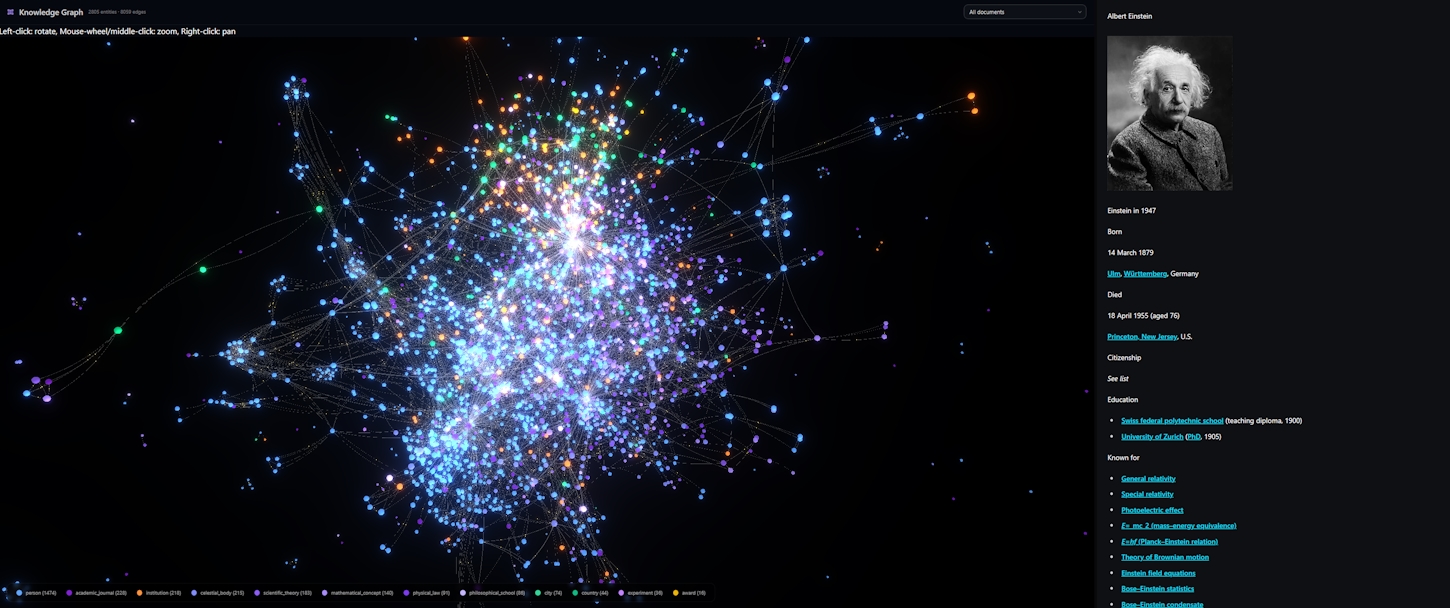\n\n## How entity extraction works\n\nThe extraction pipeline uses GLiNER, a span-level transformer model designed for named entity recognition with custom labels. Unlike traditional NER systems locked to a fixed set of types (person, location, organization), GLiNER accepts whatever entity types you define. Tell it to look for \"regulation,\" \"court,\" and \"penalty\" in your legal documents, and it will.\n\nFour model variants are available, depending on your hardware and language needs:\n\n- **Small v2.1 (fp32)** at 583 MB for best English accuracy on GPU\n- **Small v2.1 (int8)** at 183 MB for fast CPU-only extraction\n- **Multi v2.1 (int8)** at 349 MB for 100+ languages on CPU\n- **Multi v2.1 (fp16)** at 580 MB for multilingual with GPU acceleration\n\nThe model runs locally through ONNX Runtime, using WebGPU when available and falling back to WASM. Your documents never leave the browser for entity extraction.\n\nChunks are processed in batches of eight. For each batch, GLiNER evaluates all candidate spans (up to 12 tokens wide) against your entity types, scores them with a confidence threshold (default 0.3), and resolves overlapping spans with greedy selection. A noise filter strips out pronouns, stop words, URL fragments, and overly short strings before anything reaches the graph.\n\n## Ontologies: tell the AI what to look for\n\nEntity types are defined through ontologies. Daneel ships eight domain-specific presets:\n\n- **General** for broad documents: person, organization, location, product, concept\n- **Academic & Research** for papers: institution, theory, method, publication, dataset\n- **Legal & Regulatory** for compliance: regulation, law, jurisdiction, contract, clause\n- **Medical & Healthcare** for clinical docs: disease, symptom, treatment, drug, gene\n- **Programming & Software** for code docs: class, function, library, framework, API\n- **Business & Finance** for corporate: company, market, revenue, acquisition\n- **Travel & Tourism** for guides: hotel, airline, landmark, restaurant\n- **History & Geography** for reference: person, event, battle, dynasty, artifact\n\nEach preset is a starting point. You can create your own ontologies from scratch, picking from a universal vocabulary of 100 entity types organized across eight pillars: agents, organizations, places, events, knowledge, creations, legal concepts, and technology. Or just type in your own labels. The ontology editor lets you name it, pick an icon, and toggle it on or off per vault.\n\nDifferent vaults can use different ontologies. Your legal vault extracts regulations and clauses. Your research vault extracts theories and datasets. Same pipeline, different lenses.\n\n## Entity resolution: no duplicates\n\nRaw NER output is messy. \"Albert Einstein,\" \"Einstein,\" and \"A. Einstein\" all refer to the same person. The entity resolver handles this with a two-pass algorithm.\n\nFirst pass: text matching. After normalizing case and punctuation, the resolver checks for exact matches, substring containment (\"Einstein\" inside \"Albert Einstein\"), and reversed name order (\"Einstein, Albert\" matches \"Albert Einstein\"). All comparisons are scoped by entity type, so a company named \"Einstein\" won't merge with the physicist.\n\nSecond pass: embedding similarity. Each new entity gets embedded using the same model that handles document chunks. The resolver computes cosine similarity against all existing entities of the same type. If similarity exceeds the threshold (default 0.92), the entities merge. If not, a new canonical entity is created.\n\nThe result is a clean set of deduplicated entities with mention counts that reflect how often each one appears across your documents.\n\n## Building the graph\n\nWith entities extracted and deduplicated, the graph builder connects them through co-occurrence. When two entities appear in the same chunk, they get an edge. Multiple co-occurrences in different chunks increase the edge weight, reflecting stronger relationships.\n\nThe build process is incremental and tracks progress in real time. You see the chunk count advancing, the entity count growing, and a type breakdown (e.g., \"person: 42, organization: 38, regulation: 15\") updating as extraction proceeds.\n\nGraphs are stored in a dedicated IndexedDB database (`daneel-kg`), separate from the main chunk store. Three object stores hold entities, mentions (chunk-to-entity edges), and serialized graph state. Everything is vault-scoped, so deleting a vault cleanly removes its graph.\n\n## 3D interactive visualization\n\nThis is the part you have to see. The knowledge graph renders as a force-directed 3D network using Three.js and WebGL.\n\nEntities become spheres, sized logarithmically by mention count. Colors are assigned by type from a curated palette: blue tones for people and agents, orange for organizations, green for places, red for events, purple for knowledge concepts, teal for creative works. Over 100 entity types have dedicated colors; anything else falls back to neutral gray.\n\nEdges connect co-occurring entities. Their width reflects relationship strength. Gold directional particles flow along edges, showing the structure of the network in motion.\n\nThe simulation uses D3 force physics: nodes repel each other (configurable charge strength), edges pull connected nodes together (configurable link distance), and the whole system settles into a stable layout over a few seconds. You can orbit, zoom, and drag to explore from any angle.\n\n## Filtering and focus\n\nA type legend overlays the visualization, showing every entity type present in the graph with its count. Click a type to toggle it off. This lets you strip away noise and focus on the entity categories that matter for your question.\n\nA document dropdown scopes the graph to a single file. Select a specific document and only entities mentioned in that document remain visible, with their co-occurrence edges intact. Switch back to \"all documents\" to see the full picture.\n\nClick any node to focus on its neighborhood. The camera zooms to that entity and highlights its direct connections (capped at 25 neighbors to keep things readable). Click again to zoom in further. This makes it easy to explore dense graphs by starting from a known entity and walking outward.\n\n## Tuning the visualization\n\nThe settings panel exposes the physics and rendering parameters for users who want control:\n\n- **Charge strength** adjusts how strongly nodes repel each other (denser or more spread out)\n- **Link distance** sets the preferred edge length\n- **Node scale** controls sphere sizes\n- **Link opacity** dims or brightens edges\n- **Particle speed** controls the flow rate of directional particles along edges\n- **Bloom** enables a GPU-powered glow effect (UnrealBloomPass) for a more dramatic look\n\nThese are saved per session and apply immediately, so you can experiment in real time.\n\n## What you can learn\n\nThe knowledge graph surfaces relationships that are hard to spot by reading documents sequentially. Which people are mentioned alongside which organizations? Which regulations co-occur with which penalties? Which concepts bridge two otherwise separate document clusters?\n\nCombined with the Vault's RAG capabilities from Part 1, you can explore the graph to identify patterns, then switch to chat mode and ask targeted questions grounded in the actual source text. The graph tells you where to look. The RAG gives you the answers.\n\nThis is still an early feature, and we're actively expanding it. Entity-augmented search (using graph relationships to boost retrieval) and cross-vault graph merging are on the roadmap. For now, build a vault, extract entities, and explore what your documents know.\n", "date_published": "2026-04-01T00:00:00.000Z", "image": "https://daneel.injen.io/medias/kg.2.png", "tags": [ "feature", "vault", "knowledge-graph", "ner", "visualization" ] }, { "id": "https://daneel.injen.io/news/docker-companion.html", "url": "https://daneel.injen.io/news/docker-companion.html?utm_source=json&utm_medium=feed&utm_campaign=news_syndication", "title": "Docker Companion — local MCP servers, Ollama, and health monitoring from your browser", "summary": "A built-in Docker Compose generator that spins up local MCP servers, Ollama, and a health sidecar — all from your browser settings. Power user preview.", "content_html": "Most Daneel features work out of the box — install the extension, open a page, start chatting. But some of the most powerful capabilities live outside the browser: local MCP servers that expose filesystems, databases, and search APIs to your AI.
\nRunning those servers means Docker images, port mappings, environment variables, and compose files. If you're comfortable with that, the Docker Companion gives you a GUI that generates it all — and auto-registers everything back into Daneel.
\nThis is a beta feature for power users with Docker on their machine. If that's you, read on.
\nThe Docker Companion is a Compose file generator built into Daneel's settings. Toggle presets, pick MCP servers from a template catalog, configure environment variables, preview the YAML, and export — all without leaving the browser.
\nThree service categories:
\nCompanion Sidecar (always on) — a lightweight Python/FastAPI container that monitors your stack. It mounts the Docker socket read-only, discovers containers labeled daneel.managed, and reports their health, ports, and status back to the extension. The settings panel polls it every 10 seconds and shows live service status.
Ollama (optional) — a managed Ollama instance with CORS pre-configured for Chrome extensions (OLLAMA_ORIGINS=chrome-extension://*), persistent model storage via a named volume, and optional NVIDIA GPU passthrough. One toggle, and you have a local LLM server that Daneel can connect to immediately.
MCP Servers (optional, beta) — this is the interesting part. Each server you add becomes a separate container running supercorp/supergateway, which bridges stdio-based MCP servers to HTTP endpoints that Daneel already understands. One container per server, sequential ports, automatic CORS.
The template catalog includes pre-configured MCP servers ready to deploy:
\n| Server | \nWhat it does | \nRequires | \n
|---|---|---|
| Filesystem | \nRead/write files on a mounted volume | \nVolume mount | \n
| GitHub | \nRepos, issues, PRs, file access | \nGITHUB_TOKEN | \n
| SQLite | \nQuery and manage SQLite databases | \nVolume mount | \n
| PostgreSQL | \nQuery PostgreSQL databases | \nDATABASE_URL | \n
| Brave Search | \nWeb search via Brave API | \nBRAVE_API_KEY | \n
| Perplexity | \nWeb search and reasoning via Sonar | \nPERPLEXITY_API_KEY | \n
| Fetch | \nExtract content from any URL | \nNothing | \n
| Memory | \nPersistent knowledge graph | \nNothing | \n
| Puppeteer | \nBrowser automation and scraping | \nNothing | \n
Pick a template, fill in any required environment variables (secrets are masked in the UI), and the server is added to your compose stack. Each server gets a sequential port starting from 8810: first server at localhost:8810/mcp, second at localhost:8811/mcp, and so on.
Need something not in the catalog? The "Custom" option lets you specify any arbitrary stdio command — python -m my_server, npx my-private-mcp-package, whatever your setup requires.
Most MCP servers speak stdio — they read JSON-RPC from stdin and write to stdout. That's great for local CLI tools, but a Chrome extension needs HTTP.
\nSupergateway solves this. Each MCP server container runs supercorp/supergateway (or the :uvx variant for Python packages), which spawns your stdio server as a subprocess and exposes it as a Streamable HTTP endpoint with CORS headers. The generated command:
--stdio \"uvx mcp-server-filesystem /data\" --port 8000 --cors --outputTransport streamableHttpFrom Daneel's perspective, each container looks like a standard remote MCP server. The existing transport and tool-calling loop work unchanged — no special local-server handling needed.
\nThe settings panel shows a live YAML preview that updates as you toggle services and add servers. You can inspect exactly what will be generated before committing.
\nTwo export paths: copy to clipboard or download as daneel.compose.yml. Then:
docker compose -f daneel.compose.yml up -dAll services start in the background with automatic restart policies. The companion sidecar begins discovering managed containers immediately.
\nHere's the workflow payoff: when you export, Daneel can automatically register every MCP server in its internal registry. No need to manually add http://localhost:8810/mcp in the MCP settings — check the "auto-register" box and each server appears in your registered server list, ready to use in conversations, agents, and vaults.
The registered servers are marked as local (isExternal: false), so Daneel's privacy indicators correctly show that tool calls stay on your machine.
Once the stack is running, the Companion Status section in settings shows real-time service health. Each managed container appears with its name, exposed ports, and status badge — running, stopped, restarting, or unknown. The companion polls the Docker socket every request and the extension polls the companion every 10 seconds.
\nIf the companion is unreachable, the panel shows the exact docker compose command to start it.
This is a preview for a reason — we're building toward a richer local infrastructure layer:
\nThe Docker Companion is infrastructure-as-settings. If you run Docker, your browser just became a control plane.
\n", "content_text": "\n## For the tinkerers\n\nMost Daneel features work out of the box — install the extension, open a page, start chatting. But some of the most powerful capabilities live outside the browser: local MCP servers that expose filesystems, databases, and search APIs to your AI.\n\nRunning those servers means Docker images, port mappings, environment variables, and compose files. If you're comfortable with that, the Docker Companion gives you a GUI that generates it all — and auto-registers everything back into Daneel.\n\nThis is a beta feature for power users with Docker on their machine. If that's you, read on.\n\n## What it does\n\nThe Docker Companion is a Compose file generator built into Daneel's settings. Toggle presets, pick MCP servers from a template catalog, configure environment variables, preview the YAML, and export — all without leaving the browser.\n\nThree service categories:\n\n**Companion Sidecar** (always on) — a lightweight Python/FastAPI container that monitors your stack. It mounts the Docker socket read-only, discovers containers labeled `daneel.managed`, and reports their health, ports, and status back to the extension. The settings panel polls it every 10 seconds and shows live service status.\n\n**Ollama** (optional) — a managed Ollama instance with CORS pre-configured for Chrome extensions (`OLLAMA_ORIGINS=chrome-extension://*`), persistent model storage via a named volume, and optional NVIDIA GPU passthrough. One toggle, and you have a local LLM server that Daneel can connect to immediately.\n\n**MCP Servers** (optional, beta) — this is the interesting part. Each server you add becomes a separate container running `supercorp/supergateway`, which bridges stdio-based MCP servers to HTTP endpoints that Daneel already understands. One container per server, sequential ports, automatic CORS.\n\n## Nine server templates — and custom commands\n\nThe template catalog includes pre-configured MCP servers ready to deploy:\n\n| Server | What it does | Requires |\n|--------|-------------|----------|\n| **Filesystem** | Read/write files on a mounted volume | Volume mount |\n| **GitHub** | Repos, issues, PRs, file access | `GITHUB_TOKEN` |\n| **SQLite** | Query and manage SQLite databases | Volume mount |\n| **PostgreSQL** | Query PostgreSQL databases | `DATABASE_URL` |\n| **Brave Search** | Web search via Brave API | `BRAVE_API_KEY` |\n| **Perplexity** | Web search and reasoning via Sonar | `PERPLEXITY_API_KEY` |\n| **Fetch** | Extract content from any URL | Nothing |\n| **Memory** | Persistent knowledge graph | Nothing |\n| **Puppeteer** | Browser automation and scraping | Nothing |\n\nPick a template, fill in any required environment variables (secrets are masked in the UI), and the server is added to your compose stack. Each server gets a sequential port starting from 8810: first server at `localhost:8810/mcp`, second at `localhost:8811/mcp`, and so on.\n\nNeed something not in the catalog? The \"Custom\" option lets you specify any arbitrary stdio command — `python -m my_server`, `npx my-private-mcp-package`, whatever your setup requires.\n\n## The supergateway bridge\n\nMost MCP servers speak stdio — they read JSON-RPC from stdin and write to stdout. That's great for local CLI tools, but a Chrome extension needs HTTP.\n\nSupergateway solves this. Each MCP server container runs `supercorp/supergateway` (or the `:uvx` variant for Python packages), which spawns your stdio server as a subprocess and exposes it as a Streamable HTTP endpoint with CORS headers. The generated command:\n\n```\n--stdio \"uvx mcp-server-filesystem /data\" --port 8000 --cors --outputTransport streamableHttp\n```\n\nFrom Daneel's perspective, each container looks like a standard remote MCP server. The existing transport and tool-calling loop work unchanged — no special local-server handling needed.\n\n## YAML preview and export\n\nThe settings panel shows a live YAML preview that updates as you toggle services and add servers. You can inspect exactly what will be generated before committing.\n\nTwo export paths: **copy to clipboard** or **download as `daneel.compose.yml`**. Then:\n\n```bash\ndocker compose -f daneel.compose.yml up -d\n```\n\nAll services start in the background with automatic restart policies. The companion sidecar begins discovering managed containers immediately.\n\n## Auto-registration\n\nHere's the workflow payoff: when you export, Daneel can **automatically register** every MCP server in its internal registry. No need to manually add `http://localhost:8810/mcp` in the MCP settings — check the \"auto-register\" box and each server appears in your registered server list, ready to use in conversations, agents, and vaults.\n\nThe registered servers are marked as local (`isExternal: false`), so Daneel's privacy indicators correctly show that tool calls stay on your machine.\n\n## Live health monitoring\n\nOnce the stack is running, the Companion Status section in settings shows real-time service health. Each managed container appears with its name, exposed ports, and status badge — running, stopped, restarting, or unknown. The companion polls the Docker socket every request and the extension polls the companion every 10 seconds.\n\nIf the companion is unreachable, the panel shows the exact `docker compose` command to start it.\n\n## What's coming\n\nThis is a preview for a reason — we're building toward a richer local infrastructure layer:\n\n- **SearXNG preset** — a self-hosted search engine as an MCP server, giving your AI private web search with no API keys\n- **Microsoft BitNet** — 1-bit inference for extreme efficiency on CPU\n- **Observability stack** — Prometheus + Grafana preset for monitoring inference latency and token throughput\n- **More MCP templates** — as the MCP ecosystem grows, the template catalog will track it\n\nThe Docker Companion is infrastructure-as-settings. If you run Docker, your browser just became a control plane.\n", "date_published": "2026-03-28T00:00:00.000Z", "image": "https://daneel.injen.io/medias/docker.companion.jpg", "tags": [ "preview", "docker", "mcp", "power-user", "infrastructure" ] }, { "id": "https://daneel.injen.io/news/data-portability.html", "url": "https://daneel.injen.io/news/data-portability.html?utm_source=json&utm_medium=feed&utm_campaign=news_syndication", "title": "Your data, your way — backup anywhere", "summary": "Export everything to a local file, Azure Blob Storage, or any S3-compatible service. Your settings, conversations, and indexed sites travel with you — your secrets don't.", "content_html": "Daneel runs on your machine. Your conversations, your indexed sites, your vault documents — they live in your browser's storage, not on our servers. That's the promise.
\nBut local storage has a weakness: it's tied to one browser, on one machine. Reinstall Chrome, switch laptops, or clear your data — and everything is gone.
\nData portability fixes that. Starting today, you can export your entire Daneel workspace to a portable file and restore it anywhere. And if you want automated cloud backup, we support Azure Blob Storage and any S3-compatible service — without a single external SDK.
\nThe simplest path: open Settings, go to Data, and click "Export to file." Daneel gathers your settings, conversations, and all indexed site data, compresses everything into a timestamped ZIP, and downloads it to your machine.
\nTo restore, click "Import from file," pick the ZIP, and everything comes back — settings, chat history, embeddings, vault metadata. A progress bar tracks each stage so you know exactly where the import stands.
\nThe ZIP is self-contained and versioned. You can store it in your own backup system, share it across machines, or keep it as a snapshot before experimenting with settings.
\nTransparency matters when you're moving data around. Here's exactly what an export contains:
\nIncluded:
\nExcluded by design:
\nThis separation is deliberate. Your workflow travels with you. Your secrets stay behind, exactly where they should be.
\nIf you use Azure, backup is straightforward. Generate a Container SAS token in the Azure portal (read + write + list permissions), paste the URL into Daneel, and click "Test Connection." Once validated, "Upload to Azure" exports and uploads in one step.
\nDaneel talks directly to the Azure REST API — no Azure SDK, no npm packages, no intermediary services. The SAS token authenticates every request. Your backup lands as daneel.backup.zip in your container, overwritten on each upload.
Restoring is the reverse: "Download from Azure" pulls the ZIP and imports everything. The same progress tracking shows upload and download stages in real time.
\nFor S3-compatible storage, enter your access key, secret key, bucket name, and region. Optionally set a custom endpoint URL for services that aren't AWS:
\nThe same "Test Connection" then "Upload" then "Download" flow works identically across all four. Daneel auto-detects whether to use virtual-hosted or path-style URLs based on whether you've set a custom endpoint.
\nYour IAM user needs just three permissions: s3:GetObject, s3:PutObject, and s3:ListBucket on the target bucket. Nothing more.
Both the Azure and S3 integrations are built on pure browser APIs. No SDKs, no bundled libraries, no supply chain risk.
\nThe S3 client includes a complete AWS Signature Version 4 implementation written entirely against the Web Crypto API. SHA-256 hashing, HMAC-SHA256 signing, four-step key derivation — all running in your browser's native crypto engine. It passes the AWS reference test vectors, and you can read every line in a single file.
\nFor a Chrome extension that prides itself on minimal dependencies, this matters. Every byte in the bundle is code we wrote and can audit.
\nChrome extensions have a CORS constraint: content scripts can't make cross-origin requests to cloud storage providers. And Chrome's message-passing has a 64 MB per-message limit — a problem when your export ZIP contains thousands of embedded pages.
\nWe solved both. All cloud requests route through the background service worker via a long-lived port, bypassing CORS entirely. The ZIP payload is chunked at 30 MB boundaries, base64-encoded, and reassembled on the other side before uploading. This handles exports well over 100 MB without hitting any Chrome limits.
\nYou don't need to think about any of this. Click "Upload," watch the progress bar, done.
\nEvery operation — local or cloud — shows real-time progress. The progress bar parses each stage: gathering settings, exporting domains (with counts), compressing, uploading, downloading. Determinate progress shows a percentage; indeterminate stages show an animated shimmer.
\nSuccess shows a green confirmation. Errors display inline with the full message so you can diagnose issues (expired SAS token, wrong IAM permissions, network timeout) without digging through console logs.
\nAll three backup methods are gated behind a premium license, but the local file export gives you a complete, portable snapshot of your Daneel workspace regardless.
\nWe're exploring incremental backups — only syncing what changed since the last export — and scheduled automatic cloud backup on a timer. For now, one click gets you a full snapshot anywhere you want it.
\nYour data lives on your machine. Now it can also live wherever you choose.
\n", "content_text": "\n## A local-first tool should give you local-first control\n\nDaneel runs on your machine. Your conversations, your indexed sites, your vault documents — they live in your browser's storage, not on our servers. That's the promise.\n\nBut local storage has a weakness: it's tied to one browser, on one machine. Reinstall Chrome, switch laptops, or clear your data — and everything is gone.\n\nData portability fixes that. Starting today, you can export your entire Daneel workspace to a portable file and restore it anywhere. And if you want automated cloud backup, we support Azure Blob Storage and any S3-compatible service — without a single external SDK.\n\n## One-click local backup\n\nThe simplest path: open Settings, go to Data, and click \"Export to file.\" Daneel gathers your settings, conversations, and all indexed site data, compresses everything into a timestamped ZIP, and downloads it to your machine.\n\nTo restore, click \"Import from file,\" pick the ZIP, and everything comes back — settings, chat history, embeddings, vault metadata. A progress bar tracks each stage so you know exactly where the import stands.\n\nThe ZIP is self-contained and versioned. You can store it in your own backup system, share it across machines, or keep it as a snapshot before experimenting with settings.\n\n## What's inside — and what's not\n\nTransparency matters when you're moving data around. Here's exactly what an export contains:\n\n**Included:**\n- All user settings and preferences\n- Every conversation (page chats and vault chats)\n- Indexed site data with full embeddings (stored as efficient binary, not bloated JSON)\n- Vault metadata and document references\n- MCP server registrations and agent definitions\n\n**Excluded by design:**\n- API keys (Claude, Azure OpenAI) — encrypted at rest, never serialized\n- MCP credentials (OAuth tokens, API keys for connected services)\n- Telemetry identifiers\n- Backup provider credentials themselves (no circular leaks)\n- Downloaded model files (too large, re-downloaded on demand)\n\nThis separation is deliberate. Your workflow travels with you. Your secrets stay behind, exactly where they should be.\n\n## Azure Blob Storage\n\nIf you use Azure, backup is straightforward. Generate a Container SAS token in the Azure portal (read + write + list permissions), paste the URL into Daneel, and click \"Test Connection.\" Once validated, \"Upload to Azure\" exports and uploads in one step.\n\nDaneel talks directly to the Azure REST API — no Azure SDK, no npm packages, no intermediary services. The SAS token authenticates every request. Your backup lands as `daneel.backup.zip` in your container, overwritten on each upload.\n\nRestoring is the reverse: \"Download from Azure\" pulls the ZIP and imports everything. The same progress tracking shows upload and download stages in real time.\n\n## S3-compatible — AWS and beyond\n\nFor S3-compatible storage, enter your access key, secret key, bucket name, and region. Optionally set a custom endpoint URL for services that aren't AWS:\n\n- **AWS S3** — the default, virtual-hosted bucket URLs\n- **Cloudflare R2** — set the R2 endpoint, zero egress fees\n- **Backblaze B2** — set the B2 S3-compatible endpoint\n- **MinIO** — self-hosted, point to your own server\n\nThe same \"Test Connection\" then \"Upload\" then \"Download\" flow works identically across all four. Daneel auto-detects whether to use virtual-hosted or path-style URLs based on whether you've set a custom endpoint.\n\nYour IAM user needs just three permissions: `s3:GetObject`, `s3:PutObject`, and `s3:ListBucket` on the target bucket. Nothing more.\n\n## Built from scratch — zero dependencies\n\nBoth the Azure and S3 integrations are built on pure browser APIs. No SDKs, no bundled libraries, no supply chain risk.\n\nThe S3 client includes a complete AWS Signature Version 4 implementation written entirely against the Web Crypto API. SHA-256 hashing, HMAC-SHA256 signing, four-step key derivation — all running in your browser's native crypto engine. It passes the AWS reference test vectors, and you can read every line in a single file.\n\nFor a Chrome extension that prides itself on minimal dependencies, this matters. Every byte in the bundle is code we wrote and can audit.\n\n## Large files, no problem\n\nChrome extensions have a CORS constraint: content scripts can't make cross-origin requests to cloud storage providers. And Chrome's message-passing has a 64 MB per-message limit — a problem when your export ZIP contains thousands of embedded pages.\n\nWe solved both. All cloud requests route through the background service worker via a long-lived port, bypassing CORS entirely. The ZIP payload is chunked at 30 MB boundaries, base64-encoded, and reassembled on the other side before uploading. This handles exports well over 100 MB without hitting any Chrome limits.\n\nYou don't need to think about any of this. Click \"Upload,\" watch the progress bar, done.\n\n## Progress and control\n\nEvery operation — local or cloud — shows real-time progress. The progress bar parses each stage: gathering settings, exporting domains (with counts), compressing, uploading, downloading. Determinate progress shows a percentage; indeterminate stages show an animated shimmer.\n\nSuccess shows a green confirmation. Errors display inline with the full message so you can diagnose issues (expired SAS token, wrong IAM permissions, network timeout) without digging through console logs.\n\nAll three backup methods are gated behind a premium license, but the local file export gives you a complete, portable snapshot of your Daneel workspace regardless.\n\n## What's next\n\nWe're exploring incremental backups — only syncing what changed since the last export — and scheduled automatic cloud backup on a timer. For now, one click gets you a full snapshot anywhere you want it.\n\nYour data lives on your machine. Now it can also live wherever you choose.\n", "date_published": "2026-03-25T00:00:00.000Z", "image": "https://daneel.injen.io/medias/export.import.png", "tags": [ "feature", "backup", "data", "cloud", "privacy" ] }, { "id": "https://daneel.injen.io/news/vault-part-1.html", "url": "https://daneel.injen.io/news/vault-part-1.html?utm_source=json&utm_medium=feed&utm_campaign=news_syndication", "title": "The Vault, part 1: your private document knowledge base", "summary": "Import your own documents, embed them locally, and chat with your personal knowledge base. PDF, DOCX, Markdown, HTML, plain text — all searchable, all private.", "content_html": "Daneel started as a way to chat with web pages. The Vault takes that further: import your own files, build a personal knowledge base, and ask questions across your entire document collection. Everything runs locally. Nothing gets uploaded.
\nThink of it as a private, searchable library where the librarian actually reads every document and can answer questions about any of them.
\nThe Vault accepts five document formats: Markdown, plain text, PDF, DOCX, and HTML. Import through a file picker, or select an entire folder using the FileSystem Access API. Each file goes through a format-specific converter before entering the pipeline:
\nEvery imported file gets a SHA-256 content hash. If you try to import a file that's already in the vault, Daneel skips it. No duplicates, no wasted embeddings.
\nOnce imported, documents are split into chunks using a recursive semantic chunker (powered by Chonkie.js). Unlike naive splitting on word count, this chunker respects natural boundaries: it splits on paragraphs first, then sentences, then words. Chunks stay coherent, which directly improves search quality.
\nEach chunk is embedded using the same WebGPU pipeline that powers Site RAG. The default model (bge-small-en-v1.5 at fp16) runs on your GPU with sub-second batch processing. Embeddings are stored in IndexedDB, partitioned by vault ID, so each vault is an isolated search space.
\nA progress bar tracks every stage: file conversion, chunking, and embedding. Large imports with dozens of documents give you real-time feedback on exactly where things stand.
\nWith documents embedded, you can search your vault or chat with it.
\nVault-wide search finds the most relevant passages across all your documents. Type a question and Daneel embeds your query, runs GPU-accelerated cosine similarity against every chunk in the vault (typically under 5 milliseconds even for thousands of chunks), and returns the best matches with similarity scores and source attribution.
\nDocument-scoped search narrows to a single file. Select a document in the sidebar and your questions only match against that document's chunks. Useful when you know which file has the answer and want precise results.
\nChat mode takes search results and feeds them to your active LLM as context, producing a grounded answer with references to specific documents. This works with every provider: ask a question about your contract collection using WebGPU, Ollama, Claude, or Azure, and get an answer backed by actual passages from your files.
\nSelect any document in your vault and its full content renders in a viewer pane alongside the chat. The Markdown is parsed and displayed with GitHub Flavored Markdown support, including tables, code blocks, and links (which open in new tabs). You can read the source material while chatting about it, without switching contexts.
\nIf the cached content is missing (rare edge case after a storage cleanup), the viewer offers a re-import button so you can restore it instantly.
\nVaults can have MCP servers attached directly. This means your AI can combine local document search with live external data in the same conversation.
\nAttach Stripe to your invoices vault and ask "Which client from my Q1 contracts has an overdue payment?" The LLM searches your local documents for client names, then calls Stripe to check payment status. Local knowledge plus live tools, in one question.
\nThe tools section in the vault sidebar shows all registered MCP servers with available tools. Click to attach, click to detach. Simple.
\nFor more structured workflows, attach an agent instead of individual MCP servers. An agent brings its own system prompt (persona, task, constraints, style) and its own set of MCP tools, creating a focused AI environment tuned for the vault's content.
\nA finance analyst agent on your invoices vault. A legal reviewer agent on your contracts vault. A research assistant agent on your papers vault. The agent shapes both the AI's behavior and its available tools.
\nOne rule keeps things clean: a vault uses either standalone MCP servers or an agent, never both. This mutual exclusion prevents conflicting tool configurations and makes it obvious which tools are active.
\nThe Vault is available to everyone, with generous free limits:
\nThe free tier is enough to try the feature with a handful of documents. The paid tier opens it up for serious use with large document collections.
\nThis is Part 1 of the Vault story. In Part 2, we cover something more ambitious: how Daneel extracts named entities from your documents, builds a knowledge graph of their relationships, and lets you explore it in an interactive 3D visualization. Stay tuned.
\n", "content_text": "\n## Your documents, your AI\n\nDaneel started as a way to chat with web pages. The Vault takes that further: import your own files, build a personal knowledge base, and ask questions across your entire document collection. Everything runs locally. Nothing gets uploaded.\n\nThink of it as a private, searchable library where the librarian actually reads every document and can answer questions about any of them.\n\n## Import anything you have\n\nThe Vault accepts five document formats: Markdown, plain text, PDF, DOCX, and HTML. Import through a file picker, or select an entire folder using the FileSystem Access API. Each file goes through a format-specific converter before entering the pipeline:\n\n- **PDF** files are converted to structured Markdown with [EdgeParse](https://github.com/raphaelmansuy/edgeparse), a Rust-based parser compiled to WebAssembly that preserves headings, tables, and reading order. Fully scanned (image-only) PDFs are detected and rejected with a clear error rather than silently producing empty results.\n- **DOCX** files pass through the mammoth library, converting Word documents to HTML, then to clean Markdown using the same Turndown pipeline that handles web pages.\n- **HTML** files are converted with the same Markdown pipeline.\n- **Markdown and plain text** pass through directly with UTF-8 BOM stripping.\n\nEvery imported file gets a SHA-256 content hash. If you try to import a file that's already in the vault, Daneel skips it. No duplicates, no wasted embeddings.\n\n## Semantic chunking and embedding\n\nOnce imported, documents are split into chunks using a recursive semantic chunker (powered by Chonkie.js). Unlike naive splitting on word count, this chunker respects natural boundaries: it splits on paragraphs first, then sentences, then words. Chunks stay coherent, which directly improves search quality.\n\nEach chunk is embedded using the same WebGPU pipeline that powers Site RAG. The default model (bge-small-en-v1.5 at fp16) runs on your GPU with sub-second batch processing. Embeddings are stored in IndexedDB, partitioned by vault ID, so each vault is an isolated search space.\n\nA progress bar tracks every stage: file conversion, chunking, and embedding. Large imports with dozens of documents give you real-time feedback on exactly where things stand.\n\n## Search and chat\n\nWith documents embedded, you can search your vault or chat with it.\n\n**Vault-wide search** finds the most relevant passages across all your documents. Type a question and Daneel embeds your query, runs GPU-accelerated cosine similarity against every chunk in the vault (typically under 5 milliseconds even for thousands of chunks), and returns the best matches with similarity scores and source attribution.\n\n**Document-scoped search** narrows to a single file. Select a document in the sidebar and your questions only match against that document's chunks. Useful when you know which file has the answer and want precise results.\n\n**Chat mode** takes search results and feeds them to your active LLM as context, producing a grounded answer with references to specific documents. This works with every provider: ask a question about your contract collection using WebGPU, Ollama, Claude, or Azure, and get an answer backed by actual passages from your files.\n\n## The document viewer\n\nSelect any document in your vault and its full content renders in a viewer pane alongside the chat. The Markdown is parsed and displayed with GitHub Flavored Markdown support, including tables, code blocks, and links (which open in new tabs). You can read the source material while chatting about it, without switching contexts.\n\nIf the cached content is missing (rare edge case after a storage cleanup), the viewer offers a re-import button so you can restore it instantly.\n\n## Attach MCP tools\n\nVaults can have MCP servers attached directly. This means your AI can combine local document search with live external data in the same conversation.\n\nAttach Stripe to your invoices vault and ask \"Which client from my Q1 contracts has an overdue payment?\" The LLM searches your local documents for client names, then calls Stripe to check payment status. Local knowledge plus live tools, in one question.\n\nThe tools section in the vault sidebar shows all registered MCP servers with available tools. Click to attach, click to detach. Simple.\n\n## Bind an agent\n\nFor more structured workflows, attach an agent instead of individual MCP servers. An agent brings its own system prompt (persona, task, constraints, style) and its own set of MCP tools, creating a focused AI environment tuned for the vault's content.\n\nA finance analyst agent on your invoices vault. A legal reviewer agent on your contracts vault. A research assistant agent on your papers vault. The agent shapes both the AI's behavior and its available tools.\n\nOne rule keeps things clean: a vault uses either standalone MCP servers or an agent, never both. This mutual exclusion prevents conflicting tool configurations and makes it obvious which tools are active.\n\n## Free and paid tiers\n\nThe Vault is available to everyone, with generous free limits:\n\n- **Free**: 1 vault, 5 documents per vault, 1 MB file size, 100 chunks per document\n- **Paid**: unlimited vaults, 50 documents per vault, 10 MB file size, 1,000 chunks per document\n\nThe free tier is enough to try the feature with a handful of documents. The paid tier opens it up for serious use with large document collections.\n\n## What comes next\n\nThis is Part 1 of the Vault story. In Part 2, we cover something more ambitious: how Daneel extracts named entities from your documents, builds a knowledge graph of their relationships, and lets you explore it in an interactive 3D visualization. Stay tuned.\n", "date_published": "2026-03-20T00:00:00.000Z", "image": "https://daneel.injen.io/medias/vault.png", "tags": [ "feature", "vault", "rag", "documents", "privacy" ] }, { "id": "https://daneel.injen.io/news/azure-foundry-support.html", "url": "https://daneel.injen.io/news/azure-foundry-support.html?utm_source=json&utm_medium=feed&utm_campaign=news_syndication", "title": "Azure AI Foundry support: frontier models, your private cloud", "summary": "Deploy GPT-4.1, GPT-4o, or Phi-4 on your own Azure subscription — frontier model power with your organization's data governance. The privacy sweet spot between local and third-party cloud.", "content_html": "Daneel gives you two ends of the AI spectrum. On one side: local models — WebGPU, Ollama, Gemini Nano — that never leave your machine but are constrained by your hardware. On the other: Claude, a frontier model that can reason through anything but sends your data to a third-party cloud.
\nWhat if you could have both? Frontier capability with data that stays under your control?
\nThat's what Azure brings to Daneel. Deploy models on your own Azure subscription, governed by your organization's policies, and use them with every Daneel feature.
\nYour prompts reach a GPU in your cloud tenant, not someone else's API.
\nDaneel supports both Azure OpenAI Service (classic) and the newer Azure AI Foundry:
\nYou don't need to tell Daneel which style you're using. Paste the URL and it figures it out.
\nTwo authentication methods, because enterprise environments have different requirements:
\nAPI Key — paste your Azure API key, and Daneel encrypts it with AES-256-GCM before storing it in Chrome's local storage. The key never leaves your device except in the request header to your own Azure endpoint. Simple, fast, works for personal deployments and development.
\nEntra ID (SSO) — for organizations with centralized identity. Enter your tenant ID and client ID from your App Registration, click "Sign in with Azure," and authenticate through your organization's SSO flow. Full OAuth2 + PKCE, token refresh handled automatically. No shared secrets, no API keys to rotate — just your corporate identity.
\nBoth methods encrypt credentials at rest. The settings panel confirms the encryption status visually so you know your keys are protected.
\nThe Azure registry ships with five models spanning every budget and capability tier:
\nEvery model supports native tool calling through the OpenAI function calling format, meaning MCP servers work out of the box.
\nThis is why Azure matters for Daneel. Every Azure model gets "Your cloud" residency — the middle tier in Daneel's privacy model:
\nWith Azure, your data crosses the network but lands in infrastructure you control. Your organization's data governance policies apply. Azure RBAC controls access. The only data observer is your cloud tenant admin — not an external API provider.
\nFor regulated industries — healthcare, finance, legal, government — this is often the only acceptable path to frontier model capability. You get GPT-4.1's reasoning power without sending patient records, financial data, or privileged communications to a third party.
\nThe settings panel makes this explicit with a banner at the top: "Data stays within your Azure subscription, governed by your organization's policies."
\nAzure models use native OpenAI-style function calling. Connect any MCP server — Stripe, Supabase, Vercel, Salesforce — and Azure models will call tools with the same reliability as any OpenAI endpoint.
\nThe multi-turn tool loop handles complex chains: the model calls a tool, reads the result, decides if it needs more information, calls another tool, and continues until it has a complete answer. Tool results are streamed back incrementally, so you see progress in real time.
\nCombined with agents, this means you can build specialized AI workflows backed by enterprise-grade infrastructure. A compliance agent with Salesforce access. A DevOps agent with Vercel and Cloudflare. All running through your Azure tenant.
\nThe test query box lets you run a quick inference before committing — tokens stream back in real time so you can confirm the connection works and gauge latency.
\nWe're tracking Azure's expanding model catalog closely. As new models land in Foundry — including open-weight models from Mistral, Meta, and others — Daneel's registry will grow to match. The integration is endpoint-agnostic: any model Azure serves through the OpenAI-compatible API works today.
\nFrontier AI doesn't have to mean giving up control. With Azure on Daneel, it doesn't.
\n", "content_text": "\n## The missing middle\n\nDaneel gives you two ends of the AI spectrum. On one side: local models — WebGPU, Ollama, Gemini Nano — that never leave your machine but are constrained by your hardware. On the other: Claude, a frontier model that can reason through anything but sends your data to a third-party cloud.\n\nWhat if you could have both? Frontier capability with data that stays under your control?\n\nThat's what Azure brings to Daneel. Deploy models on your own Azure subscription, governed by your organization's policies, and use them with every Daneel feature.\n\n**Your prompts reach a GPU in your cloud tenant, not someone else's API.**\n\n## Two endpoint styles, one integration\n\nDaneel supports both Azure OpenAI Service (classic) and the newer Azure AI Foundry:\n\n- **Classic Azure OpenAI** — the established path. Specify your resource endpoint, deployment name, and API version. Daneel builds the request URL automatically.\n- **Azure AI Foundry** — Microsoft's newer model-as-a-service platform. Paste your project target URI and model name. Daneel auto-detects the Foundry format and adapts — no API version needed.\n\nYou don't need to tell Daneel which style you're using. Paste the URL and it figures it out.\n\n## Authentication your IT team will approve\n\nTwo authentication methods, because enterprise environments have different requirements:\n\n**API Key** — paste your Azure API key, and Daneel encrypts it with AES-256-GCM before storing it in Chrome's local storage. The key never leaves your device except in the request header to your own Azure endpoint. Simple, fast, works for personal deployments and development.\n\n**Entra ID (SSO)** — for organizations with centralized identity. Enter your tenant ID and client ID from your App Registration, click \"Sign in with Azure,\" and authenticate through your organization's SSO flow. Full OAuth2 + PKCE, token refresh handled automatically. No shared secrets, no API keys to rotate — just your corporate identity.\n\nBoth methods encrypt credentials at rest. The settings panel confirms the encryption status visually so you know your keys are protected.\n\n## Five models, from flagship to frugal\n\nThe Azure registry ships with five models spanning every budget and capability tier:\n\n- **GPT-4.1** — the flagship. 1M token context window, vision, native tool calling. $2/$8 per million tokens.\n- **GPT-4o** — the proven workhorse. 128K context, vision, tools. $2.50/$10 per million tokens.\n- **GPT-4.1 Mini** — flagship intelligence at lower cost. 1M context, vision, tools. $0.40/$1.60 per million tokens.\n- **GPT-4o Mini** — fast and affordable for lighter tasks. 128K context, tools. $0.15/$0.60 per million tokens.\n- **Phi-4** — Microsoft's own 14B parameter model. 16K context, tools, no vision. $0.07/$0.14 per million tokens — nearly free at scale.\n\nEvery model supports native tool calling through the OpenAI function calling format, meaning MCP servers work out of the box.\n\n## The privacy sweet spot\n\nThis is why Azure matters for Daneel. Every Azure model gets \"Your cloud\" residency — the middle tier in Daneel's privacy model:\n\n- **On-device** (WebGPU, Gemini Nano) — nothing leaves your browser\n- **Local network** (Ollama) — stays on your machine\n- **Your cloud** (Azure) — leaves your machine, stays in your subscription\n- **Third-party cloud** (Claude) — reaches an external provider\n\nWith Azure, your data crosses the network but lands in infrastructure you control. Your organization's data governance policies apply. Azure RBAC controls access. The only data observer is your cloud tenant admin — not an external API provider.\n\nFor regulated industries — healthcare, finance, legal, government — this is often the only acceptable path to frontier model capability. You get GPT-4.1's reasoning power without sending patient records, financial data, or privileged communications to a third party.\n\nThe settings panel makes this explicit with a banner at the top: \"Data stays within your Azure subscription, governed by your organization's policies.\"\n\n## Full tool calling support\n\nAzure models use native OpenAI-style function calling. Connect any MCP server — Stripe, Supabase, Vercel, Salesforce — and Azure models will call tools with the same reliability as any OpenAI endpoint.\n\nThe multi-turn tool loop handles complex chains: the model calls a tool, reads the result, decides if it needs more information, calls another tool, and continues until it has a complete answer. Tool results are streamed back incrementally, so you see progress in real time.\n\nCombined with agents, this means you can build specialized AI workflows backed by enterprise-grade infrastructure. A compliance agent with Salesforce access. A DevOps agent with Vercel and Cloudflare. All running through your Azure tenant.\n\n## Getting started\n\n1. Deploy a model in the Azure portal (Azure OpenAI or AI Foundry)\n2. Open Daneel Settings, then Azure OpenAI\n3. Choose your auth method (API Key or Entra ID)\n4. Paste your endpoint URL and deployment/model name\n5. Click \"Test connection\" to verify\n6. Click \"Use Azure OpenAI\" to activate\n\nThe test query box lets you run a quick inference before committing — tokens stream back in real time so you can confirm the connection works and gauge latency.\n\n## What's next\n\nWe're tracking Azure's expanding model catalog closely. As new models land in Foundry — including open-weight models from Mistral, Meta, and others — Daneel's registry will grow to match. The integration is endpoint-agnostic: any model Azure serves through the OpenAI-compatible API works today.\n\nFrontier AI doesn't have to mean giving up control. With Azure on Daneel, it doesn't.\n", "date_published": "2026-03-18T00:00:00.000Z", "image": "https://daneel.injen.io/medias/azure.foundry.webp", "tags": [ "feature", "azure", "enterprise", "privacy", "llm" ] }, { "id": "https://daneel.injen.io/news/agents-feature.html", "url": "https://daneel.injen.io/news/agents-feature.html?utm_source=json&utm_medium=feed&utm_campaign=news_syndication", "title": "Meet Agents — your AI, your rules", "summary": "Create specialized AI personas with structured prompts and bound tool access — then attach them to any conversation or document vault.", "content_html": "Every conversation is different. When you're reviewing code, you want precision and technical depth. When you're summarizing research, you want clarity and brevity. When you're drafting a customer email, you want warmth and professionalism.
\nA generic AI assistant tries to be everything at once. Agents let you build exactly the AI you need — with a structured persona, clear objectives, hard constraints, and the right tools for the job.
\nAn agent in Daneel is a reusable AI configuration built from four semantic building blocks:
\nThese four fields are assembled into a structured system prompt with clear section headers, so the LLM can parse each dimension independently. You don't need to be a prompt engineer — just fill in the fields that matter and leave the rest blank.
\nOpen Settings, navigate to the Agents tab, and click "New Agent."
\nGive your agent a name — something descriptive like "Code Reviewer" or "Research Analyst." Add a short purpose that will appear in picker dropdowns, so you can tell agents apart at a glance.
\nThen fill in the prompt fields. You don't need all four — a persona and a task are often enough to get a dramatically different experience from the default assistant. Constraints and style are there when you need finer control.
\nHit "Create Agent" and it's ready to use everywhere in Daneel.
\nHere's where agents get powerful. Each agent can have MCP servers attached, giving it access to specific external tools.
\nThe agent editor includes an MCP picker that shows all your registered servers. Attach the ones that make sense for this agent's role:
\nAttached servers appear as pills with tool counts, so you always know what capabilities an agent has. Detach a server with one click if the scope changes.
\nThe agent doesn't just know about these tools — it can call them autonomously during a conversation, chaining multiple tool calls across turns to answer complex questions.
\nIn any chat — whether you're on a web page, a YouTube video, or a site search — you can attach an agent from the picker in the toolbar.
\nWhen an agent is active, three things change:
\nA status indicator confirms you're in conversation mode with full context accumulation. Switch agents mid-conversation or detach entirely to return to the default assistant — agent selection is saved per tab, so each page remembers which agent you were using.
\nVaults — your personal document collections — can also have agents attached. This creates focused, domain-specific AI environments where document knowledge and external tools combine.
\nAttach a finance agent to your invoices vault, and it can answer questions that draw from both your local documents and live Stripe data. Attach a legal agent to your contracts vault, and it brings the right constraints and tone to every answer.
\nOne important rule: vaults enforce mutual exclusion between agents and standalone MCP servers. A vault uses either an agent's bundled servers or its own direct server list — never both. This keeps tool access predictable and prevents conflicting configurations.
\nEvery agent can be toggled on or off without deleting it. Disabled agents disappear from pickers but stay in storage, ready to re-enable when you need them.
\nNeed to share an agent with a colleague or back it up? The export button downloads the full agent definition as a JSON file — name, purpose, prompt fields, and MCP server bindings included. Import it on another machine and the agent is ready to go, provided the same MCP servers are registered.
\nThe agents list shows all your agents organized by status, with tool counts and quick actions for editing, exporting, or removing.
\nUnder the hood, agents are lightweight. An agent definition is a JSON object stored in Chrome's local storage — a name, four prompt strings, and a list of MCP server URLs. At runtime, Daneel resolves the agent's prompt and tools, injects them into the LLM request, and manages the multi-turn conversation loop.
\nThe architecture is provider-agnostic: agents work with Claude, Ollama, WebGPU, and Gemini Nano. The same agent definition produces the same behavior regardless of which AI backend is active — though tool calling reliability varies by model capability.
\nEverything stays local. Agent definitions, conversation history, and tool bindings live in your browser's storage. Nothing is uploaded unless you explicitly export.
\nWe're building toward prebuilt agent templates — curated agents for common workflows like code review, travel planning, and research synthesis, pre-configured with the right MCP servers. For now, the canvas is yours.
\nCreate your first agent, give it a persona and a purpose, attach the tools it needs, and see how a focused AI outperforms a generic one.
\n", "content_text": "\n## One prompt to rule them all? Not anymore.\n\nEvery conversation is different. When you're reviewing code, you want precision and technical depth. When you're summarizing research, you want clarity and brevity. When you're drafting a customer email, you want warmth and professionalism.\n\nA generic AI assistant tries to be everything at once. Agents let you build exactly the AI you need — with a structured persona, clear objectives, hard constraints, and the right tools for the job.\n\n## What is an agent\n\nAn agent in Daneel is a reusable AI configuration built from four semantic building blocks:\n\n- **Persona** — who the agent is. Domain expertise, professional role, knowledge base. \"You are a senior backend engineer with deep experience in distributed systems and PostgreSQL.\"\n- **Task** — what the agent should focus on. Goals, priorities, the shape of a good answer. \"Analyze code for performance bottlenecks, suggest concrete fixes with benchmarks.\"\n- **Constraints** — what the agent must avoid. Boundaries, rules, things that are off-limits. \"Never suggest rewriting in a different language. Stay within the existing tech stack.\"\n- **Style** — how the agent should communicate. Tone, verbosity, formality, language level. \"Concise and direct. Use code blocks. Skip pleasantries.\"\n\nThese four fields are assembled into a structured system prompt with clear section headers, so the LLM can parse each dimension independently. You don't need to be a prompt engineer — just fill in the fields that matter and leave the rest blank.\n\n## Building your first agent\n\nOpen Settings, navigate to the Agents tab, and click \"New Agent.\"\n\nGive your agent a **name** — something descriptive like \"Code Reviewer\" or \"Research Analyst.\" Add a short **purpose** that will appear in picker dropdowns, so you can tell agents apart at a glance.\n\nThen fill in the prompt fields. You don't need all four — a persona and a task are often enough to get a dramatically different experience from the default assistant. Constraints and style are there when you need finer control.\n\nHit \"Create Agent\" and it's ready to use everywhere in Daneel.\n\n## Tool-equipped agents\n\nHere's where agents get powerful. Each agent can have **MCP servers attached**, giving it access to specific external tools.\n\nThe agent editor includes an MCP picker that shows all your registered servers. Attach the ones that make sense for this agent's role:\n\n- A **DevOps agent** gets Vercel and Cloudflare — it can check deployments, inspect Workers, and query DNS\n- A **Sales agent** gets Stripe and Salesforce — it can pull customer data and payment history\n- A **Research agent** gets Exa and Apify — it can search the web and scrape structured data\n\nAttached servers appear as pills with tool counts, so you always know what capabilities an agent has. Detach a server with one click if the scope changes.\n\nThe agent doesn't just know about these tools — it can **call them autonomously** during a conversation, chaining multiple tool calls across turns to answer complex questions.\n\n## Agents in conversations\n\nIn any chat — whether you're on a web page, a YouTube video, or a site search — you can attach an agent from the picker in the toolbar.\n\nWhen an agent is active, three things change:\n\n1. The agent's structured system prompt shapes every response\n2. Conversation history accumulates across turns, giving the agent context about what you've discussed\n3. Any MCP tools bound to the agent become available for the LLM to call\n\nA status indicator confirms you're in conversation mode with full context accumulation. Switch agents mid-conversation or detach entirely to return to the default assistant — agent selection is saved per tab, so each page remembers which agent you were using.\n\n## Agents in vaults\n\nVaults — your personal document collections — can also have agents attached. This creates focused, domain-specific AI environments where document knowledge and external tools combine.\n\nAttach a finance agent to your invoices vault, and it can answer questions that draw from both your local documents and live Stripe data. Attach a legal agent to your contracts vault, and it brings the right constraints and tone to every answer.\n\nOne important rule: vaults enforce **mutual exclusion** between agents and standalone MCP servers. A vault uses either an agent's bundled servers or its own direct server list — never both. This keeps tool access predictable and prevents conflicting configurations.\n\n## Manage and share\n\nEvery agent can be toggled on or off without deleting it. Disabled agents disappear from pickers but stay in storage, ready to re-enable when you need them.\n\nNeed to share an agent with a colleague or back it up? The export button downloads the full agent definition as a JSON file — name, purpose, prompt fields, and MCP server bindings included. Import it on another machine and the agent is ready to go, provided the same MCP servers are registered.\n\nThe agents list shows all your agents organized by status, with tool counts and quick actions for editing, exporting, or removing.\n\n## How it all fits together\n\nUnder the hood, agents are lightweight. An agent definition is a JSON object stored in Chrome's local storage — a name, four prompt strings, and a list of MCP server URLs. At runtime, Daneel resolves the agent's prompt and tools, injects them into the LLM request, and manages the multi-turn conversation loop.\n\nThe architecture is provider-agnostic: agents work with Claude, Ollama, WebGPU, and Gemini Nano. The same agent definition produces the same behavior regardless of which AI backend is active — though tool calling reliability varies by model capability.\n\nEverything stays local. Agent definitions, conversation history, and tool bindings live in your browser's storage. Nothing is uploaded unless you explicitly export.\n\n## What's next\n\nWe're building toward prebuilt agent templates — curated agents for common workflows like code review, travel planning, and research synthesis, pre-configured with the right MCP servers. For now, the canvas is yours.\n\nCreate your first agent, give it a persona and a purpose, attach the tools it needs, and see how a focused AI outperforms a generic one.\n", "date_published": "2026-03-12T00:00:00.000Z", "image": "https://daneel.injen.io/medias/agents.png", "tags": [ "feature", "agents", "mcp", "productivity" ] }, { "id": "https://daneel.injen.io/news/model-registry.html", "url": "https://daneel.injen.io/news/model-registry.html?utm_source=json&utm_medium=feed&utm_campaign=news_syndication", "title": "Find your best model — the AI registry that knows your hardware", "summary": "A unified model registry across five providers, hardware-aware scoring, and a guided wizard that recommends the right model for your GPU, your priorities, and your privacy preferences.", "content_html": "Daneel supports AI models that run on your GPU, on your local Ollama server, through Chrome's built-in Gemini Nano, via the Claude API, or on Azure OpenAI. That's a lot of choice — and choice without guidance is just confusion.
\nThe Model Registry changes that. It's a unified catalog of every model Daneel supports, paired with a hardware evaluation engine that tells you exactly which ones will run well on your machine, which ones will struggle, and which ones won't fit at all.
\nNo more guessing. No more GPU out-of-memory errors halfway through a conversation.
\nThe registry ships with 39 models across every backend Daneel supports:
\nEvery model carries the same structured metadata: capabilities (tool calling, thinking, streaming, vision), cost, context window, quality tier, license, hardware requirements, and a full privacy profile. One format, every provider.
\nBefore recommending anything, Daneel needs to know what you're working with. The hardware probe runs automatically in the background and measures four things:
\nThe results appear in a hardware card at the top of the model browser — your GPU name, VRAM, RAM, compute power, and whether your hardware supports fp16 shaders. You can re-probe anytime with one click.
\nThis isn't a spec sheet lookup. It's a live measurement of what your GPU can actually do right now.
\nWith your hardware measured, every model in the registry gets an evaluation. The engine checks hard constraints first:
\nEach model gets a status: compatible (runs well), marginal (fits but tight — expect reduced context or slower inference), or incompatible (won't run on your hardware). Marginal models include specific warnings: "Requires 16 GB VRAM; you have 8 GB" or "Expect slow inference below recommended GFLOPS."
\nThe engine also scales effective context windows. If memory headroom drops below 30%, the available context shrinks proportionally — because the KV cache grows with context length, and an OOM error mid-conversation helps nobody.
\nDon't want to browse? The Model Wizard gets you to the right model in two steps.
\nStep 1 — What matters most? Pick one of four priorities:
\nEach priority maps to a scoring preset that weights quality, capabilities, privacy, and cost differently. Privacy-first puts 50% weight on data residency. Quality-first puts 55% on quality tier and 30% on capabilities.
\nStep 2 — Your top picks. The wizard runs the recommendation engine against your hardware and selected priority, then presents up to five models ranked by composite score. The top pick gets highlighted styling. Each result shows its match score, compatibility status, privacy level, effective context window, cost, and capability badges. One click takes you to the provider's settings tab to configure it.
\nThe full model browser gives you everything. A search bar matches across model names, descriptions, IDs, and providers. Three filter dropdowns narrow by provider, privacy floor, and required capability.
\nEvery model appears as an expandable card. Collapsed: provider icon, name, privacy badge, compatibility status, context window, cost, and capability pills. Expanded: description, quality stars, license, detailed hardware evaluation with warnings, estimated tokens-per-second, and a direct link to configure the model in its provider's settings.
\nModels re-score in real time as you change filters. The summary bar always shows how many models match and how many are compatible with your hardware.
\nEvery model carries a privacy profile with four data residency levels:
\nThe privacy filter works as a floor: select "Local network" and you'll see on-device and LAN models, but not cloud. Select "On-device only" and only WebGPU and Gemini Nano remain.
\nEach model also declares whether the weights are auditable (open-source vs. proprietary) and exactly who can observe your data. No ambiguity.
\nIf you run Ollama, Daneel doesn't just show the registry's suggested models — it recognizes what you already have installed.
\nThe merge engine pulls your installed model list from Ollama's API and matches each one against the registry in three tiers: exact tag match (high confidence), family match (same model family, different size — metadata inherited with warnings), or unknown (no match — capabilities inferred from parameter count using conservative heuristics).
\nThe result: your installed models appear at the top with full metadata, followed by recommended models you might want to pull. You see what you have, what it can do, and what else is available — all in one view.
\nThe registry loads through a three-tier strategy:
\nYou never see a loading spinner on repeat visits. The cache serves immediately while a background refresh checks for updates. If the network is down, the bundled fallback ensures the full registry is always available.
\nWe're working on per-model download tracking for WebGPU (so you can see which models are already cached), automatic model suggestions when hardware changes (new GPU? new recommendations), and deeper Ollama integration with pull progress tracking in the browser.
\nThe right model for you depends on your hardware, your priorities, and your privacy requirements. Now Daneel can figure that out for you.
\n", "content_text": "\n## Thirty-nine models, five providers, one question: which one is right for you?\n\nDaneel supports AI models that run on your GPU, on your local Ollama server, through Chrome's built-in Gemini Nano, via the Claude API, or on Azure OpenAI. That's a lot of choice — and choice without guidance is just confusion.\n\nThe Model Registry changes that. It's a unified catalog of every model Daneel supports, paired with a hardware evaluation engine that tells you exactly which ones will run well on your machine, which ones will struggle, and which ones won't fit at all.\n\nNo more guessing. No more GPU out-of-memory errors halfway through a conversation.\n\n## One registry, five providers\n\nThe registry ships with 39 models across every backend Daneel supports:\n\n- **WebGPU**: runs entirely on your GPU, from the 350M-parameter Granite 4.0 Micro to the 3.8B Phi-3.5 Mini. No network, no API keys, no cost.\n- **Ollama**: local server inference, including heavyweight options like Llama 3.1 70B for machines that can handle it\n- **Claude**: Anthropic's API, from the fast Haiku 4.5 to the flagship Opus 4.6\n- **Azure Foundry**: Your Azure Foundry deployed models like GTP-5.4, GTP-5.4-mini, GPT-4o, GPT-4.1, Phi-4...\n- **Gemini Nano**: Chrome's built-in on-device AI, zero setup\n\nEvery model carries the same structured metadata: capabilities (tool calling, thinking, streaming, vision), cost, context window, quality tier, license, hardware requirements, and a full privacy profile. One format, every provider.\n\n## Your hardware, measured\n\nBefore recommending anything, Daneel needs to know what you're working with. The hardware probe runs automatically in the background and measures four things:\n\n- **GPU identity** — vendor, architecture, discrete vs. integrated, shader-f16 support\n- **VRAM** — estimated from WebGPU buffer limits, snapped to known hardware tiers (4 GB, 8 GB, 16 GB, etc.)\n- **Compute power** — a real GPU benchmark: 512x512 matrix multiplication, three timed runs, median result in GFLOPS\n- **Memory bandwidth** — 64 MB buffer copy across ten iterations, measuring actual throughput in GB/s\n\nThe results appear in a hardware card at the top of the model browser — your GPU name, VRAM, RAM, compute power, and whether your hardware supports fp16 shaders. You can re-probe anytime with one click.\n\nThis isn't a spec sheet lookup. It's a live measurement of what your GPU can actually do right now.\n\n## Models that fit\n\nWith your hardware measured, every model in the registry gets an evaluation. The engine checks hard constraints first:\n\n- **Does it fit?** Peak GPU memory compared against your available VRAM budget, with safety margins for discrete GPUs (75%), integrated (50%), and a hard cap at 35% of system RAM for shared-memory GPUs\n- **Does it need fp16?** Models requiring shader-f16 are marked incompatible if your GPU doesn't support it\n- **Will it be fast enough?** Estimated tokens-per-second from your measured memory bandwidth and the model's size\n\nEach model gets a status: **compatible** (runs well), **marginal** (fits but tight — expect reduced context or slower inference), or **incompatible** (won't run on your hardware). Marginal models include specific warnings: \"Requires 16 GB VRAM; you have 8 GB\" or \"Expect slow inference below recommended GFLOPS.\"\n\nThe engine also scales effective context windows. If memory headroom drops below 30%, the available context shrinks proportionally — because the KV cache grows with context length, and an OOM error mid-conversation helps nobody.\n\n## Find my best model\n\nDon't want to browse? The Model Wizard gets you to the right model in two steps.\n\n**Step 1 — What matters most?** Pick one of four priorities:\n\n- **Balanced** — good quality with reasonable privacy and cost\n- **Privacy first** — everything stays on your device, no exceptions\n- **Best quality** — most capable models regardless of where they run\n- **Cost conscious** — free and local models only, no API costs\n\nEach priority maps to a scoring preset that weights quality, capabilities, privacy, and cost differently. Privacy-first puts 50% weight on data residency. Quality-first puts 55% on quality tier and 30% on capabilities.\n\n**Step 2 — Your top picks.** The wizard runs the recommendation engine against your hardware and selected priority, then presents up to five models ranked by composite score. The top pick gets highlighted styling. Each result shows its match score, compatibility status, privacy level, effective context window, cost, and capability badges. One click takes you to the provider's settings tab to configure it.\n\n## Browse and filter\n\nThe full model browser gives you everything. A search bar matches across model names, descriptions, IDs, and providers. Three filter dropdowns narrow by provider, privacy floor, and required capability.\n\nEvery model appears as an expandable card. Collapsed: provider icon, name, privacy badge, compatibility status, context window, cost, and capability pills. Expanded: description, quality stars, license, detailed hardware evaluation with warnings, estimated tokens-per-second, and a direct link to configure the model in its provider's settings.\n\nModels re-score in real time as you change filters. The summary bar always shows how many models match and how many are compatible with your hardware.\n\n## Privacy as a first-class filter\n\nEvery model carries a privacy profile with four data residency levels:\n\n- **On-device** — never leaves your browser (WebGPU)\n- **Local network** — leaves the browser but stays on your machine (Ollama)\n- **Your cloud** — goes to your organization's cloud tenant (Azure OpenAI)\n- **Third-party cloud** — reaches an external API provider (Claude, OpenAI)\n\nThe privacy filter works as a floor: select \"Local network\" and you'll see on-device and LAN models, but not cloud. Select \"On-device only\" and only WebGPU and Gemini Nano remain.\n\nEach model also declares whether the weights are auditable (open-source vs. proprietary) and exactly who can observe your data. No ambiguity.\n\n## Ollama: your models, recognized\n\nIf you run Ollama, Daneel doesn't just show the registry's suggested models — it recognizes what you already have installed.\n\nThe merge engine pulls your installed model list from Ollama's API and matches each one against the registry in three tiers: **exact tag match** (high confidence), **family match** (same model family, different size — metadata inherited with warnings), or **unknown** (no match — capabilities inferred from parameter count using conservative heuristics).\n\nThe result: your installed models appear at the top with full metadata, followed by recommended models you might want to pull. You see what you have, what it can do, and what else is available — all in one view.\n\n## Always fresh, always available\n\nThe registry loads through a three-tier strategy:\n\n1. **Chrome storage cache** (24-hour TTL) — instant load, works offline\n2. **Backend API** (3-second timeout) — fresh data from the server, cached on success\n3. **Bundled fallback** — compiled into the extension package, guaranteed available\n\nYou never see a loading spinner on repeat visits. The cache serves immediately while a background refresh checks for updates. If the network is down, the bundled fallback ensures the full registry is always available.\n\n## What's next\n\nWe're working on per-model download tracking for WebGPU (so you can see which models are already cached), automatic model suggestions when hardware changes (new GPU? new recommendations), and deeper Ollama integration with pull progress tracking in the browser.\n\nThe right model for you depends on your hardware, your priorities, and your privacy requirements. Now Daneel can figure that out for you.\n", "date_published": "2026-03-04T00:00:00.000Z", "image": "https://daneel.injen.io/medias/registry.png", "tags": [ "feature", "models", "hardware", "registry", "privacy" ] }, { "id": "https://daneel.injen.io/news/mcp-connectors.html", "url": "https://daneel.injen.io/news/mcp-connectors.html?utm_source=json&utm_medium=feed&utm_campaign=news_syndication", "title": "Connect your AI to the tools you already use", "summary": "Daneel now speaks MCP — connect Stripe, Notion, Vercel, Supabase, and dozens more services directly to your browser AI, with full OAuth support and multi-turn tool calling.", "content_html": "Until now, Daneel could read and understand web pages, search entire sites, and chat with your documents. That's powerful — but it stopped at the boundary of your browser tab.
\nWith MCP support, that boundary disappears. Daneel now speaks the Model Context Protocol — an open standard that lets AI models call external tools and services directly. Ask your AI to check a Stripe payment, query a Supabase table, look up a Notion page, or inspect a Vercel deployment — and it will do it, right from the conversation.
\nNo copy-pasting between tabs. No switching to dashboards. Just ask.
\nWe designed the MCP experience around three steps:
\nDiscover. The new MCP settings panel features a curated grid of popular services — Stripe, Notion, Vercel, Supabase, Figma, Linear, Slack, and more — each with its logo, auth type, and a one-click "Connect" button. If you need something beyond the featured list, a search bar queries multiple registries in real time. You can also paste any MCP server URL directly.
\nConnect. Daneel handles authentication automatically. For public servers, you're connected instantly. For API-key services like Google Maps, you paste your key once and it's stored securely. For OAuth services like Stripe or Notion, Daneel runs the full OAuth2 + PKCE flow through Chrome's identity API — you authorize in a familiar browser popup, and tokens are managed, refreshed, and rotated for you.
\nUse. Once connected, every tool a server exposes becomes available to your AI. Ask a question that requires external data, and the LLM decides which tools to call, executes them, reads the results, and continues the conversation. Multiple tools, multiple turns, fully autonomous.
\nThe MCP settings panel ships with a hand-picked grid of validated servers across categories:
\nEach server shows its authentication method, tool count, and status indicator so you know exactly what you're connecting to before you click.
\nMCP servers use different auth schemes, and Daneel handles all of them:
\nCredentials are stored per-server in Chrome storage, excluded from data exports, and never leave your browser. Status indicators on each registered server tell you at a glance whether authentication is healthy, expiring, or needs attention.
\nWhen you ask a question that requires external data, Daneel doesn't just make one tool call and stop. The tool-calling loop orchestrates a full multi-turn conversation between the LLM and the connected services:
\nThis means you can ask compound questions — "Find my latest Stripe invoice over $500 and check if the customer has an active Supabase project" — and the AI will chain the right calls together.
\nMCP tool calling isn't limited to cloud APIs. We built three tool-calling strategies so every backend can participate:
\nCloud or local, the same MCP servers work everywhere.
\nMCP servers aren't just global. You can attach specific servers to individual vaults or agents, creating focused tool environments:
\nVaults and agents enforce mutual exclusion: a vault uses either its own MCP servers or an agent's, keeping tool access predictable and auditable.
\nEvery registered server can be toggled on or off without removing it. Tool manifests are cached locally and refreshable on demand. The settings panel shows exactly which tools each server exposes, with parameter signatures you can inspect before connecting.
\nServers on your local network — localhost, private IPs, .local domains — are automatically detected and flagged, so you always know whether a tool call stays on your machine or reaches an external service.
\nThis is the foundation. We're working on deeper integrations — agentic RAG that combines local document search with external tool calls, Docker Companion for running MCP servers locally, and more validated servers in the featured grid.
\nMCP turns Daneel from a reader into a doer. Connect your first server and see what your browser AI can do.
\n", "content_text": "\n## Your browser AI just learned to use tools\n\nUntil now, Daneel could read and understand web pages, search entire sites, and chat with your documents. That's powerful — but it stopped at the boundary of your browser tab.\n\nWith MCP support, that boundary disappears. Daneel now speaks the Model Context Protocol — an open standard that lets AI models call external tools and services directly. Ask your AI to check a Stripe payment, query a Supabase table, look up a Notion page, or inspect a Vercel deployment — and it will do it, right from the conversation.\n\nNo copy-pasting between tabs. No switching to dashboards. Just ask.\n\n## Discover, connect, use\n\nWe designed the MCP experience around three steps:\n\n**Discover.** The new MCP settings panel features a curated grid of popular services — Stripe, Notion, Vercel, Supabase, Figma, Linear, Slack, and more — each with its logo, auth type, and a one-click \"Connect\" button. If you need something beyond the featured list, a search bar queries multiple registries in real time. You can also paste any MCP server URL directly.\n\n**Connect.** Daneel handles authentication automatically. For public servers, you're connected instantly. For API-key services like Google Maps, you paste your key once and it's stored securely. For OAuth services like Stripe or Notion, Daneel runs the full OAuth2 + PKCE flow through Chrome's identity API — you authorize in a familiar browser popup, and tokens are managed, refreshed, and rotated for you.\n\n**Use.** Once connected, every tool a server exposes becomes available to your AI. Ask a question that requires external data, and the LLM decides which tools to call, executes them, reads the results, and continues the conversation. Multiple tools, multiple turns, fully autonomous.\n\n## Sixteen featured integrations at launch\n\nThe MCP settings panel ships with a hand-picked grid of validated servers across categories:\n\n- **Payments:** Stripe — customers, invoices, subscriptions, payment intents\n- **Productivity:** Notion — pages, databases, search; Fibery — work management\n- **DevOps:** Vercel — deployments, domains, logs; Cloudflare — Workers, KV, R2, D1\n- **Database:** Supabase — tables, edge functions, storage\n- **Design:** Figma — design files, components, tokens\n- **Project management:** Linear — issues, projects, cycles; Atlassian — Jira + Confluence\n- **Communication:** Slack — messages, channels, search\n- **Search & data:** Exa — neural web search; Fiber — company enrichment; Apify — web scraping\n- **CRM:** Salesforce — objects, contacts, opportunities\n- **Maps:** Google Maps — places, geocoding, directions\n\nEach server shows its authentication method, tool count, and status indicator so you know exactly what you're connecting to before you click.\n\n## Authentication done right\n\nMCP servers use different auth schemes, and Daneel handles all of them:\n\n- **Public** — no credentials needed, connect instantly\n- **API Key** — paste once, stored in Chrome's encrypted storage, injected automatically on every request\n- **OAuth2 + PKCE** — full authorization code flow with proof key, token refresh, and expiry tracking\n- **Bearer token** — for services that issue long-lived tokens\n\nCredentials are stored per-server in Chrome storage, excluded from data exports, and never leave your browser. Status indicators on each registered server tell you at a glance whether authentication is healthy, expiring, or needs attention.\n\n## Multi-turn tool calling\n\nWhen you ask a question that requires external data, Daneel doesn't just make one tool call and stop. The tool-calling loop orchestrates a full multi-turn conversation between the LLM and the connected services:\n\n1. The LLM analyzes your question and decides which tools to call\n2. Daneel executes the tool calls against the MCP servers\n3. Results flow back to the LLM, which can ask follow-up questions or call additional tools\n4. The loop continues (up to five turns) until the LLM has enough information to answer\n\nThis means you can ask compound questions — \"Find my latest Stripe invoice over $500 and check if the customer has an active Supabase project\" — and the AI will chain the right calls together.\n\n## Works with every AI backend\n\nMCP tool calling isn't limited to cloud APIs. We built three tool-calling strategies so every backend can participate:\n\n- **Claude** uses native tool_use blocks — the most reliable path, with structured input/output\n- **Ollama** uses OpenAI-compatible function calling — works with tool-capable models like Qwen and Llama\n- **WebGPU and Gemini Nano** use a prompt-based strategy — tools are injected into the system prompt and the model outputs XML tool calls\n\nCloud or local, the same MCP servers work everywhere.\n\n## Scoped to vaults and agents\n\nMCP servers aren't just global. You can attach specific servers to individual vaults or agents, creating focused tool environments:\n\n- A **vault** for your finance docs can have Stripe attached — ask questions that combine your local documents with live payment data\n- An **agent** persona for DevOps can bind Vercel and Cloudflare — it knows its role and has the right tools\n\nVaults and agents enforce mutual exclusion: a vault uses either its own MCP servers or an agent's, keeping tool access predictable and auditable.\n\n## You stay in control\n\nEvery registered server can be toggled on or off without removing it. Tool manifests are cached locally and refreshable on demand. The settings panel shows exactly which tools each server exposes, with parameter signatures you can inspect before connecting.\n\nServers on your local network — localhost, private IPs, .local domains — are automatically detected and flagged, so you always know whether a tool call stays on your machine or reaches an external service.\n\n## What's next\n\nThis is the foundation. We're working on deeper integrations — agentic RAG that combines local document search with external tool calls, Docker Companion for running MCP servers locally, and more validated servers in the featured grid.\n\nMCP turns Daneel from a reader into a doer. Connect your first server and see what your browser AI can do.\n", "date_published": "2026-02-25T00:00:00.000Z", "image": "https://daneel.injen.io/medias/mcp.png", "tags": [ "feature", "mcp", "tools", "integrations" ] }, { "id": "https://daneel.injen.io/news/licensing-explained.html", "url": "https://daneel.injen.io/news/licensing-explained.html?utm_source=json&utm_medium=feed&utm_campaign=news_syndication", "title": "How Daneel's licensing works — one payment, no account, full control", "summary": "A one-time payment, a portable license key, no account required. Here's how Daneel keeps premium features simple, private, and permanent.", "content_html": "Daneel's core is free. Page Q&A, Site RAG, local inference, MCP tool calling, agents, vaults — the features that define the extension work without paying anything or creating an account.
\nSome capabilities — the kind that take significant infrastructure to support or that serve power-user workflows — are gated behind a one-time payment. Not a subscription. Not a recurring charge. One payment, permanent access.
\nWe'll keep expanding what's included in both tiers as Daneel grows. The boundary between free and paid will shift, but the model stays the same: most features free, a few premium, no dark patterns.
\nWe don't want your email, your name, or a password. The entire licensing flow works without creating an account.
\nClick "Unlock" in the settings panel. You're taken to a Stripe checkout page — a standard, secure payment form. Pay once, and you receive a license key in the format DAN-XXXX-XXXX-XXXX. That's it. The key is yours.
No login. No dashboard. No profile to manage. The key is your identity.
\nYour license key activates a signed token (ES256 JWT) that the extension caches locally. The token contains your plan tier, your feature flags, and a 7-day expiry.
\nDuring those 7 days, everything works offline. The extension verifies the token locally using a cryptographic signature — no network call needed. Before the token expires, Daneel refreshes it in the background. If you're offline when the refresh window opens, the cached token keeps working until it expires. Come back online, and the next refresh happens automatically.
\nYou never think about this. Features just work.
\nThe key is yours to keep. Copy it, store it in your password manager, write it on a sticky note — however you manage credentials.
\nSwitch machines? Install Daneel on your new laptop, open Settings, paste your key, and you're activated. Same key, same features, no transfer process.
\nLost your key? Enter the email you used at checkout on the recovery page, and we'll return all keys associated with that address. No support ticket, no waiting.
\nStandard — a fixed one-time payment. You get permanent access to all premium features, current and future additions to the paid tier.
\nSponsor — pay what you wish (above the minimum). Same features as Standard, but your contribution helps fund development. Sponsors may get early access to experimental features down the road.
\nBoth tiers grant the same capabilities today. The distinction exists so that users who want to support the project more generously can do so — and so we can recognize that support in the future.
\nThe backend runs on Vercel with a Supabase database. Stripe handles payments — we never see your card details. When a payment completes, a webhook generates your license key and signs your JWT.
\nThe extension caches the token in Chrome's local storage. Feature checks are local — a function reads the cached token, verifies the signature, and checks whether the requested feature flag is present. No phone-home on every use.
\nIf we add new features to your plan tier after you've purchased, the next token refresh picks up the updated flags automatically. Your key doesn't change, but what it unlocks can grow.
\nNo user accounts means no user database to breach. We store license keys and the email from the Stripe receipt — that's the entire record. Your license key isn't tied to a browser fingerprint, a device ID, or a hardware serial number. It works on any machine, in any Chrome profile.
\nThe token never leaves your device except during the refresh call to our backend — and that call contains only your license key, nothing about your browsing, your documents, or your usage.
\nWe built the licensing to match the extension's philosophy: your data is yours, your identity is minimal, and the system works even when the network doesn't.
\nIf you find the extension useful, the best way to support it is to buy a license — even if you only use free features today. Every purchase funds continued development: better models, more integrations, and features that stay free for everyone.
\n", "content_text": "\n## Free by default, paid when it matters\n\nDaneel's core is free. Page Q&A, Site RAG, local inference, MCP tool calling, agents, vaults — the features that define the extension work without paying anything or creating an account.\n\nSome capabilities — the kind that take significant infrastructure to support or that serve power-user workflows — are gated behind a one-time payment. Not a subscription. Not a recurring charge. One payment, permanent access.\n\nWe'll keep expanding what's included in both tiers as Daneel grows. The boundary between free and paid will shift, but the model stays the same: most features free, a few premium, no dark patterns.\n\n## No account required\n\nWe don't want your email, your name, or a password. The entire licensing flow works without creating an account.\n\nClick \"Unlock\" in the settings panel. You're taken to a Stripe checkout page — a standard, secure payment form. Pay once, and you receive a license key in the format `DAN-XXXX-XXXX-XXXX`. That's it. The key is yours.\n\nNo login. No dashboard. No profile to manage. The key is your identity.\n\n## How the key works\n\nYour license key activates a signed token (ES256 JWT) that the extension caches locally. The token contains your plan tier, your feature flags, and a 7-day expiry.\n\nDuring those 7 days, everything works offline. The extension verifies the token locally using a cryptographic signature — no network call needed. Before the token expires, Daneel refreshes it in the background. If you're offline when the refresh window opens, the cached token keeps working until it expires. Come back online, and the next refresh happens automatically.\n\nYou never think about this. Features just work.\n\n## Portable and permanent\n\nThe key is yours to keep. Copy it, store it in your password manager, write it on a sticky note — however you manage credentials.\n\nSwitch machines? Install Daneel on your new laptop, open Settings, paste your key, and you're activated. Same key, same features, no transfer process.\n\nLost your key? Enter the email you used at checkout on the recovery page, and we'll return all keys associated with that address. No support ticket, no waiting.\n\n## Two tiers, one price point\n\n**Standard** — a fixed one-time payment. You get permanent access to all premium features, current and future additions to the paid tier.\n\n**Sponsor** — pay what you wish (above the minimum). Same features as Standard, but your contribution helps fund development. Sponsors may get early access to experimental features down the road.\n\nBoth tiers grant the same capabilities today. The distinction exists so that users who want to support the project more generously can do so — and so we can recognize that support in the future.\n\n## What happens under the hood\n\nThe backend runs on Vercel with a Supabase database. Stripe handles payments — we never see your card details. When a payment completes, a webhook generates your license key and signs your JWT.\n\nThe extension caches the token in Chrome's local storage. Feature checks are local — a function reads the cached token, verifies the signature, and checks whether the requested feature flag is present. No phone-home on every use.\n\nIf we add new features to your plan tier after you've purchased, the next token refresh picks up the updated flags automatically. Your key doesn't change, but what it unlocks can grow.\n\n## Privacy-first licensing\n\nNo user accounts means no user database to breach. We store license keys and the email from the Stripe receipt — that's the entire record. Your license key isn't tied to a browser fingerprint, a device ID, or a hardware serial number. It works on any machine, in any Chrome profile.\n\nThe token never leaves your device except during the refresh call to our backend — and that call contains only your license key, nothing about your browsing, your documents, or your usage.\n\nWe built the licensing to match the extension's philosophy: your data is yours, your identity is minimal, and the system works even when the network doesn't.\n\n## Supporting Daneel\n\nIf you find the extension useful, the best way to support it is to buy a license — even if you only use free features today. Every purchase funds continued development: better models, more integrations, and features that stay free for everyone.\n", "date_published": "2026-02-18T00:00:00.000Z", "image": "https://daneel.injen.io/medias/license.png", "tags": [ "licensing", "privacy", "how-it-works" ] }, { "id": "https://daneel.injen.io/news/claude-support.html", "url": "https://daneel.injen.io/news/claude-support.html?utm_source=json&utm_medium=feed&utm_campaign=news_syndication", "title": "When you need the full power — Claude on Daneel", "summary": "Bring your own Claude API key for tasks that demand frontier intelligence — complex reasoning, multi-step tool chains, and long documents — while keeping local inference as your default.", "content_html": "Daneel is built around a simple principle: your data should stay on your machine. WebGPU, Ollama, and Gemini Nano all honor that promise — inference runs locally, nothing leaves your device.
\nBut local models have limits. A 3B model running on your GPU can summarize a page and answer straightforward questions. It can't reliably reason through a complex legal document, orchestrate a five-step tool chain across Stripe and Supabase, or analyze a 50-page PDF with nuance.
\nSometimes you need a frontier model. That's what Claude is for.
\nOpen Settings, go to the Claude tab, paste your Anthropic API key, and click Save & Test. Daneel encrypts the key with AES-256-GCM and stores it in Chrome's local storage. It never leaves your device except in the API request header itself.
\nThree models are available:
\nEach model shows its per-token pricing directly in the settings panel, so you know exactly what you're paying before you start.
\nWith Claude as your active provider, every Daneel feature gets an upgrade:
\nAfter each response, the chat shows token counts and estimated cost — so you always know what a conversation is costing.
\nClaude is a cloud API. Your prompts leave your machine and reach Anthropic's servers. In Daneel's privacy model, Claude gets "Third-party cloud" residency — the lowest privacy tier.
\nWe don't hide this. The settings panel states it plainly: your data leaves your device when you use the Anthropic API. The model weights are proprietary and not auditable.
\nThis is a conscious choice, not a default. Daneel starts local. Claude is there for when local isn't enough — a complex analysis, a critical tool chain, a document that demands the best model available. Use it deliberately, for the tasks that justify it, and keep your default provider local.
\nDaneel's multi-provider architecture means you're never locked in. Use WebGPU for everyday browsing. Switch to Ollama for heavier local tasks. Reach for Claude when the stakes or complexity demand it. One click switches providers — your conversations, vaults, and agents stay the same.
\nLocal-first, cloud-when-needed. That's the balance.
\n", "content_text": "\n## Local-first doesn't mean local-only\n\nDaneel is built around a simple principle: your data should stay on your machine. WebGPU, Ollama, and Gemini Nano all honor that promise — inference runs locally, nothing leaves your device.\n\nBut local models have limits. A 3B model running on your GPU can summarize a page and answer straightforward questions. It can't reliably reason through a complex legal document, orchestrate a five-step tool chain across Stripe and Supabase, or analyze a 50-page PDF with nuance.\n\nSometimes you need a frontier model. That's what Claude is for.\n\n## Bring your own API key\n\nOpen Settings, go to the Claude tab, paste your Anthropic API key, and click Save & Test. Daneel encrypts the key with AES-256-GCM and stores it in Chrome's local storage. It never leaves your device except in the API request header itself.\n\nThree models are available:\n\n- **Haiku 4.5** — fast and affordable, great for quick tasks\n- **Sonnet 4.6** — the balanced choice for most workloads\n- **Opus 4.6** — maximum capability for the hardest problems\n\nEach model shows its per-token pricing directly in the settings panel, so you know exactly what you're paying before you start.\n\n## What Claude unlocks\n\nWith Claude as your active provider, every Daneel feature gets an upgrade:\n\n- **Page Q&A** handles long, complex pages with deep reasoning\n- **Site RAG** produces more nuanced answers from search results\n- **Vault conversations** can work through dense documents with multi-turn follow-ups\n- **MCP tool calling** uses Claude's native tool_use format — the most reliable tool calling in Daneel, capable of multi-step chains across multiple servers\n- **Agents** become dramatically more capable with a frontier model behind them\n\nAfter each response, the chat shows token counts and estimated cost — so you always know what a conversation is costing.\n\n## The privacy trade-off, stated clearly\n\nClaude is a cloud API. Your prompts leave your machine and reach Anthropic's servers. In Daneel's privacy model, Claude gets \"Third-party cloud\" residency — the lowest privacy tier.\n\nWe don't hide this. The settings panel states it plainly: your data leaves your device when you use the Anthropic API. The model weights are proprietary and not auditable.\n\nThis is a conscious choice, not a default. Daneel starts local. Claude is there for when local isn't enough — a complex analysis, a critical tool chain, a document that demands the best model available. Use it deliberately, for the tasks that justify it, and keep your default provider local.\n\n## The right tool for the right job\n\nDaneel's multi-provider architecture means you're never locked in. Use WebGPU for everyday browsing. Switch to Ollama for heavier local tasks. Reach for Claude when the stakes or complexity demand it. One click switches providers — your conversations, vaults, and agents stay the same.\n\nLocal-first, cloud-when-needed. That's the balance.\n", "date_published": "2026-02-10T00:00:00.000Z", "image": "https://daneel.injen.io/medias/claude.png", "tags": [ "feature", "claude", "api", "llm", "anthropic" ] }, { "id": "https://daneel.injen.io/news/privacy-architecture.html", "url": "https://daneel.injen.io/news/privacy-architecture.html?utm_source=json&utm_medium=feed&utm_campaign=news_syndication", "title": "Privacy in Daneel: how your data stays yours across every feature", "summary": "From on-device inference to encrypted API keys, from MCP credential isolation to opt-in analytics — a complete look at how Daneel protects your data at every layer.", "content_html": "Daneel is built on a simple premise: your browsing, your documents, and your conversations belong to you. That sounds obvious, but making it real across five AI backends, dozens of MCP integrations, document vaults, and analytics requires deliberate engineering at every layer.
\nThis article explains exactly how privacy works in Daneel. Not marketing claims. The actual mechanisms.
\nNot all AI inference is equal when it comes to data residency. Daneel defines four levels, and every model in the registry carries an explicit label so you always know where your data goes.
\nOn-device is the most private tier. WebGPU models and Gemini Nano run entirely inside your browser. Your prompts never leave the JavaScript process. No network calls, no external observers. The model weights are open-source and auditable. This is the default.
\nLocal network is the next step. Ollama models run on a server you control, typically localhost. Prompts leave the browser process but stay on your machine or your local network. You control the infrastructure, you audit the logs.
\nYour cloud covers Azure OpenAI deployments. Data leaves your machine but lands in your organization's Azure subscription. Your tenant admin controls access, Azure RBAC governs permissions, and your organization's data governance policies apply. The model weights are proprietary, but the infrastructure is yours.
\nThird-party cloud is the least private tier. Claude sends prompts to Anthropic's servers. You rely on their privacy policy and terms of service. The trade-off is access to frontier-class reasoning that no local model can match today.
\nEvery model in the registry exposes three boolean flags alongside its residency level: whether data leaves the browser process, whether it leaves your machine, and whether it leaves your control. The model browser in Settings shows these visually, and the recommendation engine can filter by privacy floor. An enterprise user can restrict results to "Your cloud or better" and never see third-party options.
\nAPI keys for Claude and Azure are encrypted with AES-256-GCM before they touch storage. The encryption key is derived from the extension's unique ID combined with a provider-specific salt, hashed through SHA-256. A fresh 12-byte initialization vector is generated for each encryption operation, prepended to the ciphertext, and the whole blob is base64-encoded before writing to Chrome's local storage.
\nDecryption only happens in the background service worker when a request needs the key. The plaintext lives in memory for the duration of the API call, then is discarded. Keys are re-derived on each use rather than cached.
\nThis follows the browser extension threat model: the extension context is trusted, but web pages are not. If Chrome's storage is compromised at the OS level, AES-256-GCM still protects the contents. And critically, encrypted keys are excluded from data exports, so they never end up in a backup ZIP.
\nEach MCP server's credentials (OAuth tokens, API keys, bearer tokens) are stored under a separate key in Chrome storage, namespaced by the server's canonical URL. There's no shared credential pool. Revoking access to one server has zero impact on others.
\nOAuth2 tokens include expiry tracking with a 60-second safety margin. When a token is close to expiring, the transport layer refreshes it transparently. If the refresh fails, the server is flagged as needing re-authorization rather than silently failing.
\nMCP credentials are permanently excluded from data exports. Both the exact keys and the prefix-matched patterns are stripped during the export assembly. After importing a backup on a new machine, you re-authorize each MCP server individually. This is intentional: portable credentials are a security liability.
\nThe data export system applies strict exclusion rules:
\nNever exported: Claude API key, Azure API key, all MCP credentials, OAuth client registrations, telemetry client ID, cloud backup credentials (Azure SAS URL, S3 config), and registry caches.
\nAlways exported: Settings, conversations, vault metadata, document embeddings (as efficient binary), MCP server registrations (URLs, not credentials), and agent definitions.
\nThe exclusion list covers both exact key matches and prefix patterns, so dynamically-created credential keys (one per MCP server) are caught automatically. The export manifest documents what's included, giving you full transparency on the contents of every backup.
\nChrome's service worker automatically attaches an Origin: chrome-extension://... header to every outbound request. Some MCP servers reject this with a 403, treating it as an unexpected origin.
Daneel solves this with declarativeNetRequest rules that dynamically strip the Origin header for registered MCP server domains. Rules are regenerated whenever the server list changes, scoped to specific hostnames, and use a reserved ID range (100,000+) to avoid conflicts with other extensions. This prevents origin leakage while keeping MCP communication functional.
\nDaneel uses Google Analytics 4 via the Measurement Protocol. This means no gtag.js script is loaded, no tracking pixels are injected, and no cookies are set on web pages. Analytics are plain HTTP POST requests sent from the background service worker to GA4's collection endpoint.
\nWhat we collect:
\nFeature usage counters. When you start a chat, run a search, import a document, or switch providers, an event fires with the action name, the provider used, and aggregate counts (number of results, number of chunks). We also collect device metadata: OS, browser version, screen size, language, and timezone.
\nGeolocation is derived from your browser's IANA timezone by default. A hardcoded lookup table maps "Europe/Paris" to France, "America/New_York" to the US, and so on. No network call, no IP lookup, no external service.
\nWhat we never collect:
\nYour prompts. Your AI responses. The content of your pages or documents. The URLs you visit. Your search queries. Your API keys. Any personally identifiable information. These exclusions are enforced in code: the telemetry service filters out non-primitive values to prevent accidental leakage of complex objects.
\nOpt-out:
\nOpen Settings, go to Privacy, and toggle telemetry off. That's it. The gate is checked before every event. When telemetry is off, nothing is sent. No degraded experience, no nag banners, no "are you sure" prompts.
\nEnhanced geolocation (opt-in):
\nIf you want more accurate location data in analytics (useful for us to understand regional usage), you can enable IP-based geolocation. This makes a single request per session to ip-api.com, returning your approximate country, region, and city. It's off by default and clearly labeled in the Privacy settings. The timezone-derived fallback works fine for most purposes.
\nThe extension runs under a strict CSP: only scripts from the extension itself are allowed (script-src 'self'), with wasm-unsafe-eval permitted for ONNX Runtime's WebAssembly needs. No remote scripts, no inline scripts, no eval. The Cross-Origin Embedder Policy uses credentialless mode, which enables SharedArrayBuffer for multi-threaded inference without sending credentials on cross-origin model downloads.
Every privacy decision in Daneel follows one rule: the user should be able to understand where their data goes by looking at a single label. On-device means on-device. Local network means local network. Third-party cloud means third-party cloud.
\nWe don't hide privacy trade-offs behind marketing language. If you choose Claude for its capability, the Settings panel tells you plainly that your data reaches Anthropic's servers. If you stay on WebGPU, nothing leaves your browser. The gradient exists because real users have real needs that span from maximum privacy to maximum capability.
\nYour data, your choice. That's the whole idea.
\n", "content_text": "\n## Privacy isn't a feature. It's the architecture.\n\nDaneel is built on a simple premise: your browsing, your documents, and your conversations belong to you. That sounds obvious, but making it real across five AI backends, dozens of MCP integrations, document vaults, and analytics requires deliberate engineering at every layer.\n\nThis article explains exactly how privacy works in Daneel. Not marketing claims. The actual mechanisms.\n\n## The privacy gradient\n\nNot all AI inference is equal when it comes to data residency. Daneel defines four levels, and every model in the registry carries an explicit label so you always know where your data goes.\n\n**On-device** is the most private tier. WebGPU models and Gemini Nano run entirely inside your browser. Your prompts never leave the JavaScript process. No network calls, no external observers. The model weights are open-source and auditable. This is the default.\n\n**Local network** is the next step. Ollama models run on a server you control, typically localhost. Prompts leave the browser process but stay on your machine or your local network. You control the infrastructure, you audit the logs.\n\n**Your cloud** covers Azure OpenAI deployments. Data leaves your machine but lands in your organization's Azure subscription. Your tenant admin controls access, Azure RBAC governs permissions, and your organization's data governance policies apply. The model weights are proprietary, but the infrastructure is yours.\n\n**Third-party cloud** is the least private tier. Claude sends prompts to Anthropic's servers. You rely on their privacy policy and terms of service. The trade-off is access to frontier-class reasoning that no local model can match today.\n\nEvery model in the registry exposes three boolean flags alongside its residency level: whether data leaves the browser process, whether it leaves your machine, and whether it leaves your control. The model browser in Settings shows these visually, and the recommendation engine can filter by privacy floor. An enterprise user can restrict results to \"Your cloud or better\" and never see third-party options.\n\n## Encrypted credentials\n\nAPI keys for Claude and Azure are encrypted with AES-256-GCM before they touch storage. The encryption key is derived from the extension's unique ID combined with a provider-specific salt, hashed through SHA-256. A fresh 12-byte initialization vector is generated for each encryption operation, prepended to the ciphertext, and the whole blob is base64-encoded before writing to Chrome's local storage.\n\nDecryption only happens in the background service worker when a request needs the key. The plaintext lives in memory for the duration of the API call, then is discarded. Keys are re-derived on each use rather than cached.\n\nThis follows the browser extension threat model: the extension context is trusted, but web pages are not. If Chrome's storage is compromised at the OS level, AES-256-GCM still protects the contents. And critically, encrypted keys are excluded from data exports, so they never end up in a backup ZIP.\n\n## MCP credential isolation\n\nEach MCP server's credentials (OAuth tokens, API keys, bearer tokens) are stored under a separate key in Chrome storage, namespaced by the server's canonical URL. There's no shared credential pool. Revoking access to one server has zero impact on others.\n\nOAuth2 tokens include expiry tracking with a 60-second safety margin. When a token is close to expiring, the transport layer refreshes it transparently. If the refresh fails, the server is flagged as needing re-authorization rather than silently failing.\n\nMCP credentials are permanently excluded from data exports. Both the exact keys and the prefix-matched patterns are stripped during the export assembly. After importing a backup on a new machine, you re-authorize each MCP server individually. This is intentional: portable credentials are a security liability.\n\n## What gets exported, and what doesn't\n\nThe data export system applies strict exclusion rules:\n\n**Never exported:** Claude API key, Azure API key, all MCP credentials, OAuth client registrations, telemetry client ID, cloud backup credentials (Azure SAS URL, S3 config), and registry caches.\n\n**Always exported:** Settings, conversations, vault metadata, document embeddings (as efficient binary), MCP server registrations (URLs, not credentials), and agent definitions.\n\nThe exclusion list covers both exact key matches and prefix patterns, so dynamically-created credential keys (one per MCP server) are caught automatically. The export manifest documents what's included, giving you full transparency on the contents of every backup.\n\n## Origin header management\n\nChrome's service worker automatically attaches an `Origin: chrome-extension://...` header to every outbound request. Some MCP servers reject this with a 403, treating it as an unexpected origin.\n\nDaneel solves this with declarativeNetRequest rules that dynamically strip the Origin header for registered MCP server domains. Rules are regenerated whenever the server list changes, scoped to specific hostnames, and use a reserved ID range (100,000+) to avoid conflicts with other extensions. This prevents origin leakage while keeping MCP communication functional.\n\n## Analytics: what we collect and what we don't\n\nDaneel uses Google Analytics 4 via the Measurement Protocol. This means no gtag.js script is loaded, no tracking pixels are injected, and no cookies are set on web pages. Analytics are plain HTTP POST requests sent from the background service worker to GA4's collection endpoint.\n\n**What we collect:**\n\nFeature usage counters. When you start a chat, run a search, import a document, or switch providers, an event fires with the action name, the provider used, and aggregate counts (number of results, number of chunks). We also collect device metadata: OS, browser version, screen size, language, and timezone.\n\nGeolocation is derived from your browser's IANA timezone by default. A hardcoded lookup table maps \"Europe/Paris\" to France, \"America/New_York\" to the US, and so on. No network call, no IP lookup, no external service.\n\n**What we never collect:**\n\nYour prompts. Your AI responses. The content of your pages or documents. The URLs you visit. Your search queries. Your API keys. Any personally identifiable information. These exclusions are enforced in code: the telemetry service filters out non-primitive values to prevent accidental leakage of complex objects.\n\n**Opt-out:**\n\nOpen Settings, go to Privacy, and toggle telemetry off. That's it. The gate is checked before every event. When telemetry is off, nothing is sent. No degraded experience, no nag banners, no \"are you sure\" prompts.\n\n**Enhanced geolocation (opt-in):**\n\nIf you want more accurate location data in analytics (useful for us to understand regional usage), you can enable IP-based geolocation. This makes a single request per session to ip-api.com, returning your approximate country, region, and city. It's off by default and clearly labeled in the Privacy settings. The timezone-derived fallback works fine for most purposes.\n\n## Content Security Policy\n\nThe extension runs under a strict CSP: only scripts from the extension itself are allowed (`script-src 'self'`), with `wasm-unsafe-eval` permitted for ONNX Runtime's WebAssembly needs. No remote scripts, no inline scripts, no eval. The Cross-Origin Embedder Policy uses `credentialless` mode, which enables SharedArrayBuffer for multi-threaded inference without sending credentials on cross-origin model downloads.\n\n## The design principle\n\nEvery privacy decision in Daneel follows one rule: the user should be able to understand where their data goes by looking at a single label. On-device means on-device. Local network means local network. Third-party cloud means third-party cloud.\n\nWe don't hide privacy trade-offs behind marketing language. If you choose Claude for its capability, the Settings panel tells you plainly that your data reaches Anthropic's servers. If you stay on WebGPU, nothing leaves your browser. The gradient exists because real users have real needs that span from maximum privacy to maximum capability.\n\nYour data, your choice. That's the whole idea.\n", "date_published": "2026-02-04T00:00:00.000Z", "image": "https://daneel.injen.io/medias/privacy.png", "tags": [ "privacy", "security", "how-it-works", "analytics" ] }, { "id": "https://daneel.injen.io/news/semantic-search.html", "url": "https://daneel.injen.io/news/semantic-search.html?utm_source=json&utm_medium=feed&utm_campaign=news_syndication", "title": "Search by meaning, not just keywords", "summary": "Daneel crawls and indexes entire websites, then lets you search them with natural language — matching concepts, not strings, with results in under 5 milliseconds.", "content_html": "You search a documentation site for "how to handle errors" and get zero results because the docs say "exception management." You look for "deploy to production" and miss the page titled "release workflow." Keyword search only finds what you already know how to phrase.
\nSemantic search works differently. It understands that "handle errors" and "exception management" mean the same thing. It matches intent, not strings.
\nOpen Daneel on any page, switch to Site mode, and hit Index. Here is what happens:
\nsitemap.xml and follows nested sitemaps up to three levels deep. If there is no sitemap, it indexes the current page.The entire pipeline runs in your browser. Your browsing data never leaves your machine.
\nWhen you type a question, Daneel embeds your query with the same model and runs a cosine similarity search across all stored chunks. On modern hardware with WebGPU, this takes under 5 milliseconds, even across tens of thousands of chunks.
\nResults are ranked by semantic similarity with a keyword boost layer: if your exact terms appear in a chunk, it gets a small score bonus. This hybrid approach catches both conceptual matches and precise terminology.
\nThe top results, with their source URLs, are assembled into context for the LLM, which answers your question grounded in the actual site content.
\nSitemaps cover most well-structured sites, but not all pages are listed. We are building a true crawler that follows links breadth-first, discovering pages the sitemap missed. Stay tuned.
\n", "content_text": "\n## Why keyword search falls short\n\nYou search a documentation site for \"how to handle errors\" and get zero results because the docs say \"exception management.\" You look for \"deploy to production\" and miss the page titled \"release workflow.\" Keyword search only finds what you already know how to phrase.\n\nSemantic search works differently. It understands that \"handle errors\" and \"exception management\" mean the same thing. It matches intent, not strings.\n\n## How Daneel indexes a site\n\nOpen Daneel on any page, switch to Site mode, and hit Index. Here is what happens:\n\n1. **Sitemap discovery** — Daneel looks for the site's `sitemap.xml` and follows nested sitemaps up to three levels deep. If there is no sitemap, it indexes the current page.\n2. **Content extraction** — Each page is converted to clean Markdown using a three-strategy pipeline: Readability, CSS-aware Turndown, or plain-text fallback.\n3. **Chunking** — The text is split into overlapping segments along natural boundaries (paragraphs, then sentences), preserving context at the edges.\n4. **Embedding** — Each chunk is transformed into a 384-dimensional vector by an embedding model running on your GPU via WebGPU. No cloud calls.\n5. **Storage** — Embeddings are persisted in IndexedDB, partitioned by domain. They survive browser restarts.\n\nThe entire pipeline runs in your browser. Your browsing data never leaves your machine.\n\n## How search works\n\nWhen you type a question, Daneel embeds your query with the same model and runs a cosine similarity search across all stored chunks. On modern hardware with WebGPU, this takes under 5 milliseconds, even across tens of thousands of chunks.\n\nResults are ranked by semantic similarity with a keyword boost layer: if your exact terms appear in a chunk, it gets a small score bonus. This hybrid approach catches both conceptual matches and precise terminology.\n\nThe top results, with their source URLs, are assembled into context for the LLM, which answers your question grounded in the actual site content.\n\n## What is coming next\n\nSitemaps cover most well-structured sites, but not all pages are listed. We are building a true crawler that follows links breadth-first, discovering pages the sitemap missed. Stay tuned.\n", "date_published": "2026-02-01T00:00:00.000Z", "image": "https://daneel.injen.io/medias/semantic.search.png", "tags": [ "feature", "search", "rag", "indexing", "privacy" ] }, { "id": "https://daneel.injen.io/news/gemini-nano-support.html", "url": "https://daneel.injen.io/news/gemini-nano-support.html?utm_source=json&utm_medium=feed&utm_campaign=news_syndication", "title": "Zero-install AI — Gemini Nano runs inside your browser", "summary": "Chrome ships an AI model built into the browser itself. Daneel now supports it — no downloads, no API keys, no server. Here's how to activate it and what you can do with it.", "content_html": "What if you didn't need to download a model, run a server, or enter an API key? What if the AI was just... part of your browser?
\nThat's Gemini Nano. Google ships a compact language model directly inside Chrome — built into the browser binary, managed by Chrome's update system, running entirely on your device. Daneel now supports it as a first-class provider.
\nNo setup beyond flipping two flags. No storage to manage. No cost. And absolutely nothing leaves your machine.
\nGemini Nano is Google's on-device language model, designed to run locally inside Chrome. It's approximately 3 billion parameters — small enough to fit on most modern hardware, capable enough for summarization, Q&A, rewriting, and basic reasoning.
\nChrome handles the entire lifecycle: downloading the model weights, updating them silently, and managing GPU memory. Your extension — and Daneel — simply calls the LanguageModel API and gets responses. The model is shared across all extensions and web apps that use it, so there's no duplication.
\nGemini Nano isn't enabled by default yet. You need to flip two Chrome flags — it takes about two minutes.
\nStep 1 — Check your Chrome version. You need Chrome 140 or later. Check at chrome://settings/help. If you're on an older version, update first.
Step 2 — Enable the on-device model flag. Navigate to:
\nchrome://flags/#optimization-guide-on-device-modelSet it to Enabled (or Enabled BypassPerfRequirement if your hardware is slightly below spec). This tells Chrome to download and maintain the Gemini Nano model.
\nStep 3 — Enable the Prompt API flag. Navigate to:
\nchrome://flags/#prompt-api-for-gemini-nanoSet it to Enabled for English only, or Enabled multilingual for English, Spanish, and Japanese support.
\nStep 4 — Relaunch Chrome. Click the Relaunch button at the bottom of the flags page. Chrome will restart and begin downloading the model in the background.
\nStep 5 — Verify the download. Open chrome://on-device-internals and check the Model Status tab. You should see Gemini Nano listed as downloaded. If it shows "scheduled" or "pending," give it a few minutes — the download happens silently.
You can also verify in DevTools (F12, then Console):
\nawait LanguageModel.availability()\n// Should return: \"available\"Once you see "available," you're ready to go.
\nGemini Nano needs reasonable hardware to run well:
\nImportant: if your free storage drops below 10 GB after the download, Chrome will automatically remove the model to reclaim space.
\nNot supported on Android, iOS, or non-Chromebook-Plus ChromeOS devices.
\nOpen Settings, go to the Gemini Nano tab. Daneel auto-detects whether the model is available — you'll see a green status if everything is ready, or clear guidance on what's missing.
\nChoose your output language. Chrome uses language selection for quality optimization — English, Spanish, and Japanese are supported with multilingual mode enabled. The language setting is saved and persists across sessions.
\nHit the test query box to try a quick prompt. Tokens stream back in real time, confirming the model is working on your hardware.
\nSelect Gemini Nano as your active provider and you're set. Page Q&A, Site RAG, Vault conversations — everything works with zero network dependency.
\nOne quirk of Chrome's API: it emits cumulative chunks rather than incremental tokens. Each chunk contains the entire response generated so far, not just the new text. Daneel handles this transparently — a smart auto-detection layer compares consecutive chunks and extracts only the new content, giving you the same smooth token-by-token streaming experience you get from every other provider.
\nNewer Chrome versions (135+) sometimes emit true incremental chunks instead. Daneel adapts to both modes automatically during the first two tokens of each response. You never notice the difference.
\nYes, Gemini Nano can use MCP tools. Daneel injects tool descriptions into the system prompt and parses XML-tagged tool calls from the model's output. Connect Stripe, Exa, or any MCP server and Nano will attempt to call the right tools.
\nThe honest caveat: a 3B model is not as reliable at tool calling as Claude or a large Ollama model. It works for simple, single-tool queries but can struggle with complex multi-step chains. Daneel truncates large tool results to 1,500 characters to stay within Nano's limited context window.
\nThink of it as a capable assistant for straightforward tasks, not a power tool for complex orchestration. For that, step up to Ollama or Claude.
\nGemini Nano is the only provider where the model runs inside the browser process itself. Your prompts never leave Chrome — they don't cross a network boundary, they don't reach a localhost server, they don't touch any external process.
\nIn Daneel's privacy model, Gemini Nano gets "On-device" residency — the highest privacy tier. The only caveat: Chrome itself manages the model, so the browser vendor is technically in the loop. But your questions, your pages, your documents? They stay in your browser's memory and nowhere else.
\nGemini Nano is powerful for its size, but it's a 3B model running on consumer hardware. Set your expectations accordingly:
\nThe context window and inference speed depend on your specific GPU. Daneel's settings panel notes this explicitly so you're never surprised.
\nLearn more about Gemini Nano: Read on site
\nChrome's built-in AI APIs are evolving rapidly. Google is adding new capabilities — Summarizer, Writer, Rewriter, Proofreader — and improving the underlying model. As Chrome's AI surface grows, Daneel will integrate deeper.
\nFor now, Gemini Nano is the zero-friction entry point: no downloads, no keys, no cost, no configuration beyond two flags. If you have Chrome 140+ and decent hardware, your browser already has an AI. Daneel just gives it something to do.
\n", "content_text": "\n## The AI is already there\n\nWhat if you didn't need to download a model, run a server, or enter an API key? What if the AI was just... part of your browser?\n\nThat's Gemini Nano. Google ships a compact language model directly inside Chrome — built into the browser binary, managed by Chrome's update system, running entirely on your device. Daneel now supports it as a first-class provider.\n\nNo setup beyond flipping two flags. No storage to manage. No cost. And absolutely nothing leaves your machine.\n\n## What is Gemini Nano\n\nGemini Nano is Google's on-device language model, designed to run locally inside Chrome. It's approximately 3 billion parameters — small enough to fit on most modern hardware, capable enough for summarization, Q&A, rewriting, and basic reasoning.\n\nChrome handles the entire lifecycle: downloading the model weights, updating them silently, and managing GPU memory. Your extension — and Daneel — simply calls the LanguageModel API and gets responses. The model is shared across all extensions and web apps that use it, so there's no duplication.\n\n## How to activate it\n\nGemini Nano isn't enabled by default yet. You need to flip two Chrome flags — it takes about two minutes.\n\n**Step 1 — Check your Chrome version.** You need Chrome 140 or later. Check at `chrome://settings/help`. If you're on an older version, update first.\n\n**Step 2 — Enable the on-device model flag.** Navigate to:\n\n```\nchrome://flags/#optimization-guide-on-device-model\n```\n\nSet it to **Enabled** (or **Enabled BypassPerfRequirement** if your hardware is slightly below spec). This tells Chrome to download and maintain the Gemini Nano model.\n\n**Step 3 — Enable the Prompt API flag.** Navigate to:\n\n```\nchrome://flags/#prompt-api-for-gemini-nano\n```\n\nSet it to **Enabled** for English only, or **Enabled multilingual** for English, Spanish, and Japanese support.\n\n**Step 4 — Relaunch Chrome.** Click the Relaunch button at the bottom of the flags page. Chrome will restart and begin downloading the model in the background.\n\n**Step 5 — Verify the download.** Open `chrome://on-device-internals` and check the Model Status tab. You should see Gemini Nano listed as downloaded. If it shows \"scheduled\" or \"pending,\" give it a few minutes — the download happens silently.\n\nYou can also verify in DevTools (F12, then Console):\n\n```javascript\nawait LanguageModel.availability()\n// Should return: \"available\"\n```\n\nOnce you see \"available,\" you're ready to go.\n\n## System requirements\n\nGemini Nano needs reasonable hardware to run well:\n\n- **OS:** Windows 10/11, macOS 13+ (Ventura), Linux, or ChromeOS 16389+ (Chromebook Plus only)\n- **RAM:** 16 GB minimum\n- **CPU:** 4 cores or more\n- **GPU:** Strictly more than 4 GB VRAM (integrated GPUs may work if RAM is sufficient)\n- **Storage:** At least 22 GB free on the volume containing your Chrome profile\n- **Network:** Unmetered connection for the initial model download only\n\nImportant: if your free storage drops below 10 GB after the download, Chrome will automatically remove the model to reclaim space.\n\nNot supported on Android, iOS, or non-Chromebook-Plus ChromeOS devices.\n\n## Using Gemini Nano in Daneel\n\nOpen Settings, go to the Gemini Nano tab. Daneel auto-detects whether the model is available — you'll see a green status if everything is ready, or clear guidance on what's missing.\n\nChoose your output language. Chrome uses language selection for quality optimization — English, Spanish, and Japanese are supported with multilingual mode enabled. The language setting is saved and persists across sessions.\n\nHit the test query box to try a quick prompt. Tokens stream back in real time, confirming the model is working on your hardware.\n\nSelect Gemini Nano as your active provider and you're set. Page Q&A, Site RAG, Vault conversations — everything works with zero network dependency.\n\n## Streaming with a twist\n\nOne quirk of Chrome's API: it emits **cumulative** chunks rather than incremental tokens. Each chunk contains the entire response generated so far, not just the new text. Daneel handles this transparently — a smart auto-detection layer compares consecutive chunks and extracts only the new content, giving you the same smooth token-by-token streaming experience you get from every other provider.\n\nNewer Chrome versions (135+) sometimes emit true incremental chunks instead. Daneel adapts to both modes automatically during the first two tokens of each response. You never notice the difference.\n\n## Tool calling — with caveats\n\nYes, Gemini Nano can use MCP tools. Daneel injects tool descriptions into the system prompt and parses XML-tagged tool calls from the model's output. Connect Stripe, Exa, or any MCP server and Nano will attempt to call the right tools.\n\nThe honest caveat: a 3B model is not as reliable at tool calling as Claude or a large Ollama model. It works for simple, single-tool queries but can struggle with complex multi-step chains. Daneel truncates large tool results to 1,500 characters to stay within Nano's limited context window.\n\nThink of it as a capable assistant for straightforward tasks, not a power tool for complex orchestration. For that, step up to Ollama or Claude.\n\n## The most private option\n\nGemini Nano is the only provider where the model runs inside the browser process itself. Your prompts never leave Chrome — they don't cross a network boundary, they don't reach a localhost server, they don't touch any external process.\n\nIn Daneel's privacy model, Gemini Nano gets \"On-device\" residency — the highest privacy tier. The only caveat: Chrome itself manages the model, so the browser vendor is technically in the loop. But your questions, your pages, your documents? They stay in your browser's memory and nowhere else.\n\n## What to expect\n\nGemini Nano is powerful for its size, but it's a 3B model running on consumer hardware. Set your expectations accordingly:\n\n- **Great for:** summarization, simple Q&A, rewriting, page chat, quick lookups\n- **Decent for:** basic reasoning, short document analysis, single-tool MCP calls\n- **Limited for:** complex multi-step reasoning, long documents, multi-turn tool chains, code generation\n- **Context window:** varies by GPU capability and Chrome version — shorter than cloud models\n\nThe context window and inference speed depend on your specific GPU. Daneel's settings panel notes this explicitly so you're never surprised.\n\n**Learn more about Gemini Nano:** [Read on site](https://developer.chrome.com/docs/ai/built-in)\n\n## What's next\n\nChrome's built-in AI APIs are evolving rapidly. Google is adding new capabilities — Summarizer, Writer, Rewriter, Proofreader — and improving the underlying model. As Chrome's AI surface grows, Daneel will integrate deeper.\n\nFor now, Gemini Nano is the zero-friction entry point: no downloads, no keys, no cost, no configuration beyond two flags. If you have Chrome 140+ and decent hardware, your browser already has an AI. Daneel just gives it something to do.\n", "date_published": "2026-01-18T00:00:00.000Z", "image": "https://daneel.injen.io/medias/gemini.nano.jpg", "tags": [ "feature", "gemini-nano", "local", "privacy", "how-to" ] }, { "id": "https://daneel.injen.io/news/ollama-support.html", "url": "https://daneel.injen.io/news/ollama-support.html?utm_source=json&utm_medium=feed&utm_campaign=news_syndication", "title": "Run AI on your own machine — Ollama meets Daneel", "summary": "Connect your local Ollama server to Daneel and run models like Llama, Mistral, and Qwen entirely on your hardware — with streaming, tool calling, and full model management from your browser.", "content_html": "Running AI on your own hardware used to mean terminal commands, Python scripts, and a lot of configuration. Ollama made local inference approachable. Daneel makes it seamless.
\nWith Ollama support, you can run models like Llama, Mistral, Qwen, Phi, and Granite entirely on your machine — and interact with them through the same browser interface you use for everything else. No API keys, no cloud, no usage fees. Just your GPU doing the work.
\nOpen Settings, go to the Ollama tab, and you're looking at a connection panel with one field: the base URL. The default is http://localhost:11434 — if Ollama is running, Daneel finds it automatically.
The auto-probe runs silently when you open settings. If Ollama is reachable, you'll see a green "Connected" status with your installed model count. If it's not running, the panel stays quiet — no error spam on first visit.
\nIf you hit a 403 error, Daneel knows exactly what happened: Chrome extensions send an Origin header that Ollama blocks by default. Instead of a cryptic error, you get step-by-step instructions to restart Ollama with the right environment variable:
\nOLLAMA_ORIGINS=chrome-extension://* ollama serveOne restart, problem solved permanently.
\nOnce connected, the installed models section shows everything Ollama has downloaded. Each model appears with its name, parameter count, quantization level, and capability badges — green for tool calling, purple for thinking, blue when it's the active model.
\nSelect a model and a details card appears: family, parameter size, quantization, context length, and capabilities. This metadata comes from two sources — Ollama's own API and Daneel's model registry, which enriches installed models with quality scores, descriptions, and hardware evaluations.
\nBelow your installed models, a recommendations section suggests popular models you haven't pulled yet, sorted by quality and filtered to lightweight options that are likely to run well on your hardware.
\nYou don't need the terminal to manage models. The settings panel gives you full lifecycle control:
\nPull — type any model name from the Ollama library (or click a suggested model) and hit Pull. A live progress bar streams download status in real time: bytes downloaded, total size, percentage. Large models download in the background while you keep browsing.
\nDelete — hover over any installed model and click the trash icon. The model is removed from Ollama's storage immediately.
\nRunning models — a dedicated section shows which models are currently loaded in VRAM, with memory usage, quantization info, and an unload countdown timer. You can see exactly what's consuming your GPU right now.
\nTest query — before committing to a model, type a quick question in the test box. Tokens stream back in real time with a blinking cursor, confirming the model works and giving you a feel for its speed and quality.
\nOllama serves responses as newline-delimited JSON — each line is a token. Daneel reads this stream and renders tokens as they arrive, giving you the same real-time typing experience you'd expect from a cloud API.
\nThe streaming pipeline handles edge cases cleanly: malformed lines are skipped, the final completion chunk is detected and processed, and the UI stays responsive even with fast models generating hundreds of tokens per second.
\nThis is where Ollama goes beyond basic chat. Models that support function calling — Qwen 3, Llama 3.1, Mistral, and others — can use MCP tools just like Claude does.
\nConnect Stripe, Vercel, Supabase, or any MCP server, select a tool-capable Ollama model, and ask a question that needs external data. Daneel formats the tools in OpenAI-compatible function calling format, sends them to Ollama, parses the tool call response, executes the tools against the MCP servers, and feeds results back for the next turn.
\nThe multi-turn tool loop works identically to cloud providers. The only difference is that the LLM reasoning happens on your GPU instead of someone else's server.
\nCapability badges in the model list make it clear which models support tools, so you know before you start a conversation.
\nReasoning models like Qwen 3 wrap their chain-of-thought in <think>...</think> blocks. Useful for the model, noisy for you. Daneel strips these automatically — a stateful parser detects think tags across token boundaries during streaming and only surfaces the final answer.
The stripping works for both explicit think blocks and the implicit reasoning format some models use. You get clean output regardless of model quirks.
\nOllama is the highest-privacy option after WebGPU. Your prompts and responses travel over localhost — they leave the browser process but never leave your machine. No API keys to manage, no usage to track, no data to audit.
\nIn Daneel's privacy model, Ollama gets "Local network" residency: data leaves the browser but stays on your hardware. The only observer is you. Model weights are open-source and auditable.
\nFor users who need inference power beyond what WebGPU can handle in a browser tab — larger models, longer context, faster generation — Ollama is the privacy-preserving step up.
\nOllama isn't a silo. It integrates with every Daneel feature:
\nSwitch between Ollama and any other provider with one click. Your conversations, agents, and vault configurations don't change.
\nWe're working on deeper model management — pull progress in notifications, automatic model suggestions based on your hardware, and preset configurations for common use cases. Ollama's ecosystem is growing fast, and Daneel will keep pace.
\nYour machine is more capable than you think. Connect Ollama and find out.
\n", "content_text": "\n## Local models, browser convenience\n\nRunning AI on your own hardware used to mean terminal commands, Python scripts, and a lot of configuration. Ollama made local inference approachable. Daneel makes it seamless.\n\nWith Ollama support, you can run models like Llama, Mistral, Qwen, Phi, and Granite entirely on your machine — and interact with them through the same browser interface you use for everything else. No API keys, no cloud, no usage fees. Just your GPU doing the work.\n\n## Connect in seconds\n\nOpen Settings, go to the Ollama tab, and you're looking at a connection panel with one field: the base URL. The default is `http://localhost:11434` — if Ollama is running, Daneel finds it automatically.\n\nThe auto-probe runs silently when you open settings. If Ollama is reachable, you'll see a green \"Connected\" status with your installed model count. If it's not running, the panel stays quiet — no error spam on first visit.\n\nIf you hit a 403 error, Daneel knows exactly what happened: Chrome extensions send an Origin header that Ollama blocks by default. Instead of a cryptic error, you get step-by-step instructions to restart Ollama with the right environment variable:\n\n```\nOLLAMA_ORIGINS=chrome-extension://* ollama serve\n```\n\nOne restart, problem solved permanently.\n\n## Your model library, in the browser\n\nOnce connected, the installed models section shows everything Ollama has downloaded. Each model appears with its name, parameter count, quantization level, and capability badges — green for tool calling, purple for thinking, blue when it's the active model.\n\nSelect a model and a details card appears: family, parameter size, quantization, context length, and capabilities. This metadata comes from two sources — Ollama's own API and Daneel's model registry, which enriches installed models with quality scores, descriptions, and hardware evaluations.\n\nBelow your installed models, a recommendations section suggests popular models you haven't pulled yet, sorted by quality and filtered to lightweight options that are likely to run well on your hardware.\n\n## Pull, delete, manage\n\nYou don't need the terminal to manage models. The settings panel gives you full lifecycle control:\n\n**Pull** — type any model name from the Ollama library (or click a suggested model) and hit Pull. A live progress bar streams download status in real time: bytes downloaded, total size, percentage. Large models download in the background while you keep browsing.\n\n**Delete** — hover over any installed model and click the trash icon. The model is removed from Ollama's storage immediately.\n\n**Running models** — a dedicated section shows which models are currently loaded in VRAM, with memory usage, quantization info, and an unload countdown timer. You can see exactly what's consuming your GPU right now.\n\n**Test query** — before committing to a model, type a quick question in the test box. Tokens stream back in real time with a blinking cursor, confirming the model works and giving you a feel for its speed and quality.\n\n## Streaming conversations\n\nOllama serves responses as newline-delimited JSON — each line is a token. Daneel reads this stream and renders tokens as they arrive, giving you the same real-time typing experience you'd expect from a cloud API.\n\nThe streaming pipeline handles edge cases cleanly: malformed lines are skipped, the final completion chunk is detected and processed, and the UI stays responsive even with fast models generating hundreds of tokens per second.\n\n## Tool calling — MCP servers work with Ollama\n\nThis is where Ollama goes beyond basic chat. Models that support function calling — Qwen 3, Llama 3.1, Mistral, and others — can use MCP tools just like Claude does.\n\nConnect Stripe, Vercel, Supabase, or any MCP server, select a tool-capable Ollama model, and ask a question that needs external data. Daneel formats the tools in OpenAI-compatible function calling format, sends them to Ollama, parses the tool call response, executes the tools against the MCP servers, and feeds results back for the next turn.\n\nThe multi-turn tool loop works identically to cloud providers. The only difference is that the LLM reasoning happens on your GPU instead of someone else's server.\n\nCapability badges in the model list make it clear which models support tools, so you know before you start a conversation.\n\n## Thinking models, handled\n\nReasoning models like Qwen 3 wrap their chain-of-thought in `Today we are proud to announce the general availability of Daneel AI 1.0, a Chrome extension that brings AI directly into your browsing experience, with privacy as a first-class citizen.
\nDaneel lets you ask questions about any web page, search entire websites semantically, and build a personal knowledge vault from your own documents, all powered by on-device inference that never sends your data to external servers.
\nEvery inference mode in Daneel has a clear privacy profile. The default (WebGPU) runs entirely on your GPU with zero network calls after the initial model download. Your pages, your documents, your questions: they stay on your machine.
\nThis is just the beginning. We have a packed roadmap ahead: better models, more document formats, enterprise features, and deeper integrations. Stay tuned for updates right here.
\nThank you to everyone who tested early builds and shared feedback. Daneel 1.0 is yours.
\n", "content_text": "\n## A new way to use AI in your browser\n\nToday we are proud to announce the general availability of **Daneel AI 1.0**, a Chrome extension that brings AI directly into your browsing experience, with privacy as a first-class citizen.\n\nDaneel lets you **ask questions about any web page**, **search entire websites semantically**, and **build a personal knowledge vault** from your own documents, all powered by on-device inference that never sends your data to external servers.\n\n## What you can do with Daneel\n\n- **Page Q&A** —> highlight a page, ask a question, get an answer grounded in the actual content\n- **Site RAG** —> crawl and index an entire site via its sitemap, then search it with natural language\n- **Vault** —> import your own documents (PDF, DOCX, Markdown, HTML, plain text) and chat with them\n- **Multiple AI backends** —> run fully local with WebGPU, connect to Ollama, use Chrome's built-in Gemini Nano, or bring your own Claude API key\n- **MCP tool use** —> connect remote MCP servers (Stripe, Vercel, Supabase and more) and let the AI call tools on your behalf\n\n## Privacy by design\n\nEvery inference mode in Daneel has a clear privacy profile. The default (WebGPU) runs entirely on your GPU with zero network calls after the initial model download. Your pages, your documents, your questions: they stay on your machine.\n\n## What comes next\n\nThis is just the beginning. We have a packed roadmap ahead: better models, more document formats, enterprise features, and deeper integrations. Stay tuned for updates right here.\n\nThank you to everyone who tested early builds and shared feedback. Daneel 1.0 is yours.\n", "date_published": "2026-01-01T00:00:00.000Z", "image": "https://daneel.injen.io/medias/daneel.launch.robot.jpg", "tags": [ "release", "milestone" ] } ] }